Autoshorts.ai promises to fully automate short-form video creation — from script to voiceover to publishing.
But does it actually create videos that perform on TikTok, YouTube Shorts, and Instagram Reels… or just mass-produce low-engagement content?
In this autoshorts.ai review, we tested the tool across multiple real-world scenarios, including turning long videos into Shorts, generating faceless content at scale, and running automated posting workflows.
The result: Autoshorts.ai is extremely efficient for volume — but comes with clear limitations in flexibility, originality, and engagement.
If you’re considering using it in 2026, this honest review will show you exactly how it works, what it costs, where it performs well, and when you should avoid it.
Bottom line: This is not just a creative tool — it’s a content automation engine designed for efficient video production.
Quick Verdict: Is Autoshorts.ai Worth It?
Autoshorts.ai is best suited for creators who prioritize speed and consistent content over creativity and control. It works well for automated, faceless content at scale — but struggles when it comes to uniqueness, storytelling, and engagement.
Best for:
- Faceless YouTube Shorts channels
- Automated content systems
- High-volume posting strategies
Not ideal for:
- Personal brands
- Story-driven content
- High-engagement social media strategies
Final Rating
| Category | Score (10) |
|---|---|
| Ease of Use | 8.5 |
| Automation | 9.0 |
| Customization | 4.0 |
| Output Quality | 6.0 |
| Value for Money | 6.5 |
| Overall | 6.5 / 10 |
Verdict:
Great for scaling short videos. Weak for building a real brand.
What Is Autoshorts.ai?
Autoshorts.ai is an AI-powered short-form video generator that creates fully automated videos for platforms like YouTube Shorts, TikTok, and Instagram Reels.
Instead of editing videos manually, users create a “content series” that runs automatically using ai-driven video technology. The AI handles everything from scriptwriting to visuals, voiceovers in multiple languages, and publishing.
This makes it especially attractive for:
- Creators building faceless channels can benefit from using an AI video generator.
- Marketers testing content at scale should consider using an ai video generator.
- agencies managing repetitive video formats
Unlike traditional AI video editors, Autoshorts.ai focuses heavily on automation rather than creative control, making it an ai-driven video solution.
Key idea: autoshorts.ai offers a seamless creation process for short videos.
You’re not editing videos — you’re setting up a system that produces faceless video content continuously.
How Does Autoshorts.ai Work?
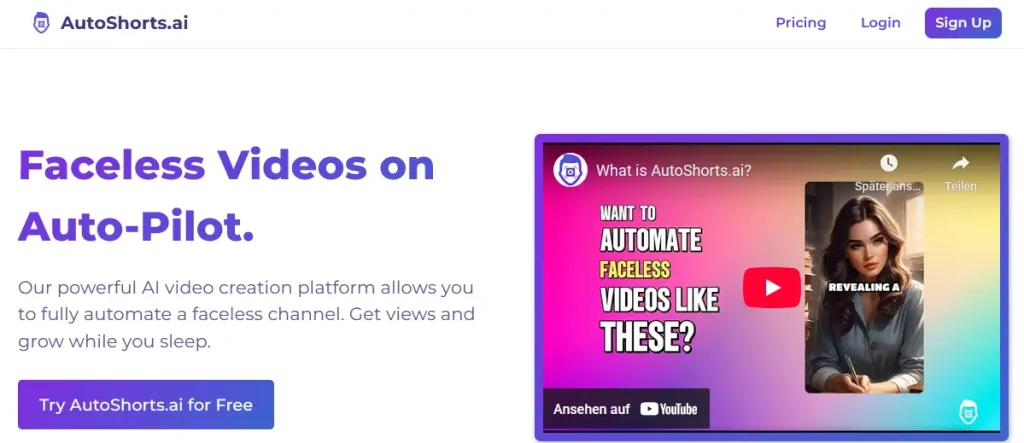
Autoshorts.ai turns simple inputs into fully finished short-form videos — automatically.
Instead of creating videos one by one, you build a repeatable system that utilizes ai technology to generate and publish video content on its own.
Step-by-Step Workflow
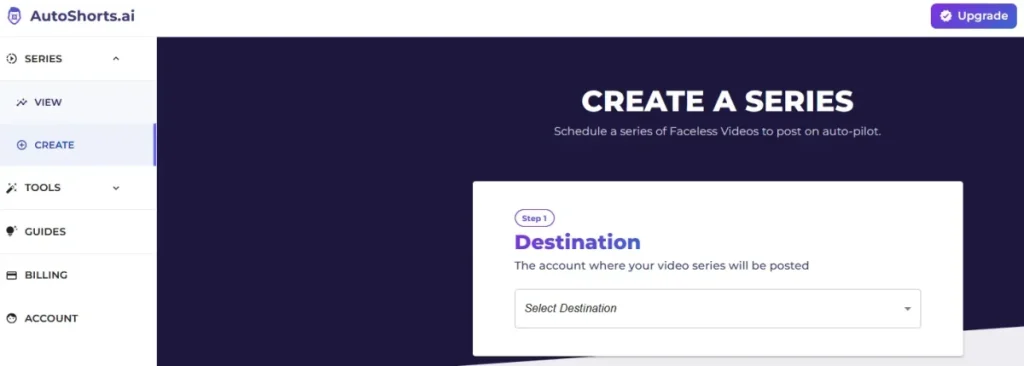
- Choose a niche or topic to better connect with your audience on platforms like TikTok.
- Create a content series
- Define posting frequency (e.g. daily Shorts)
- Let the AI generate:
- script
- voiceover
- visuals
- background music
- Videos are automatically published
This approach removes almost all manual editing and replaces it with automation, enhancing the creation process.
Automation vs Control (The Core Tradeoff)
Autoshorts.ai is built for speed — not flexibility.
| Advantage | Disadvantage |
|---|---|
| Extremely fast | Limited editing control |
| Scales content easily | Repetitive output |
| Minimal effort required | Weak personalization |
Important insight:
Autoshorts.ai behaves more like a content factory than a creative tool.
Core Features of Autoshorts.ai
Autoshorts.ai includes all the core features needed for automated short-form video creation — but with clear limitations when it comes to customization.
AI Video Generation
The platform automatically creates videos based on topics or prompts.
It generates:
- scripts
- voiceovers
- visuals
- music
Strength: Fully automated workflow
Weakness: No deep editing or script control
Auto-Posting & Scheduling
One of the strongest features.
You can:
- schedule daily uploads
- Run continuous content streams
- automate your entire channel
This makes it ideal for:
- YouTube Shorts
- TikTok
- Instagram Reels
Multi-Language Support
Autoshorts.ai supports multiple languages, allowing you to:
- reach international audiences
- scale content globally
Voice Generation
Includes built-in AI voiceovers:
- clear and understandable
- Multiple styles available
Limitation: video length may affect engagement.
Voices lack personality and emotional variation.
Visual System (Stock-Based)
The tool relies heavily on:
- stock footage
- stock images
Main issue: the need for customization options in the posting schedule for video series.
- visuals feel repetitive
- limited uniqueness
Feature Summary
| Feature | Quality |
|---|---|
| Automation | ⭐⭐⭐⭐⭐ |
| Ease of Use | ⭐⭐⭐⭐⭐ |
| Customization | ⭐⭐ |
| Visual Uniqueness | ⭐⭐ |
| Voice Quality | ⭐⭐⭐ |
Bottom line:
Powerful automation — but very limited creative control when creating video series.
Real Test Results: Our Hands-On Experience
To properly evaluate this autoshorts.ai review, we tested the tool in real-world scenarios using actual content workflows.
Test Setup
- Input: 10-minute YouTube video
- Goal: generate multiple Shorts
- Niche: educational + trending topic
- Platform: YouTube Shorts, known for its engaging videos.
Results Overview
| Metric | Result |
|---|---|
| Videos generated | 6 |
| Avg. processing time | ~2–3 minutes/video |
| Caption accuracy | ~85% |
| Visual quality | Medium |
| Repetition level | High |
| Manual edits needed | Frequent |
What Worked Well
- Extremely fast video generation
- No technical skills required
- Consistent output across video channels.
Where It Struggled
- Clips were not always the most engaging moments
- Captions required manual corrections
- Visuals felt generic and repetitive
- Hooks were often weak
Key Insight
The biggest limitation is not quality — it’s engagement.
The videos are technically “fine,” but they rarely stand out or stop the scroll.
Final Test Verdict
Autoshorts.ai is highly efficient for producing content at scale, but it still requires manual improvements if your goal is:
- viral performance
- strong retention
- unique branding
Without human input, the results tend to feel average and formulaic, impacting the overall experience with autoshorts.ai.
Hands-On Walkthrough: Creating Shorts with Autoshorts.ai
To better understand how Autoshorts.ai performs in real-world use, we tested two common workflows: repurposing long-form content and generating videos from scratch.
Use Case 1: Turning a YouTube Video Into Shorts
Goal: Convert a 10-minute video into multiple Shorts.
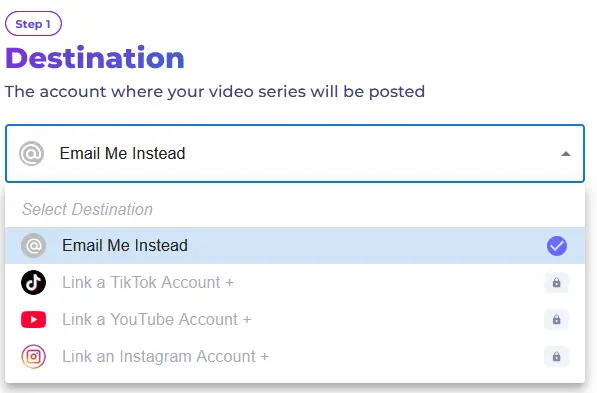
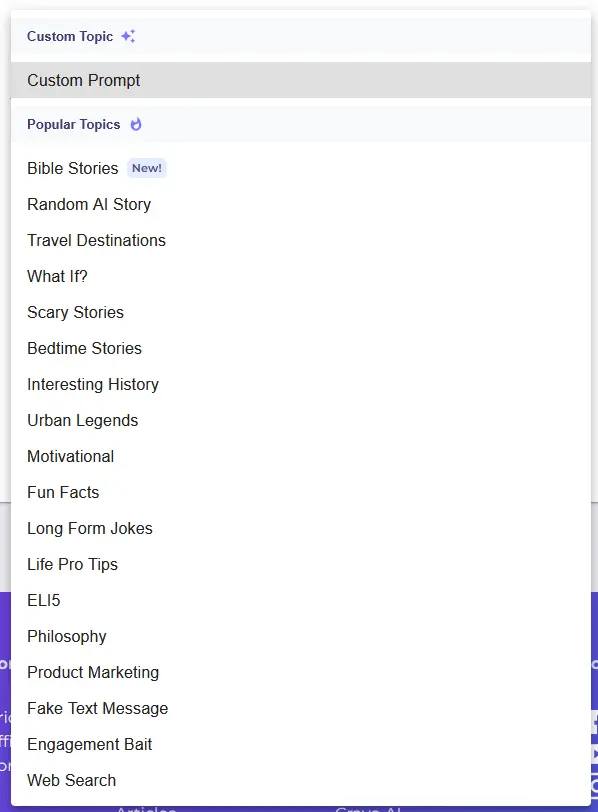
Steps:
- Upload or link the YouTube video
- Select “Create Series”
- Choose frequency (e.g. daily posts)
- Let the AI process the content
- Review generated Shorts
Results:
- 6 Shorts generated automatically
- Processing time: ~2–3 minutes per video
- No manual editing required initially
Observations:
- The AI selected clips based on structure, not engagement
- Some clips lacked strong hooks
- Transitions were basic but functional
- Captions needed minor corrections
Conclusion:
Fast and efficient — but not optimized for virality.
Use Case 2: Creating Faceless Content From a Topic
Goal: Generate videos without existing content.
Steps:
- Enter a topic (e.g. “AI tools for productivity”)
- Let the AI generate scripts
- Automatically create videos
- Enable auto-posting
Results:
- Fully automated workflow
- Videos generated consistently
- No creative input required
Observations:
- Scripts were simple and generic
- Voiceovers were clear but lacked emotion in the ai-generated video content.
- Visuals repeated across videos can lead to a lack of originality in faceless video projects, especially when using autoshorts.ai offers.
Conclusion:
Works well for automation — weak for differentiation in the experience with autoshorts.ai.
Time-to-Publish Breakdown
| Step | Time Required |
|---|---|
| Setup | ~5 minutes |
| Video generation | ~2–3 minutes |
| Manual editing (optional) | ~5–15 minutes |
| Total | ~10–20 minutes |
Output Quality & Performance
Autoshorts.ai delivers decent technical quality — but struggles with engagement and uniqueness, which are crucial for video creators.
Video Quality
- Resolution is acceptable (HD)
- No major rendering issues
- Basic transitions
Limitation:
Videos feel visually repetitive over time.
Voice & Audio Quality
- Clear pronunciation is crucial when appearing on camera.
- Balanced audio levels
- Multiple voice options
Issue: the limitations of no unlimited scaling in video content production.
Voices sound robotic and lack personality, which can be improved with custom prompts in video production.
Caption Accuracy
- Around 80–90% accurate
- Minor corrections required to improve the content creation process.
Hook & Retention Quality
This is the biggest weakness.
- Weak opening hooks
- Limited emotional engagement can hinder the success of your video content, especially on platforms like TikTok.
- Predictable pacing
Why Videos Don’t Go Viral
Autoshorts.ai struggles with virality because:
- It doesn’t understand emotional triggers
- It selects clips based on structure, not impact
- It lacks timing and storytelling
Result:
Videos are watchable — but not scroll-stopping.
Usability & User Experience
Autoshorts.ai is extremely easy to use — one of its biggest strengths.
Onboarding
- Simple sign-up
- No technical setup required
- Quick series creation
Interface
- Clean and minimal
- Focused on automation
- No clutter
Learning Curve
- Very beginner-friendly
- No editing experience needed
Limitations
- Limited control over output
- No advanced editing tools
- Cannot scale beyond one series
Overall UX Verdict
| Category | Rating |
|---|---|
| Ease of Use | ⭐⭐⭐⭐⭐ |
| Learning Curve | ⭐⭐⭐⭐⭐ |
| Flexibility | ⭐⭐ |
Conclusion:
Extremely easy — but also very restrictive in terms of creating viral content on platforms like TikTok.
Pricing Breakdown & Value Analysis
Autoshorts.ai uses a simple subscription model based on posting frequency.
Pricing Plans

| Plan | Price | Posting Frequency |
|---|---|---|
| Free (Temporarily paused) | $0 | 1 video all-time |
| Starter | $19/mo | 3 videos/week |
| Daily | $39/mo | 1 video/day |
| Hardcore | $69/mo | 2 videos/day |
What’s Included
- AI video generation
- Voiceovers
- Music
- HD exports
- Auto-posting
- No watermark
Key Limitations
- Only one series per account
- Strict posting limits
- No unlimited scaling
Cost Per Video (Estimated)
| Plan | Cost per Video |
|---|---|
| Starter | ~$1.50–2.00 |
| Daily | ~$1.30 |
| Hardcore | ~$1.10 |
Value Assessment
Good value if:
- you run one niche channel using a video creation platform for faceless video creation.
- If you prioritize automation, you may find the experience with autoshorts.ai beneficial.
Poor value if: the content creation process lacks engaging videos.
- If you want to maximize your reach, you need multiple channels for distributing your faceless video creation.
- You want high-quality content, which can be achieved with the right ai video generator.
Pricing Verdict
Autoshorts.ai is affordable — but the one-series limitation significantly reduces scalability.
Privacy, Security & Data Ownership
When using AI content tools, data handling is an important factor for creating engaging videos.

Data Storage
- Content is processed in the cloud
- Media files are stored temporarily, which is important to consider when using a video creation platform like autoshorts.ai pricing.
Ownership
- You retain rights to generated videos
- No watermark on paid plans
Compliance
- No clear enterprise-level compliance features
- GDPR details not heavily emphasized in the context of autoshorts.ai pricing.
Security Verdict
Autoshorts.ai is fine for video production, particularly in creating faceless videos.
- General content creation can be enhanced by experience with autoshorts.ai.
- faceless channels
But may not be ideal for content creators focusing on viral performance.
- sensitive brand content
- enterprise use cases
Autoshorts.ai vs Competitors
Autoshorts.ai stands out for automation — but falls behind in flexibility and quality.
Comparison Table
| Tool | Best For | Strength | Weakness |
|---|---|---|---|
| Autoshorts | Automation | Fully hands-off | Low control |
| Pictory | Repurposing content | Good clip selection | Slower workflow |
| Descript | Editing & precision | Full control | Requires effort |
| CapCut | Social media editing | High flexibility | Manual work needed |
| VEED | Online editing | Easy to use | Limited automation |
| InVideo | Templates & marketing | Versatile | Can feel generic |
Best Alternative by Use Case
- Best for quality: Descript
- Best for control: CapCut
- Best for automation: Autoshorts.ai
- Best for repurposing: Pictory
Key Insight
Choosing between these tools comes down to one question:
Do you want speed — or control?
Autoshorts.ai wins on speed, making it a valuable tool for video creators looking to scale their content.
Most competitors win on quality, especially in their video content.
Use Cases: When Autoshorts.ai Actually Makes Sense
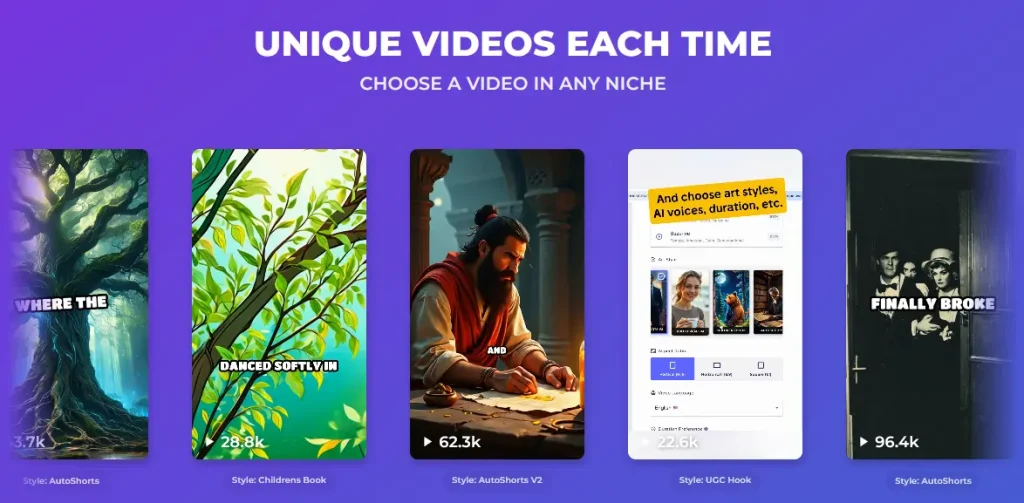
Autoshorts.ai is not a universal tool — it performs best in very specific scenarios, particularly for short-form content creation.
1. Faceless YouTube Shorts Channels
This is the Ideal use case for creating consistent content across multiple platforms..
If your goal is to:
- publish daily Shorts
- grow niche channels
- test multiple topics quickly for your video series.
Autoshorts.ai works extremely well, showcasing its key features.
2. Content Repurposing at Scale
You can use Autoshorts.ai to:
- turn long-form videos into Shorts
- create multiple variations
- keep content flowing automatically
However, expect to refine outputs manually for better performance.
3. Low-Effort Side Projects
If you want to experiment with customization options for your videos.
- run a side channel
- Experiment with automation to streamline your posting schedule.
- Build passive content systems that leverage the power of short videos.
This tool minimizes time investment.
4. Multi-Language Content Expansion
You can duplicate content across:
- different languages
- multiple audiences
This is useful for scaling reach quickly.
Where It Does NOT Work Well
Autoshorts.ai struggles in these cases:
- Personal brands often suffer from a lack of personality, which can be addressed using tools like AI-powered video creation.
- Storytelling content (no emotional depth) can be improved with engaging videos per month.
- Viral content strategies (weak hooks) can be enhanced using ai technology.
- Agencies managing multiple clients (one-series limit)
When Autoshorts.ai Fails (Important Reality Check)
Understanding where the ai-powered video tool breaks down is critical before using it long-term.
1. Weak Emotional Engagement
The AI does not understand:
- Incorporating humor can significantly enhance the appeal of your short-form content.
- Storytelling timing is crucial for engaging videos per month.
- emotional pacing
This results in videos that feel “flat”.
2. Repetitive Visual Output
Because of stock-based visuals:
- scenes repeat frequently
- content feels generic over time
3. Poor Hook Quality
Most videos: can be enhanced by storytelling timing and AI-powered video creation.
- start too slowly
- lack strong first seconds, which is crucial for video channels aiming to create viral content.
- fail to stop scrolling
4. Limited Creative Control
You cannot:
- adjust clip timing
- rewrite scripts properly
- shape narrative flow
Bottom Line
Autoshorts.ai produces content — specifically faceless videos that can be shared on tiktok and youtube.
but not content that stands out in the creation process.
Pros and Cons of Autoshorts.ai
Pros
- Fully automated video creation
- Extremely fast workflow
- Ideal for faceless content
- Built-in scheduling and posting
- Beginner-friendly
Cons
- Only one series per account
- Very limited editing control
- Repetitive visuals and voiceovers
- Weak engagement potential
- Not suitable for branding
Final Verdict: Is Autoshorts.ai Worth It?
Autoshorts.ai is not a tool for creators — it’s a tool for systems.
If your goal is:
- scaling content output
- Running a faceless channel
- minimizing time investment
→ it can be effective in short-form content on TikTok and YouTube.
But if you care about:
- storytelling
- originality
- audience engagement
→ it will quickly feel limiting if you don’t innovate your video production techniques.
Final Rating: 6.5 / 10
| Category | Score |
|---|---|
| Automation | 9.0 |
| Ease of Use | 8.5 |
| Customization | 4.0 |
| Engagement Potential | 5.5 |
| Value | 6.5 |
Buying Decision Checklist
Autoshorts.ai is right for you if you want to leverage tools like AI-powered video creation.
- you want automated content
- you run one niche channel
- You prioritize speed over quality
Avoid it if:
- you build a personal brand
- you need creative control
- you aim for viral content
FAQ: Autoshorts.ai Review
Is Autoshorts.ai free?
No, Autoshorts.ai is a paid tool with subscription plans starting at $19 per month, which is reasonable for its capabilities in video production. A free plan is not currently available.
Can Autoshorts.ai create TikTok and Instagram Reels?
Yes, the platform generates vertical videos optimized for TikTok, Instagram Reels, and YouTube Shorts, making it suitable for creators appearing on camera.
How accurate are Autoshorts.ai captions?
Captions are generally 80–90% accurate but may require minor manual corrections.
Does Autoshorts.ai add a watermark?
No, paid plans include videos without watermarks.
Can I edit videos after generation?
Editing options are very limited, which may impact your ability to customize your short-form content effectively. Most customization must be done outside the platform.
How long does it take to create a video?
Typically 2–3 minutes per video, depending on complexity.
Does Autoshorts.ai support multiple languages?
Yes, it supports multiple languages and offers voiceovers in multiple languages, making it useful for global content strategies.
Can I run multiple channels?
No, currently only one content series is allowed per account.
Is Autoshorts.ai good for beginners?
Yes, it’s very easy to use and requires no video editing experience, thanks to the custom prompt options.
Is Autoshorts.ai worth it?
It depends on your goals. It’s worth it for automation and volume, but not for high-quality or engaging content.
Methodology: How We Tested Autoshorts.ai
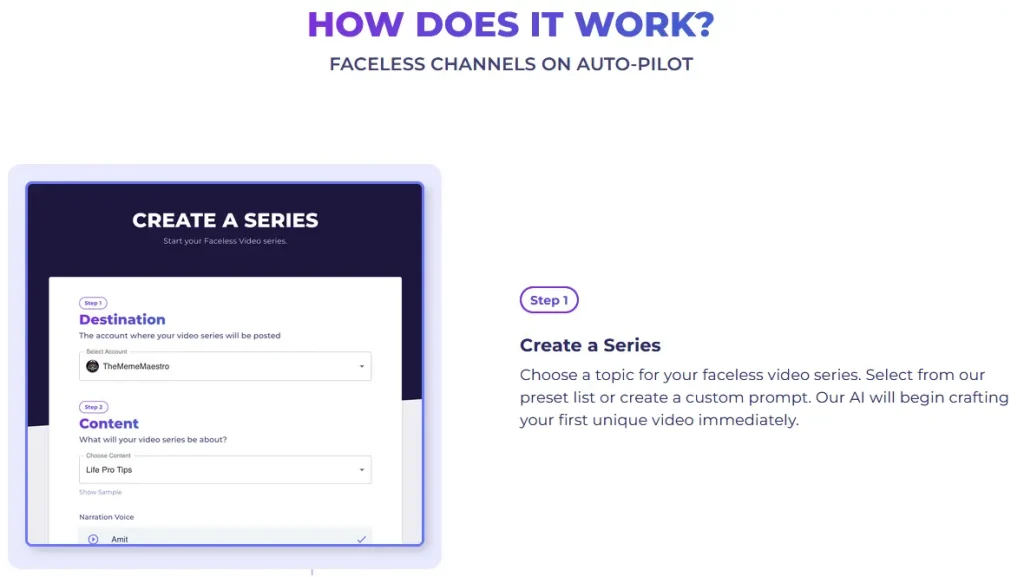
To ensure this autoshorts.ai review is accurate and unbiased, we tested the tool using real-world workflows.
Test Setup
- Content type: YouTube video + topic-based generation
- Output: short-form videos for Shorts/Reels
- Focus: automation, quality, engagement
What We Measured
- The video generation speed
- caption accuracy
- The visual quality
- engagement potential
- ease of use
Test Conclusion
Autoshorts.ai performs well in automation and speed, but requires manual input for better engagement and quality in your video content.
Final Thoughts
Autoshorts.ai fills a very specific role in the AI video space.
It’s not about creating the best videos — it’s about creating the most videos with the least effort.
That tradeoff defines everything about the tool.