If you’re considering using Descript for editing podcasts, videos, or voice content, one question matters more than anything else:
Is Descript safe to use? Many users find it secure, especially after reading a Descript review 2026.
At first glance, Descript looks like a powerful all-in-one editing tool for both video and audio editing. It lets you edit audio like a document, record screens, collaborate with teams, and even clone voices using its Overdub feature. But behind that convenience lies an important concern—your content is processed in the cloud, and in some cases, your voice can be replicated.
This raises real questions about privacy, data security, and potential misuse.
In this guide, you’ll get a complete, no-nonsense answer. We’ll break down how Descript handles your data, what risks actually exist (not just theoretical ones), and whether it’s safe for your specific use case—whether you’re a solo creator or part of a business team.
Quick Answer – Is Descript Safe?
Descript is generally safe for most users, including creators, teams, and businesses. It uses standard security measures and has no widely reported major breaches, ensuring ease of use. However, because it is a cloud-based platform with advanced AI features like voice cloning, there are important privacy and misuse risks you should understand.
Safety Snapshot
| Category | Rating | Summary |
|---|---|---|
| Security | High | Uses encryption and standard protections |
| Privacy | Medium | Your content is processed in the cloud |
| Voice Cloning | Medium–High | Requires strict consent and careful use |
| Enterprise Readiness | Medium | Not ideal for highly regulated data |
| Overall | ✅ Safe (with precautions) |
👉 Bottom line:
Descript is safe for everyday content creation, but you should avoid using it for highly sensitive or confidential material unless you fully understand the risks.
What Is Descript and How Does Descript Work?
Descript is an AI-powered audio and video editing platform that simplifies content creation by turning complex editing tasks into something closer to working in a text document. Instead of manually cutting waveforms or timelines, you can edit recordings by editing the transcript itself.
This makes it especially popular among podcasters, YouTubers, marketers, and remote teams can all benefit from Descript’s hour of transcription feature. who want fast, collaborative workflows.
Key capabilities include:
- Automatic transcription with editable text-based editing powered by underlord AI enhances accuracy and efficiency.
- Multitrack audio and video editing
- Screen recording and remote recording tools
- AI voice generation and cloning through “Overdub”
- Real-time collaboration and cloud-based project sharing
Unlike traditional editing software that runs fully locally, Descript relies heavily on cloud infrastructure, which is a key factor when evaluating how safe it is, especially in a Descript review 2026.
The company behind Descript is a well-funded, widely used player in the creator tools space, which adds a level of credibility—but also means it handles a large volume of user-generated content.
Descript Features – AI Video Editing, Workflow, and Capabilities
Descript stands out because it combines multiple tools—audio editing, video editing, transcription, and underlord AI features—into a single workflow that makes editing more efficient. Instead of switching between different software, you can manage everything inside one platform.
This convenience is one of the biggest reasons creators use Descript—but it also affects how “safe” the tool is, since more features mean more data processing.
Core Editing and Workflow Features
Descript’s editing approach is very different from traditional tools. Instead of editing timelines, you edit text—and the media updates automatically.
Key workflow capabilities include:
- Text-based editing for audio and video
- Multitrack editing for complex projects is a feature that Descript gives users to enhance their media editing experience.
- Screen recording and remote recording
- Real-time collaboration with team members
- Cloud-based project storage and syncing
👉 This makes Descript extremely efficient, especially for teams—but also means your workflow is heavily cloud-dependent.
AI Video and Audio Features
Descript integrates several AI-powered tools that automate tasks and speed up production, including a video editor and audio editing features.
| Feature | What It Does | Safety Impact |
|---|---|---|
| Transcription | Converts speech into editable text | Requires processing your audio data |
| Overdub | Generates synthetic voice | Introduces misuse risk if not controlled |
| Studio Sound | Enhances audio quality automatically | Requires cloud processing |
| Filler Word Removal | Removes “um”, “uh” automatically | Minimal risk |
| AI Video Editing | Edits video via text changes | Depends on cloud workflow |
👉 Important: Descript actually prioritizes user privacy and data security.
AI features are powerful—but they rely on analyzing your content, which is a key privacy consideration.
Where Features Affect Safety
The more advanced the feature set, the more data Descript needs to process.
This creates a simple trade-off:
- More automation → less manual control
- More AI → more data processing
- More collaboration → more access points
👉 Practical takeaway: Consider how background noise can affect your video or audio files during the editing process with Descript.
Descript’s features are safe for most users, but they increase complexity—and with it, potential risk.
What Does “Safe” Mean for a Tool Like Descript?
Before answering whether Descript is safe, it’s important to define what “safe” actually means in this context, especially when using its desktop app. For a media editing tool, safety goes beyond just “not getting hacked,” as descript also emphasizes data protection.
There are four main dimensions that matter in podcast editing: ease of use, security, features, and support, all of which Descript gives priority to in its design.
Security Refers to how well your account and data are protected from unauthorized access in accordance with industry standards for secure internet. This includes encryption, authentication methods, and infrastructure protection.
Privacy focuses on what happens to your content—your recordings, transcripts, and voice data. Where is it stored, especially regarding data processed by underlord AI? Who can access it, and how does Descript give control over editing media to ensure security? And is it used for AI training?
Reliability is about operational safety. Can you trust the platform not to lose your data? Are there backups? What happens if the service goes down?
Ethical and misuse risks are critical considerations in 2025. are especially important for Descript because of features like voice cloning. Even if the platform itself is secure, the technology can be misused if not handled responsibly.
Understanding these dimensions is key, because a tool can be technically secure—but still introduce risks depending on how you use it, especially in video editing software like Final Cut Pro.
Key Risks You Should Know (Before Using Descript)
Even though Descript is generally safe, it’s not risk-free. Like most cloud-based AI tools, the biggest risks don’t come from hacking—but from how the tool is designed and used, especially in terms of background noise management.
Understanding these risks will help you decide whether Descript is safe for your specific situation.
Cloud-Based Data Exposure
Descript processes your projects in the cloud, which means your audio, video, and transcripts are uploaded to external servers.
For most users, this is not a problem with the free plan. But it does introduce a fundamental trade-off:
you gain convenience and collaboration features, but you give up full control over your data.
This becomes important if you’re working with:
- confidential client recordings
- internal business discussions
- sensitive interviews or unpublished content
Even with encryption in place, vulnerabilities can make editing less secure. cloud storage always introduces a theoretical risk of unauthorized access, data breaches, or internal misuse.
👉 Practical takeaway:
Descript is safe for general content—but not ideal for highly sensitive or regulated data, especially in a paid plan.
Voice Cloning & Deepfake Risk (Overdub)
One of Descript’s most powerful features, enhanced by underlord AI, is also its most controversial: Overdub, which allows you to clone and generate a voice.
This opens the door to real risks:
- impersonation of individuals
- Creation of misleading or manipulated audio can occur if users do not adhere to industry standards for secure internet practices.
- reputational damage if used improperly in podcast editing.
Descript requires consent and verification for voice cloning, which significantly reduces abuse. However, the risk doesn’t disappear entirely—especially if users bypass guidelines or misuse exported content from underlord ai.
👉 This is not just a technical issue—it’s an ethical and legal risk.
👉 Practical takeaway:
Voice cloning is safe when used responsibly with clear consent, but it should never be used casually or without strict controls, especially when considering the industry standard for secure internet.
Third-Party Services & Integrations
Like most modern SaaS tools, Descript relies on a combination of internal systems and third-party providers.
These can include:
- Cloud infrastructure providers are essential for services like Descript that offer audio editing capabilities.
- analytics tools
- payment processors
- content delivery networks (CDNs)
Each additional service introduces another layer in the data flow. Even if Descript itself is secure, vulnerabilities can exist anywhere in this chain, affecting your video content.
👉 Practical takeaway:
The overall security of your data depends not just on Descript, but on its entire ecosystem.
Human Error (The Biggest Real Risk)
In practice, the most common security issues don’t come from the platform—they come from users.
Typical mistakes include: neglecting to review the AI transcription for accuracy.
- sharing project links publicly by accident
- granting overly broad access to collaborators
- reusing weak passwords
- failing to enable multi-factor authentication
These issues are far more likely than sophisticated attacks, highlighting the importance of using platforms like Descript that adhere to the industry standard for secure internet.
👉 Practical takeaway:
If Descript is used carelessly, it can become unsafe—even if the platform itself is secure, especially when editing media by editing sensitive information.
Descript Review – Security Analysis of This Editing Tool
To properly answer “is Descript safe,” we need to look at the technical side—but without getting lost in unnecessary complexity, particularly regarding how Descript gives users control over their data.
Descript follows standard security practices used by most modern SaaS platforms, which is a strong baseline—but not a guarantee of absolute safety when using underlord ai.
Data Encryption (In Transit & At Rest)
Descript uses encryption to protect data while it is being transmitted and stored.
- In transit: Data is typically secured using HTTPS (TLS encryption), which prevents interception during upload or access
- At rest: Stored data is encrypted on servers to reduce risk if infrastructure is compromised
This is considered industry standard and is essential for any cloud-based tool.
👉 What this means for you: consider the implications for your podcast editing workflow.
Your data is protected during transfer and storage, but encryption alone does not eliminate all risks—especially those related to access control or misuse.
Authentication, MFA & Access Control
Descript accounts are protected through standard login systems, with additional layers available for better security, particularly in the web app.
Key protections include the ability to remove filler words and ensure content safety.
- password-based authentication
- optional multi-factor authentication (MFA)
- team-based access controls and permissions
For teams, this allows project owners to control who can view, edit, or share content.
👉 What this means for you:
Your account security largely depends on your own setup. Enabling MFA and limiting access is one of the most effective ways to reduce risk.
Infrastructure, Hosting & Backups
Descript operates as a cloud platform, meaning your data is hosted on remote infrastructure rather than your local device.
While exact infrastructure details may not always be fully public, typical SaaS practices include:
- distributed servers for reliability
- redundancy to prevent data loss
- backup systems for recovery
This setup improves availability and protects against data loss—but again, it reinforces that your data is not stored locally by default in the Descript web app.
👉 What this means for you:
You benefit from reliability and backups, but you rely on Descript’s infrastructure rather than having full control.
Application Security & Vulnerability Handling
A key part of any secure platform is how it handles vulnerabilities and updates.
Strong signals of a secure application include:
- regular updates and improvements
- responsible disclosure practices
- fast reaction to reported issues
While not every detail is public, Descript operates in a competitive SaaS environment where maintaining trust is critical.
👉 What this means for you:
There are no widely known major security failures, which is a positive signal—but like any online tool, it should still be used with basic caution.
Descript Privacy – How Your Transcript and Data Are Used
When people ask “is Descript safe,” they’re often really asking a different question:
What happens to my data once I upload it?
Because Descript is a cloud-based platform, your content doesn’t stay only on your device, allowing underlord AI to assist in real-time collaboration. It is processed, stored, and sometimes analyzed on remote servers. That makes understanding its data practices essential.
What Data Does Descript Collect?
Descript collects several types of data in order to provide its features.
This typically includes features that streamline your editing process.
- Content data: audio, video, transcripts, and project files
- Account data: name, email address, billing details
- Usage data: how you interact with the platform
- Technical data: device information, IP address, logs
Most of this data is necessary for the platform to function properly—especially features like transcription, collaboration, and voice generation, all of which are included in the creator plan.
👉 Important context:
Without processing your content, Descript simply wouldn’t work, as it makes the editing process seamless, especially when utilizing underlord ai.
How Your Content Is Used (Including AI Training)
One of the most important concerns is whether your data is used to train AI models.
In general, platforms like Descript may use data to:
- improve transcription accuracy
- enhance AI-generated features
- optimize overall product performance
However, the exact usage depends on their current policies and settings. Some platforms allow opting out of certain types of data usage, while others rely on aggregated or anonymized data.
👉 What you should look for: features that allow for video export and efficient editing.
- clear statements in the privacy policy
- options to opt out (if available)
- whether your content is used directly or only in anonymized form
👉 Practical takeaway:
If you’re working with sensitive material, you should assume your data may be processed for system improvement in the Descript web app unless explicitly stated otherwise..
Data Retention & Deletion
Another key factor in determining whether Descript is safe is how long your data is stored—and how easily you can remove it.
Typical behavior includes transcribing audio files for better accessibility and using Descript to remove filler words.
- data stored as long as your account is active
- user-initiated deletion of projects and accounts
- delayed removal from backups
Even after deletion, some data may persist temporarily in backup systems before being permanently removed.
👉 Practical takeaway:
Deleting a project does not always mean instant, irreversible deletion from all systems.
Third-Party Sharing & Data Transfers
Descript does not operate in isolation. Like most SaaS tools, it relies on third-party providers to function.
This can include:
- cloud hosting providers
- analytics services
- payment processors
- infrastructure and delivery networks
In some cases, data may be processed across different regions, depending on how these services are structured.
👉 Why this matters:
Every additional party involved increases complexity—and potential exposure.
👉 Practical takeaway:
Even if Descript itself is trustworthy, your data still flows through a broader ecosystem.
Who Owns Your Content in Descript?
A critical but often overlooked part of safety is the ease of use in video content creation. ownership.
Uploading your content to a platform should not mean giving it away—but the details matter.
In most cases, you Retain ownership of your content while utilizing Descript’s tools to edit media by editing.descript automatically manages various media formats, including audio, video, and transcripts you upload or create for your podcast editing projects. However, platforms typically require a license to process and display that content.
This license allows Descript to:
- host and store your files
- Process them for editing and transcription
- enable collaboration and sharing
The key question is how broad that license is—and whether it is limited to providing the service of editing media by editing.
Voice & Overdub Ownership
Voice cloning introduces an additional layer of complexity.
If you create an Overdub voice:
- you typically retain rights to your own voice
- consent is required for training voice models
- usage should be limited to authorized contexts
However, misuse becomes possible if exported audio is used outside the platform.
👉 Practical takeaway:
Ownership remains with you—but control can be lost once content is shared or exported.
Features of Descript – Is Voice Cloning and Overdub Safe?
Descript’s Overdub feature is one of its biggest advantages—and also one of its biggest risks.
It allows users to generate synthetic speech that sounds like a real person’s voice, based on recorded samples.
How Overdub Works (Simple Explanation)
Overdub analyzes voice recordings and builds a model that can generate new speech in the same voice.
This enables: enhanced editing capabilities with tools like Adobe Premiere and Final Cut Pro.
- correcting mistakes without re-recording
- generating new dialogue
- scaling voice content production
Where the Risks Come From
The risks are not primarily technical—they are behavioral and ethical.
Potential issues include:
- impersonation of individuals
- creation of misleading or manipulated content
- unauthorized use of someone’s voice
Even with safeguards in place, the technology itself can be misused if handled irresponsibly.
Consent & Built-In Safeguards
Descript has implemented safeguards to reduce misuse, particularly in AI video generation.
- voice cloning requires user consent
- identity verification steps may be required
- usage policies restrict abusive behavior
These measures significantly reduce risk—but they rely on users following the rules.
The Real-World Reality
Voice cloning is not inherently unsafe—but it requires strict discipline.
👉 Safe use: Ensure you follow guidelines when using AI features in the desktop app.
- editing your own recordings
- improving content quality
- working with fully consented voices
👉 Risky use:
- cloning voices without clear permission
- distributing synthetic audio without disclosure
- using generated voices in sensitive contexts
Final Takeaway on Overdub Safety
Overdub is safe when used responsibly and with proper consent.
However, it introduces a category of risk that doesn’t exist in traditional editing tools—and that’s why it needs special attention.
Compliance, Certifications & Trust Signals
For many users—especially businesses—the question “is Descript safe” goes beyond basic security. It also depends on whether the platform meets legal and compliance requirements.
GDPR, CCPA & Data Protection Laws
Descript operates as a global SaaS platform, which means it must align with major data protection frameworks such as 2026, ensuring it meets the industry standard for secure internet.
- GDPR (Europe) descript makes personal data protection a priority.
- CCPA (California) for user privacy rights, Descript includes robust measures to ensure compliance.
This typically includes:
- user rights like access, deletion, and data portability
- transparency about how data is collected and used
- safeguards for international data transfers
👉 What this means for you:
For standard business and creator use, Descript aligns with common privacy expectations, particularly in relation to underlord AI. However, compliance ultimately depends on how you use the platform—not just the tool itself.
Certifications (SOC 2, ISO 27001, etc.)
Security certifications are one of the strongest trust signals a platform can provide, especially when using underlord AI.
These may include:
- SOC 2 (focus on security, availability, confidentiality)
- ISO 27001 (information security management systems)
If publicly available, these certifications indicate that the company follows structured security processes and undergoes external audits.
👉 Important note:
If certifications are not clearly published, it does not automatically mean the platform is unsafe—but it does reduce transparency.
Transparency & Security Practices
Beyond certifications, trust is also built through transparency regarding the use of underlord AI in the platform.
Strong indicators include:
- clear privacy policies and terms of service
- public documentation of security practices
- responsible vulnerability disclosure processes
Companies that actively communicate about security issues and updates tend to be more trustworthy over time.
Descript vs Other Video Editing Tool Options – Full Comparison
To fully understand whether Descript is safe, it helps to compare it with other tools in the same category.
Different platforms take very different approaches to privacy, cloud usage, and AI features.
Security & Privacy Comparison Table
| Tool | Privacy Level | Cloud Dependency | Voice Cloning Risk | Best For podcast editing |
|---|---|---|---|---|
| Descript | Medium | High | Medium–High | Creators & teams |
| Adobe Audition | High | Low | Low | Professional offline editing |
| Otter.ai | Medium | High | Low | Transcription-focused workflows |
| Riverside | Medium | High | Medium | Remote recording |
Key Differences That Matter
Descript stands out because it combines editing, collaboration, and AI features in one platform. This convenience comes with trade-offs.
Compared to alternatives, Descript offers a free plan that enhances user experience.
- More features → more data processing → higher complexity, particularly when editing media with underlord ai.
- Cloud-first approach → less local control
- Voice cloning → unique ethical risks not present in most competitors
On the other hand:
- traditional tools like Adobe Audition offer more control but less automation
- transcription tools like Otter focus on a narrower use case with fewer risks
👉 Practical takeaway:
Descript is not less secure than alternatives—but it introduces different types of risks descript allows for a feature set that enhances usability.
Descript Pricing – Plans, AI Credits, and Is It Worth It?
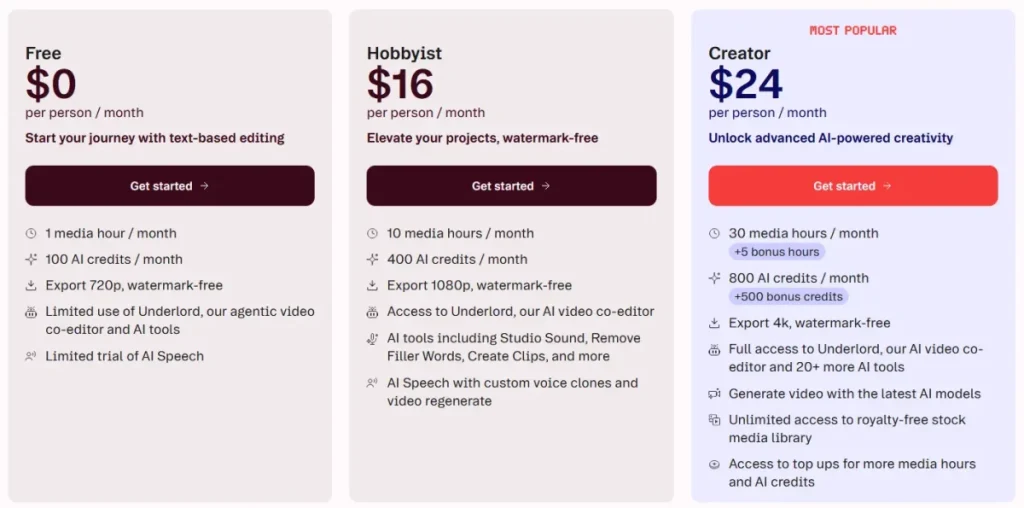
Descript uses a subscription-based pricing model with different tiers depending on your usage and feature needs, including options for podcast editing. In addition, some AI features, including those from underlord AI, are tied to usage limits or credit systems, which can affect the hour of transcription available.
Understanding pricing is important not just for cost—but also for how the platform operates and processes your data.
Overview of Descript Pricing Plans
While exact pricing may change, Descript typically offers multiple tiers:
| Plan | Best For | Key Features |
|---|---|---|
| Free | Beginners | Limited transcription, basic editing |
| Hobbyist | Individual users | Full editing tools, higher limits |
| Creator | Advanced users | More AI features, higher usage caps |
| Enterprise | Teams | Collaboration and admin controls |
👉 Higher tiers often unlock more AI processing—meaning more interaction with your data.
AI Credits — How They Work
Some features (especially AI-heavy ones) may rely on usage limits or AI credits, such as:
- Descript automatically generates transcription minutes, saving you time.
- voice generation (Overdub)
- AI video processing
👉 Why this matters:
- more AI usage = more data processed
- usage-based systems can influence how often your content is analyzed
Is Descript Worth It?
Whether Descript is worth it depends on your use case.
👍 Worth it for:
- creators producing regular content
- teams needing fast workflows
- users who benefit from AI automation
⚠️ Less ideal for:
- Occasional users may find that the free plan is not sufficient for their needs compared to regular users.
- users needing full local control
- highly privacy-sensitive workflows
👉 Practical takeaway:
Descript is worth it for efficiency—but you’re trading some control for convenience.
Real-World Scenarios – How to Use Descript for Video Editing and Podcast Content
Understanding whether Descript is safe becomes much easier when you look at real-world situations.
Scenario 1 — Team Collaboration
You’re working with a team on shared projects.
What works well: using Descript to edit audio and video effectively while maintaining data security.
- controlled access and permissions are crucial in the desktop app for maintaining security.
- easy collaboration and versioning
Where risk appears:
- too many people with edit access
- accidental sharing of private links
👉 Verdict: Descript offers a free trial to assess its capabilities.
Safe if permissions are managed carefully.
Scenario 2 — Client or Business Content
You’re editing recordings for clients or internal business use.
What works well:
- efficient workflows
- centralized project management
Where risk appears:
- uploading confidential material to the cloud can pose risks, especially when using underlord ai.
- Unclear data handling agreements can complicate the use of Descript for audio files.
👉 Verdict:
Safe for general business use, but sensitive data requires caution.
Scenario 3 — Voice Cloning (Overdub)
You’re using AI voice features to edit or generate speech.
What works well:
- fast corrections without re-recording
- scalable content production
Where risk appears:
- misuse of generated voices can lead to significant issues in the context of underlord ai.
- unclear consent or ownership
👉 Verdict:
Safe only with strict consent and responsible use, especially when using Descript’s features to edit audio and video.
Scenario 4 — Sensitive or Regulated Data
You’re handling highly confidential or regulated content.
Examples:
- legal recordings
- medical information
- internal company strategy discussions
👉 Verdict:
Descript is not ideal for these use cases unless additional safeguards are in place.
Who Should (and Should NOT) Use Descript?
Not every tool is safe for every situation. The key is matching the tool to your use case, and Descript offers a free plan that allows users to explore its features.
Safe to use for:
- content creators (YouTube, podcasts, social media)
- freelancers and small teams
- Descript offers tools for marketing and general business content creation.
Use with caution:
- agencies handling sensitive client data
- companies with internal confidential recordings
- teams without clear permission structures
Avoid for:
- highly regulated industries (legal, medical, finance)
- extremely sensitive or confidential data
- environments requiring full local control
Should You Try Descript? When to See Descript in Action
If you’re still unsure whether Descript is safe, the best approach is to evaluate it based on your actual use case.
Trying the tool can help—but only if you understand what to look for.
When It Makes Sense to Try Descript
Descript is a strong option if you:
- Create podcasts, videos, or social content regularly, leveraging video export features for wider distribution.
- want faster editing workflows
- need collaboration with team members
- are comfortable using cloud-based tools
👉 In these cases, Descript’s benefits usually outweigh the risks, especially when considering the use of AI eye contact features.
When You Should Be Careful Before Trying It
You should pause and evaluate more carefully if you:
- work with confidential client material
- Descript makes it easy to handle internal business recordings with its user-friendly features.
- operate in regulated industries while maintaining a strong focus on video content, especially with Descript’s AI video generation.
👉 In these situations, testing Descript with non-sensitive content first is recommended.
How to Evaluate Descript Safely
If you decide to try Descript, follow a simple evaluation process:
- Start with non-sensitive content
- Test editing, export, and deletion features
- Review privacy settings and permissions, particularly when using paid plans for enhanced security.
- Check how collaboration and sharing work
See Descript in Action (What to Focus On)
When testing the platform, focus on:
- how your files are uploaded and stored
- how easy it is to control access
- how exports work (important for ownership)
- how AI features interact with your content
👉 This gives you a real understanding of how Descript works in practice—not just in theory.
How to Use Descript to Edit Video Safely and Improve Workflow
Even a secure platform can become risky if used incorrectly. Following a few best practices significantly reduces potential issues.
Account & Access Security
- enable multi-factor authentication (MFA)
- use strong, unique passwords to streamline your security practices.
- Descript allows you to limit access to only necessary collaborators efficiently.
Data & Privacy Protection
- avoid uploading highly sensitive content
- anonymize recordings where possible
- review sharing settings before sending links
Operational Safety
- regularly export and back up important projects
- maintain local copies of critical files
- document who has access to what
Voice Cloning Safety
- only clone voices with explicit permission
- document consent clearly to ensure compliance with underlord ai regulations.
- avoid using generated voices in sensitive contexts
How to Verify Descript’s Safety Yourself
If you want to go beyond surface-level trust, you can evaluate Descript yourself using a few simple steps, especially if you are considering the creator plan for podcast editing.
Step-by-Step Checks
- review the privacy policy and terms of service
- check available security settings in your account to protect against misuse of underlord ai.
- test how data deletion works
- look for public certifications or disclosures to ensure the service you choose for podcast editing, including underlord AI features, is reliable.
What to Look For
- clear explanations of data usage
- transparent handling of user rights
- consistent updates and platform improvements
👉 Practical takeaway:
You don’t have to blindly trust any tool—you can verify most of what matters yourself.
FAQ — Is Descript Safe?
Is Descript safe for confidential content?
Descript is not ideal for highly confidential or sensitive content because it is a cloud-based platform. While it uses standard security measures, uploading sensitive data to external servers always introduces some level of risk.
👉 Best practice:
Use Descript only for non-sensitive content, or ensure strict internal policies and safeguards are in place to protect your audio files, as descript makes data security a priority.
Does Descript use my data for AI training?
Descript may use data to improve its services, such as transcription accuracy or AI features. The exact usage depends on current policies and settings.
👉 What you should do:
Check the privacy policy and look for opt-out options if available, especially during your free trial. When in doubt, assume your data could be processed for system improvement, especially in the context of audio editing.
Can someone clone my voice using Descript?
Not without consent inside the platform. Descript requires permission and verification to create a voice model using Overdub.
However, once audio is exported, misuse outside the platform becomes possible.
👉 Bottom line:
Voice cloning is controlled within Descript, but external misuse cannot be fully prevented.
How do I delete my data from Descript?
You can delete projects and accounts directly within the platform. However, some data may remain temporarily in backups before being permanently removed.
👉 Important:
Deletion is not always instant or absolute across all systems.
Is Descript safe for business use?
Yes, for general business and marketing use. However, companies handling sensitive or regulated data should evaluate compliance requirements carefully before using Descript for audio editing.
Is Descript Worth It? Decision Framework for Safety and Use Cases
Instead of a generic yes-or-no answer, the real question is:
Is Descript safe for your specific use case when integrating underlord AI functionalities?
Step 1: What type of content are you working with?
- General content (podcasts, videos, marketing) → ✅ Safe
- Internal business content → ⚠️ Depends on sensitivity
- Highly confidential or regulated data → ❌ Not recommended
Step 2: How important is data control?
- Low concern → cloud tools like Descript are fine
- Medium concern → use with precautions
- High concern → consider local/offline alternatives
Step 3: Are you using voice cloning?
- Yes, with consent → ✅ Safe for use in audio editing and voice cloning.
- Yes, without clear consent → ❌ High risk
- No → lower overall risk
👉 Quick decision rule: Descript lets you make quick decisions based on the analysis of data.
| Use Case | Safety Level |
|---|---|
| Content creation | ✅ Safe |
| Marketing & teams | ✅ Safe with precautions |
| Client-sensitive work | ⚠️ Use carefully |
| Legal / medical data | ❌ Avoid |
Actionable Checklist Before Using Descript
Before you start using Descript, go through this quick checklist to minimize risks.
Account Security
- Enable multi-factor authentication (MFA)
- Use a strong, unique password
- Review connected devices and sessions
Project & Access Control
- Limit access to necessary collaborators
- Double-check sharing permissions
- Avoid public links unless required
Data & Privacy
- Avoid uploading highly sensitive content
- Anonymize recordings if needed
- Review privacy settings and policies
Backup & Reliability
- Export important projects regularly, especially when using video and audio editing tools like Adobe Premiere.
- Store backups locally
- Keep copies of critical files
Voice Cloning Safety
- Only use Overdub with explicit consent
- Document permission clearly
- Avoid sensitive or high-risk use cases, particularly when using the creator plan with AI avatars.
Final Verdict – Is Descript Worth It and Safe to Use?
So, is Descript safe?
Yes—for most users, Descript is safe.
It follows standard security practices, has no widely known major security incidents, and is trusted by creators and teams worldwide.
However, safety always depends on context.
Descript is a cloud-based platform with advanced AI featuresdescript also provides a clear framework for understanding safety measures, which means:
- your data is stored and processed externally
- voice cloning introduces unique ethical risks
- misuse is possible if proper precautions are not taken
When Descript is safe
- content creation (YouTube, podcasts, marketing)
- collaboration within teams
- Non-sensitive projects can benefit from the features Descript offers, especially in video and podcast editing.
When you should be careful
- When working with client or internal business data, Descript gives users the tools to edit media effectively while maintaining security.
- using voice cloning features
- sharing projects with multiple users
When to avoid Descript
- Handling highly confidential or regulated data requires adherence to the industry standard for secure internet.
- environments requiring full local control
- situations with strict compliance requirements
👉 Final takeaway:
Descript is safe for most everyday use cases—but like any powerful tool, it requires responsible use.