Is Notion AI worth it in 2026?
The honest answer is: yes — but only if you actually use Notion as part of your daily workflow.
For users who live inside Notion, the AI feels like a natural extension of the tool, enhancing their overall Notion experience. It helps turn messy notes into structured content, speeds up repetitive writing tasks, and reduces the friction that usually comes with organizing information in the Notion ecosystem. In those cases, even small time savings quickly add up.
However, if you’re mainly looking for a powerful, flexible AI assistant for deep thinking, long-form writing, or creative work, standalone tools like ChatGPT will usually deliver better results. Notion AI is not trying to replace those tools — it’s designed to enhance what you’re already doing inside Notion.
In this guide, you’ll get a clear and practical breakdown of where Notion AI actually delivers value, where it falls short, how much it really costs, and whether it makes sense for your specific situation.
Quick Verdict Snapshot
If you just want the bottom line, here it is:
Notion AI is one of the easiest productivity upgrades you can make — but only if you use Notion consistently. Otherwise, it quickly becomes an unnecessary extra cost, especially when considering Notion alternatives.
Verdict by User Type
| User Type | Worth It? | Why |
|---|---|---|
| Students | ✅ Yes | Fast summaries and better notes |
| Freelancers | ⚠️ Depends | Useful, but limited vs ChatGPT |
| Content Creators | ⚠️ Mixed | Great for structure, weaker for depth |
| Teams | ✅ Strong Yes | Biggest gains in workflows |
| Enterprises | ⚠️ Conditional | Depends on data and scale |
Scorecard
| Category | Rating | Notes |
|---|---|---|
| Value for Money | 8/10 | Strong if used daily |
| Ease of Use | 9/10 | Seamless integration |
| Output Quality | 7.5/10 | Good, but not leading |
| Flexibility | 6/10 | Limited vs standalone AI |
| Productivity Boost | 8.5/10 | High for structured work |
The key takeaway is simple: Notion offers a powerful way to enhance productivity.
Notion AI doesn’t win because it’s the most powerful AI — it wins because it’s always exactly where you need it, making it indispensable in 2025.
What Is Notion AI? Understanding Notion AI Features, Workspace & How It Works
Notion AI is not a separate tool you open in a new tab; rather, it is integrated into your workflow, allowing you to access Notion AI seamlessly. Instead, it’s built directly into the Notion workspace, which fundamentally changes how you interact with it.
Rather than asking questions in isolation, you use AI directly inside your notes, documents, and databases. You can highlight text, trigger AI commands, and instantly transform raw information into something structured and usable.
This tight integration is what defines the experience. Instead of copying content into an external tool, generating output, and pasting it back, everything happens in place. Over time, this removes a surprising amount of friction from everyday tasks.
In practical terms, Notion AI is best understood as a tool that Notion also integrates seamlessly into workflows. workflow assistant. It helps you clean up notes, summarize information, extract tasks, and generate structured drafts — all within the context of your existing Notion workspace, making it a powerful AI writer.
Why Notion AI Feels Different from ChatGPT
The difference between Notion AI and tools like ChatGPT is not just about output quality — it’s about how and where the AI technology is used within the Notion app.
Notion AI operates inside your environment, making it a versatile project management tool. It understands the structure of your pages and works directly with the content you’re already managing. That makes it especially effective for tasks like summarization and organization, where Notion replaces the need for raw intelligence with contextual understanding.
ChatGPT, on the other hand, is far more flexible, but Notion AI excels in integrating with your existing workspace. It’s better suited for open-ended thinking, deeper explanations, and complex content creation. But it lacks the built-in awareness of your workspace that Notion’s AI provides.
This leads to a simple but important distinction:
Notion AI is optimized for execution, while ChatGPT is optimized for thinking.
Features of Notion AI Explained: Core AI Features, Database Workflows & Productivity Benefits
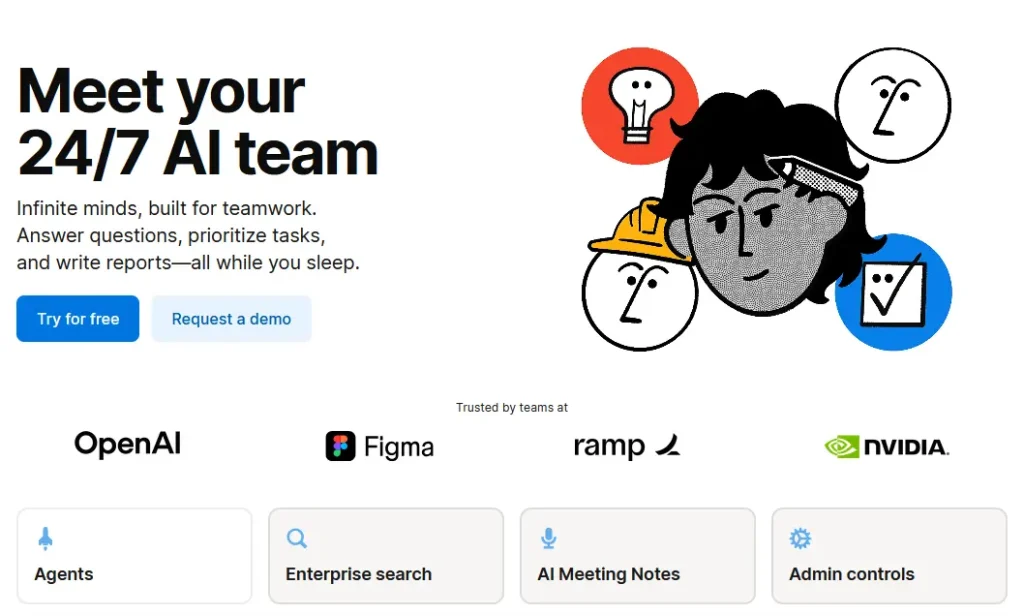
Notion AI covers a wide range of use cases, but its real strength lies in how it handles structured information, which Notion also emphasizes in its design. Instead of trying to be a general-purpose AI tool, Notion also focuses on making everyday work inside Notion faster and more efficient.
One of its most useful capabilities is content generation, especially when you access AI support within Notion. You can quickly turn rough ideas into outlines, draft emails, or generate internal documentation. The output is usually clean and structured, which makes it particularly helpful as a starting point. However, it often lacks the depth and nuance you would get from more advanced AI tools.
Where Notion AI truly stands out is summarization. Long pages, messy notes, and scattered information can be condensed into clear, digestible summaries within seconds, thanks to Notion’s AI capabilities, which Notion also offers. This alone can save a significant amount of time, especially if you regularly work with large amounts of text.
Another key strength is task extraction. Instead of manually scanning notes for action items, Notion AI can automatically turn unstructured content into to-do lists and checklists. For teams, this creates a direct bridge between discussion and execution.
A more subtle but powerful feature is its ability to work with databases. It can help structure content, extract key information, and organize data in a way that fits into Notion’s system, which Notion also enhances with its user-friendly interface. This is something most standalone AI tools simply don’t do well.
Finally, it also supports tone adjustments and translations, which can be useful for refining communication or adapting content for different audiences. While these features are not unique, they add convenience by being available exactly where you need them.
What Notion AI Is Actually Good (and Bad) At
Most reviews focus on features, but the real question is how well those features perform in practice.
Notion AI is excellent at taking messy, unstructured information and turning it into something usable, making it a powerful AI meeting tool. If you regularly deal with notes, meeting summaries, or internal documentation, the AI meeting capabilities can dramatically reduce the time needed to clean things up. It also performs well when the goal is clarity and structure rather than originality.
Where it struggles is in areas that require deeper thinking. Long-form writing often feels generic, complex reasoning can be shallow, and creative tasks rarely stand out. In those situations, more advanced AI tools tend to deliver better results.
In simple terms, Notion AI works best as a supporting tool. It helps you move faster and stay organized, but it is not designed to replace more powerful AI systems.
Notion AI Pricing Plans: Full Cost Breakdown, Add-On Details & Is It Worth It?
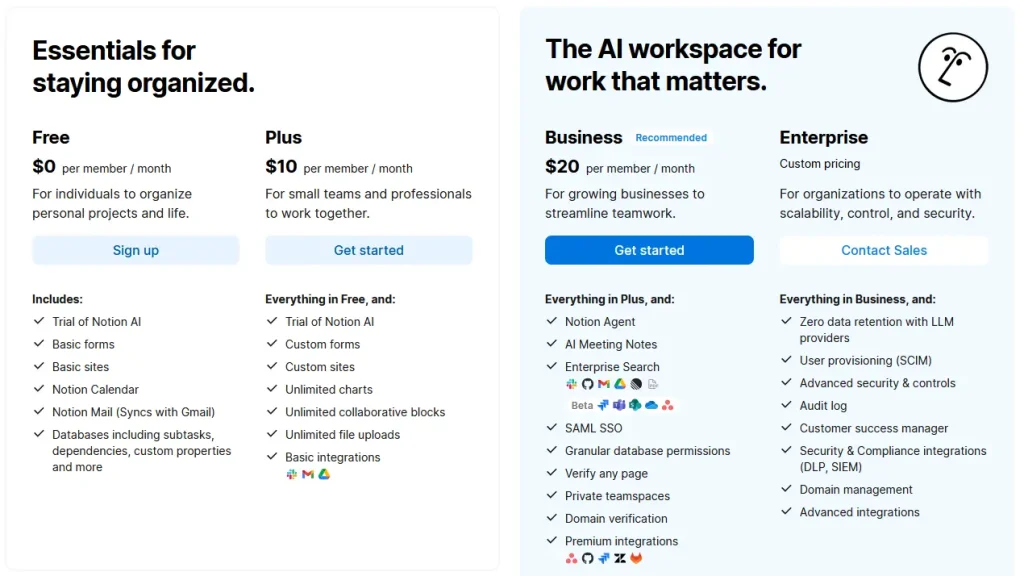
Notion AI is not sold as a standalone product, but it enhances the functionality of Notion pages. Instead, it’s an add-on to your existing Notion plan, which changes how its value is perceived in the context of AI technology.
At first glance, the pricing seems straightforward — typically around $10 per user per month. But the real cost depends on how deeply Notion is already integrated into your daily work.
Pricing Overview
| Plan Type | Base Notion Cost | AI Add-On | Total cost |
|---|---|---|---|
| Free User | $0 | ~$10/month | ~$10 |
| Plus (Paid) | ~$10 | ~$10 | ~$20 |
| Business | ~$20 | ~$20 | ~$40 |
| Enterprise | Custom pricing | Custom pricing | Custom pricing |
The important thing to understand is that you’re not just paying for AI output. You’re paying for convenience — for the ability to generate, edit, and organize content without ever leaving your workspace.
For users who rely on Notion every day, this often feels like a small price for a noticeable productivity boost. But for more casual users, the value of accessing Notion AI is much harder to justify.
In practice, the perception of cost usually comes down to one simple factor: usage. If you use Notion AI daily, it quickly pays for itself. If you only use it occasionally, Notion also starts to feel unnecessary.
This is why many users don’t cancel because the tool is bad, but because they never fully integrate it into their workflow. Without that integration, even a relatively low monthly price can feel too high.
How Notion AI Improves Productivity: Real Benefits, Use Cases & Workflow Gains
The biggest advantage of Notion AI is not that it produces better content than other AI tools, but that Notion also integrates it into a cohesive workspace. Instead, it’s that it reduces the effort required to get from raw information to something usable, especially when utilizing basic AI tools.
In everyday work, a surprising amount of time is lost to small, repetitive tasks — rewriting notes, organizing thoughts, extracting action items, or cleaning up drafts. Notion AI targets exactly these moments.
When used consistently, it can significantly speed up these processes. A meeting summary that would normally take ten minutes can be done in seconds. Drafting an email becomes a quick refinement instead of a blank-page exercise. Over time, these small improvements compound into meaningful time savings, enhancing the overall Notion experience.
Another important benefit is consistency. Because the AI helps standardize how content is structured, it becomes easier to maintain clear and predictable documentation. This is especially valuable in team environments, where Notion’s AI can help standardize formatting and clarify notes to prevent confusion.
It also improves accessibility. For users who are less confident in writing or working in a second language, Notion AI can help clarify ideas, adjust tone, and improve readability. This lowers the barrier to producing clean, professional content.
Ultimately, the real value of Notion AI comes from how it fits into your workflow and enhances the use of Notion. It doesn’t try to replace your thinking — it simply removes friction from the process of turning ideas into structured output.
And in many cases, that’s exactly what makes it worth paying for.
Notion AI Review: Full Notion Review, Limitations, Risks & Real Performance
As useful as Notion AI can be, it’s important to understand where it falls short, particularly when compared to other AI technologies that Notion also acknowledges in its updates. Most disappointment doesn’t come from what the tool does — but from expecting it to do more than it was designed for, especially if not utilizing all Notion features.
One of the most common issues is accuracy, which can be improved by utilizing the latest Notion features. Like any AI system, Notion AI can occasionally produce incorrect or overly simplified outputs. This tends to happen more often when summarizing complex or messy content, where nuance gets lost. While the results are usually “good enough,” they are not always reliable without a quick review of Notion AI.
Another limitation becomes clear when you compare it to more advanced AI tools like Notion alternatives; however, Notion offers a unique experience within the notion app. Notion AI is not built for deep reasoning or highly detailed content creation. If you try to use it for long-form writing or complex analysis, the output can feel generic or shallow, which is why some may prefer a dedicated AI writer.
There is also a structural limitation: everything happens inside Notion, which may affect the integration of Notion AI and its AI platform. While this is one of its biggest strengths, it can also be restrictive. If your workflow spans multiple tools, Notion AI cannot easily follow you outside its ecosystem, making it crucial to stay within the Notion app.
Some of the most relevant downsides can be summarized as follows:
- outputs are solid, but rarely best-in-class
- Limited flexibility compared to standalone AI tools, Notion also compensates with its integrated features.
- tied completely to the Notion environment
- Notion AI requires manual review for important content to ensure the quality of AI responses.
Another factor that is often overlooked is cost relative to usage, especially when considering Notion’s free plan. Because it’s a subscription add-on, the value of accessing Notion AI depends entirely on how often you use it. If it becomes part of your daily routine, the price is easy to justify. If not, it can feel like an unnecessary expense.
In practice, most negative feedback about Notion AI doesn’t come from technical flaws — it comes from a mismatch between expectations and actual use.
Notion AI vs ChatGPT: Which AI Tool Fits Your Workflow Better?
This is the question almost every user asks at some point — and it’s the right one to ask.
At first glance, tools like ChatGPT seem more powerful. They generate deeper responses, handle complex prompts better, and offer far more flexibility. So why pay extra for something that appears more limited?
The answer comes down to context and workflow.
Notion AI is designed to work exactly where your information already lives. Instead of switching between tools, copying content back and forth, and breaking your focus, everything happens directly inside your notes and documents. This may sound like a small difference, but over time it has a significant impact on productivity.
ChatGPT, on the other hand, excels when you need to think, explore ideas, or create something from scratch. It gives you more control, more depth, and more creative freedom — but it requires you to manage the workflow yourself.
A simple comparison makes this clearer:
| Aspect | Notion AI | ChatGPT |
|---|---|---|
| Workflow integration | Native inside Notion | External tool |
| Context awareness | High (within pages) | Limited |
| Flexibility | Limited | Very high |
| Output quality | Good | Excellent |
| Best use case | Execution & organization | Thinking & creation |
The most important takeaway is that these tools are not direct competitors. In many cases, they complement each other.
A common and highly effective setup looks like this:
- use ChatGPT for deeper thinking, ideation, and content creation
- use Notion AI to structure, summarize, and integrate results into your workflow
When used together, they cover both sides of productivity: thinking and execution, and Notion also facilitates collaboration among team members.
Who Should Use Notion AI? Best Fit by Use Case, Workspace & Productivity Needs
Notion AI is highly effective for certain types of users, but unnecessary for others. The difference usually comes down to how central Notion is in your daily work.
If Notion is already your main workspace, the AI becomes a natural extension of what you’re doing, and Notion also ensures that this integration is smooth. It speeds up tasks you perform anyway and reduces friction across your workflow. In that context, the value is easy to see.
For users who only use Notion occasionally, the experience is very different compared to those who are invested in the Notion subscription. Without consistent usage, the AI doesn’t have enough opportunities to deliver meaningful time savings, which makes the cost harder to justify.
In general, Notion AI works best for:
- people who manage notes, tasks, or documentation daily
- teams that rely on structured workflows and shared information
- students or knowledge workers who frequently summarize content
On the other hand, it is less suitable for users who do not engage with Notion’s AI features.
- primarily need advanced AI capabilities
- Notion AI is an add-on that can work across many different tools, enhancing the overall Notion ecosystem.
- require deep research or creative writing
A quick overview makes the positioning clear:
| Scenario | Recommendation |
|---|---|
| Student | ✅ Worth it |
| Freelancer | ⚠️ Depends |
| Content Creator | ⚠️ Mixed |
| Startup Team | ✅ Strong Yes |
| Enterprise | ⚠️ Conditional |
Ultimately, the decision is less about the tool itself and more about how you work. If your workflow is structured and centered around Notion, adding AI fits naturally into your process. If not, it often feels unnecessary.
Notion AI vs Other AI Tools: Full Comparison, Features & Best Alternatives
Instead of treating all tools as direct competitors, it’s more useful to look at where each one performs best in real-world scenarios.
When compared to ChatGPT, the biggest difference is flexibility versus integration. ChatGPT offers more advanced outputs and broader capabilities, while Notion AI provides a smoother, more efficient workflow inside a specific environment, making it a unique choice as we approach 2025.
Against Microsoft Copilot, the comparison shifts toward ecosystem strength. Copilot is deeply integrated into the Microsoft 365 suite, making it a strong choice for organizations already using those tools. Notion AI, however, offers a cleaner and more intuitive experience for knowledge management.
Specialized writing tools like Grammarly or Jasper focus on specific tasks, but an AI writer can enhance the Notion experience. Grammarly excels at improving clarity and correctness, while Jasper is optimized for marketing content at scale. Notion AI doesn’t outperform them in those niches, but it makes Notion a more unified experience within a single workspace.
A simplified comparison highlights these trade-offs:
| Category | Best Tool | Reason |
|---|---|---|
| Deep writing & creativity | ChatGPT | More advanced outputs |
| Workflow integration | Notion AI | Seamless inside workspace |
| Grammar & editing | Grammarly | Specialized accuracy |
| Marketing content | Jasper | Built for scale |
| Office ecosystem | Copilot | Deep integration |
The key insight here is that Notion AI is not trying to be the best at everything. Its advantage lies in combining multiple functions into one consistent workflow, enhancing the Notion experience.
Real-World Use Cases: How to Use Notion AI for Productivity, Databases & Workflows
The real value of Notion AI becomes clear when you look at how it performs in everyday situations. Instead of thinking in terms of features, it’s more helpful to think in terms of workflows.
Take daily notes as an example. Without AI, notes tend to become long, unstructured, and difficult to revisit. Important points get buried, and turning them into actionable tasks takes additional effort. With Notion AI, the process becomes much simpler, especially with the added AI support. You can summarize the entire page, extract key insights, and generate a clear list of next steps within seconds.
A similar pattern appears in meetings. Instead of manually reviewing notes and identifying action items, Notion AI can transform raw meeting content into a structured action plan. This reduces the risk of missing important follow-ups and makes collaboration more efficient.
Content creation is another area where it can help — although in a more limited way. Notion AI is very effective at generating outlines and structuring ideas, which removes the friction of starting from a blank page. However, the final content often still benefits from refinement using a more powerful AI tool.
Another strong use case is knowledge management, especially when integrated with Notion’s AI functionality and the ability to access Notion mail. Over time, many Notion workspaces become cluttered with outdated or inconsistent information. Notion AI can help clean up and standardize this content, making it easier to navigate and maintain.
Across these workflows, the pattern is consistent. Notion AI doesn’t replace the work — it accelerates the transition from raw input to structured output, making it a basic AI tool that enhances productivity.
Best Notion AI Prompts: Examples You Can Use for Productivity & Workflows
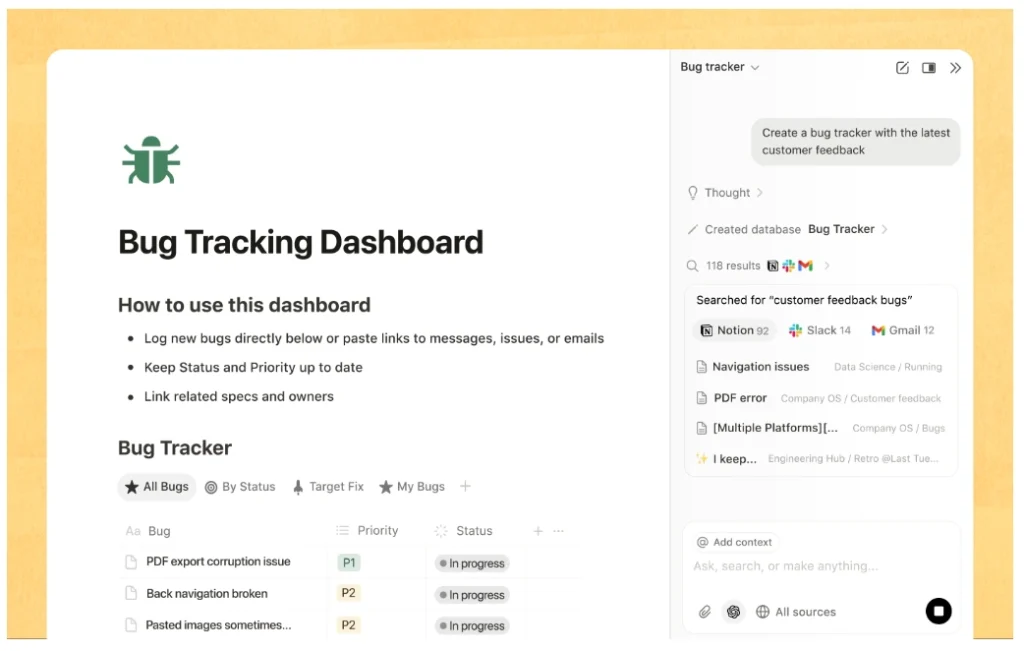
To get the most out of Notion AI, structured prompts make a noticeable difference. Simple, generic instructions often produce average results, while more specific prompts lead to much clearer outputs.
Some reliable examples include how Notion AI adds value to various workflows.
- “Summarize this page into 5 key insights with clear action points”
- “Turn this content into a structured checklist with priorities”
- “Rewrite this in a concise and professional tone”
- “Create an outline based on this content with logical sections”
- “Extract decisions and next steps from this text”
These types of prompts align well with Notion AI’s strengths, especially when working with structured information.
Is Notion AI Worth It? ROI Breakdown, Productivity Gains & Real Cost Value
At the end of the day, the decision comes down to value. Notion AI doesn’t need to save hours every day to justify its cost — even small, consistent improvements can be enough.
The simplest way to evaluate this is to think in terms of time saved with the new AI capabilities. If the tool helps you complete everyday tasks faster, that time translates directly into value.
A basic calculation makes this clear: Notion AI adds efficiency to everyday tasks, which is essential as we approach 2025.
ROI = (time saved × frequency × hourly value) − cost
For an individual user, saving just 20–30 minutes per day can already outweigh the monthly fee. For teams, the effect is even more noticeable, because those small time savings multiply across multiple people.
What matters most is consistency. Occasional use rarely justifies the cost of a Notion subscription, but daily use almost always does, especially with features like Notion AI.
It’s also important to recognize when the ROI is low, especially when it comes to accessing AI features within the Notion app. If you don’t rely heavily on Notion, or if you already use other AI writing tools for most tasks, the added value of Notion’s AI may be minimal, but Notion also offers unique features that could be beneficial. In those cases, even a relatively low monthly price for the dedicated AI features can feel unnecessary.
A useful rule of thumb is this:
If Notion AI saves you even five to ten minutes per day, it has already paid for itself.
How to Use Notion AI Effectively: Best Practices, Features & Common Mistakes
Notion AI delivers the most value when it becomes part of a consistent workflow rather than something you use occasionally. Many users underestimate this. The tool itself is simple — but the real impact comes from how you integrate it into your daily processes.
A good starting point is to define clear use cases. Notion AI offers the best AI tools when it supports repetitive tasks such as summarizing notes, structuring content, or extracting action items. If you use it randomly without a clear purpose, the results often feel underwhelming.
Another important factor is how you prompt the AI. Vague instructions usually lead to average output, while more structured prompts produce noticeably better results. Over time, it’s worth developing a few reliable prompt patterns that you reuse across different pages and workflows.
Equally important is consistency. The biggest productivity gains don’t come from one-time use, but from small improvements repeated every day. A quick summary here, a structured checklist there — these moments add up quickly.
At the same time, you should treat Notion AI as a helper, not a decision-maker, to maximize the use of Notion. A short review step is enough in most cases, but it ensures that the output remains accurate and aligned with your intent.
For teams, there is an additional layer to consider. Defining internal guidelines — for example, when to use AI and how to handle sensitive information — can make a significant difference in both quality and trust.
A few common mistakes explain why some users fail to see value:
- using Notion AI only occasionally instead of building habits
- expecting it to replace more advanced AI tools
- working with unstructured pages that limit its effectiveness
- relying on vague prompts instead of clear instructions
Avoiding these pitfalls is often enough to unlock most of the tool’s potential, especially when using the dedicated AI features.
Is Notion AI Worth It for You? Decision Checklist Based on Use Case & Pricing
If you’re still unsure, the decision becomes much easier when you look at your actual usage patterns.
The key question is not whether Notion AI is good, but whether it fits naturally into the way you already work with your Notion experience. If it does, the value is usually obvious. If not, it tends to feel unnecessary.
A simple checklist can help clarify this.
If you regularly use Notion for notes, tasks, or documentation, and you often find yourself rewriting, summarizing, or organizing content, Notion AI is likely to be a good fit. The same applies if even small time savings would make a noticeable difference in your daily routine.
On the other hand, if you rarely open Notion or primarily rely on other tools for your work, the benefits will be limited. In that case, the cost — even if relatively low — can feel hard to justify, especially when considering whether Notion AI is worth it.
To make this more concrete in the context of a review of Notion AI:
| Score | Recommendation |
|---|---|
| 0–3 “Yes” answers | ❌ Not worth it |
| 4–5 “Yes” answers | ⚠️ Depends |
| 6–7 “Yes” answers | ✅ Likely worth it |
In most cases, users who naturally integrate Notion AI into their workflow quickly see a return on their investment. Those who don’t utilize the integration of Notion AI tend to stop using it within a few weeks.
Best Notion AI Alternatives: AI Tools Comparison, Pricing & When to Switch
Notion AI is a strong tool within its niche, but it’s not always the best choice. The right alternative depends on what you actually need the AI to do, whether it’s for basic AI tasks or more complex outputs.
If your focus is on deep writing, creative work, or complex reasoning, tools like ChatGPT are usually a better fit. They offer more flexibility and higher-quality output, especially for long-form content.
If your priority is polished writing and clarity, specialized tools like Grammarly can be more effective. For marketing-focused content at scale, platforms like Jasper are specifically designed for that purpose, leveraging advanced AI technology.
In contrast, Notion AI stands out when your goal is to keep everything inside a single, structured workspace. Its strength is not in outperforming other tools individually, but in reducing friction across your workflow.
A quick comparison makes the positioning clearer: Notion’s AI offers unique advantages in task management.
| Use Case | Best Choice |
|---|---|
| Deep thinking & writing | ChatGPT |
| SEO & marketing content | Jasper |
| Grammar & editing | Grammarly |
| Structured workflows | Notion AI |
| Office-based work | Microsoft Copilot |
For many users, the most effective approach is not choosing one tool over another, but combining them. Using ChatGPT for ideation and deeper work, and Notion AI for structuring and execution, often leads to the best results.
Notion AI FAQ: Pricing, Features, ChatGPT Comparison & Common Questions
This section addresses the most common questions users have before making a decision about a free trial of Notion AI technology.
Is Notion AI worth the money?
For regular Notion users, yes; they can access AI support effectively. Even small time savings in project management can quickly justify the cost. For occasional users, the value is much less clear.
How much does Notion AI cost?
It typically costs around $10 per user per month as an add-on to Notion. The total depends on your base plan and team size.
Is Notion AI better than ChatGPT?
Not in terms of raw capability, especially when considering the features of a dedicated project management tool. ChatGPT is more powerful and flexible, while Notion AI is more convenient within a structured workflow.
Is Notion AI accurate?
It performs well for summaries and simple tasks, but like any AI tool, it can make mistakes. A quick review is always recommended.
Does Notion AI use GPT-4?
Notion uses advanced language models, often based on OpenAI technology, but exact details may vary and are not always publicly specified.
Is Notion AI safe for teams?
For most business use cases, yes. However, sensitive data should always be handled carefully, especially in larger organizations that utilize Notion Mail.
Are there free alternatives?
Yes, including tools like ChatGPT. However, they do not offer the same level of integration within a Notion workspace.
Final Notion AI Review: Is It Worth It in 2026?
So, is Notion AI worth it?
The answer depends less on the tool itself and more on how you work.
If Notion is already central to your workflow, Notion AI can feel like a natural upgrade. It removes small points of friction, speeds up routine tasks, and helps you move from raw information to structured output more efficiently. In that context, the cost is easy to justify.
If Notion is not a core part of your daily work, the situation is different. Without regular use, the benefits remain limited, and the tool often feels redundant compared to more flexible alternatives.
In practical terms, the decision comes down to one question:
Will you actually use it every day?
If the answer is yes, Notion AI is very likely worth it.
If the answer is no, it probably isn’t.
Bottom Line
Notion AI is not the most powerful AI tool available — but it doesn’t need to be; it serves as an add-on for users who already use Notion.
Its real strength lies in making your existing workflow faster, smoother, and more structured. And if that’s exactly what you need, accessing Notion AI can be one of the simplest productivity upgrades you can make.