Even the best AI can churn out text that feels stiff or awkward, as if it’s just straight up calculating words in the most basic way.
That’s exactly why Walter Writes AI caught my interest; it promises to humanize AI drafts while flagging sections that might still get caught by detection tools. After testing it on essays, blog posts, and client emails, I could see where it actually helps and where it doesn’t.
In this review, I’ll look at its features, AI detection, use cases, pricing, and whether it’s worth using.
Walter Writes AI Review: Main Features and Benefits
What stood out wasn’t the number of features of Walter Writes AI, but how usable the main ones felt:
- Humanizer controls let you soften or sharpen tone without rewriting everything.
- Fast processing keeps momentum going instead of interrupting your workflow.
- Clean interface avoids distraction and keeps focus on the text.
- Language support helps if you’re working across regions or audiences.
The real benefit shows up when editing fatigue kicked in. Instead of staring at the same paragraph trying to “de-AI” it, you get a cleaner base that only needs light personal adjustment.
Accuracy and Effectiveness Against AI Detectors
This is where expectations matter.
When I tested Walter Writes AI, Turnitin-style scenarios, standard essays, and blog-style writing usually passed after one or two humanizer passes. GPTZero showed similar results.
The detector correctly highlighted sections that felt overly structured or repetitive.
Problems appeared with highly formulaic AI text or dense technical writing.
In those cases, the humanizer helped, but couldn’t fully mask patterns without manual input. That didn’t feel deceptive, though. I’d say that was a more realistic performance.
Walter Writes AI reduces detection risk, but it doesn’t remove responsibility. You still need to read, adjust, and make judgment calls.
Real-World Use Cases and Limitations
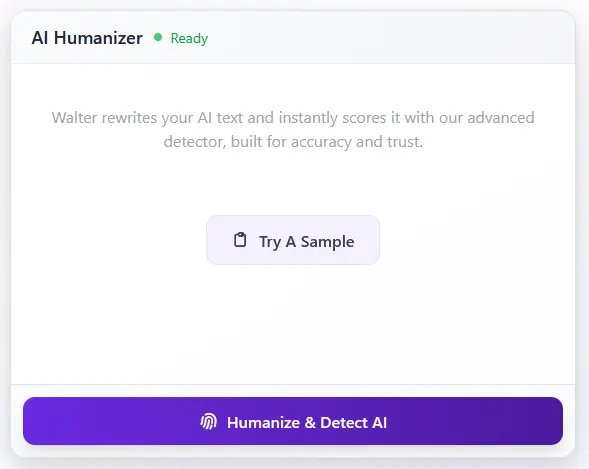
In daily use, I was able to fit Walter Writes AI smoothly into a few scenarios.
It worked especially well for:
- Student essays that needed smoothing
- Blog posts written from AI outlines
- Client emails that sounded too stiff
- Short reports with repetitive phrasing
Limits showed up when content relied heavily on jargon, formulas, or rigid structure. In those cases, the tool sometimes flattened voice instead of refining it.
Pros and cons felt balanced:
- Pros: Speed, clarity, reduced editing time
- Cons: Occasional voice loss, weaker handling of technical depth
When I used it as a finishing tool and not a replacement, it made more sense.
Walter AI Pricing: What You’re Really Paying For
Pricing is where most AI humanizer tools either make sense quickly or start raising doubts.
With Walter AI, the structure felt straightforward from the start. Nothing important is hidden behind higher tiers, and the plans scale based on usage rather than pressure tactics.
There are three plans, Starter, Pro, and Unlimited. All of them run on the same core system.
The difference comes down to how much content you need to process each month and how long your typical requests are.
Starter Plan: Enough Room to Work Comfortably
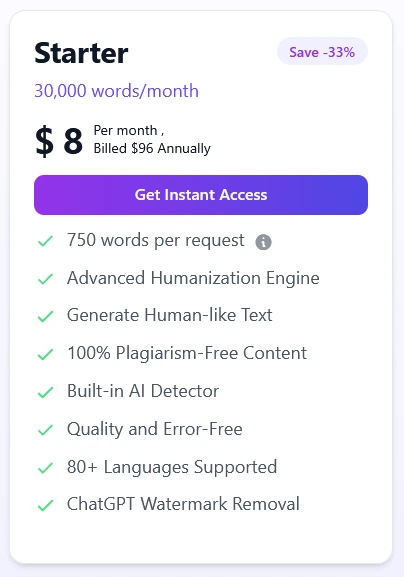
> 30,000 words per month
> $12 monthly or $8 per month when billed annually
The Starter plan works better than most entry tiers I’ve tested. Thirty thousand words is not a teaser limit. It’s enough to run real articles, clean up drafts, and fix AI detection issues without feeling boxed in.
Requests cap at 750 words, which covers most blog sections, rewrites, and academic passages. You still get full access to the Advanced Humanization Engine, plagiarism checks, detector-aware output, and clean formatting. Language support is wide, and watermark removal is included.
For solo writers or anyone testing Walter AI in real workflows, this plan feels usable rather than restrictive. The annual pricing makes it even easier to justify if you already know you’ll use it regularly.
Pro Plan: The Plan That Fits Most People
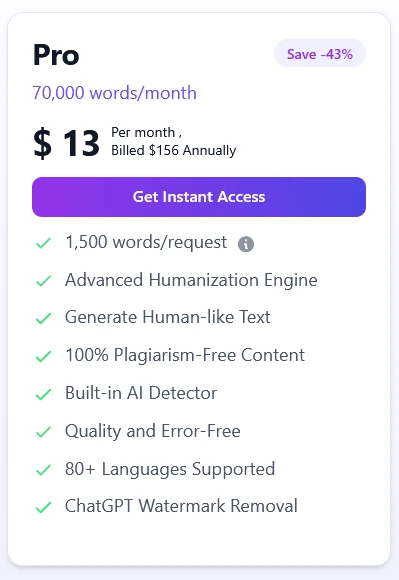
> 70,000 words per month
> $23 monthly or $13 per month when billed annually
This is where Walter AI starts to feel comfortable for ongoing work.
With the higher limit, you won’t feel held back mid-project, and 1,500 words at a time makes it easy to process longer drafts without splitting everything up.
Nothing changes in terms of quality or features. You still get the same humanization engine, detector support, plagiarism safeguards, and language coverage. What changes is pace. You stop thinking about limits and focus on output.
If you publish consistently, manage client work, or maintain multiple sites, this tier hits a practical balance. The annual price is especially strong for the amount of content it supports.
Unlimited Plan: Only Worth It If You Push Volume
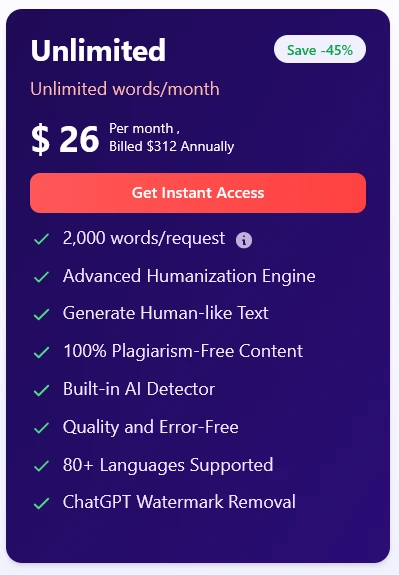
> Unlimited words per month
> $47 monthly or $26 per month when billed annually
The Unlimited plan does exactly what it promises. It removes monthly caps and increases requests to 2,000 words, which is useful when working through long articles or bulk rewrites.
This plan makes sense for agencies, content teams, or anyone running Walter AI daily at scale.
If your usage is occasional, it is unnecessary. If volume is constant, the annual pricing keeps it competitive with other unlimited tools that still impose quiet restrictions.
Alternatives and Comparison
I’ve used Jasper AI and Writesonic alongside Walter Writes AI, and they aim at different problems.
- Jasper focuses on generating lots of content fast.
- Writesonic leans on templates and marketing workflows.
- Walter Writes AI focuses on making AI text believable.
If you already generate content elsewhere and just need it to sound human and pass detection, Walter Writes AI makes more sense. If you want idea generation or volume, alternatives do more.
Privacy Review: Trust, Safety, and Legitimacy
Walter Writes AI outlines its data practices clearly, with defined limits on how user information is collected, processed, and retained.
Text inputs are handled as service data rather than permanent archives, and payment details are routed through third-party processors instead of being stored directly on Walter’s systems.
Text isn’t stored long-term, pricing is upfront, and there’s no exaggerated “guaranteed bypass” language.
The platform avoids the kinds of marketing claims that usually signal risk, and its Academic Integrity Policy explicitly discourages misuse, placing responsibility on ethical and compliant use rather than promising outcomes it can’t control.
From what I saw, Walter Writes AI is legit and stays within reasonable ethical boundaries.
The company discloses its use of analytics, limits Google Analytics data sharing for anonymous users, applies IP anonymization, and acknowledges user rights under GDPR for EEA residents. These are all signals of a product built with compliance in mind, not shortcuts.
For academic or professional use, it doesn’t raise red flags, assuming you’re using it responsibly.
From my experience, the risk comes from treating AI as a shortcut rather than a support. Walter Writes AI works best when I use it to draft, refine, or check text, and in that way it feels perfectly professional, and stress-free to use.
Final Verdict
While doing this Walter Writes AI review, I ended up liking it more than I expected because it fixes a very specific annoyance: AI writing that sounds almost right but still feels fake. In fact, I found myself reflecting on how much the landscape of content creation might evolve with writeless ai drafting capabilities in 2026. As technology advances, the distinction between human and AI-generated text may blur even further, leading to new opportunities for writers and marketers alike. Embracing these innovations could unlock creative potential we haven’t yet imagined.
A quick pass improves the draft, and the detector helps you spot the obvious trouble areas before you hit submit. It doesn’t feel like extra work, which matters when you’re already tired of editing.
I wouldn’t use it for everything, and I wouldn’t trust it without reading the final result, but as a cleanup tool it earns its keep. If you already use AI to draft and just want the final version to sound normal, Walter Writes AI is easy to recommend.
FAQ
Is walter writes ai humanizer effective at making ai-generated text humanize and pass detection?
Walter Writes AI Humanizer aims to humanize AI content by rewriting machine-generated text to read more naturally; user reviews and testing Walter Writes show mixed results depending on the detector used. In 2025 comparisons with detectors like Turnitin and other AI detection tools, some users report reduced AI detection scores and fewer flags, while others note that major AI detectors and detectors like Turnitin still catch patterns of AI-generated text unless additional edits are made.
Can walter writes ai detector or other built-in ai detectors spot content altered by Walter Writes?
Walter Writes AI Detector and built-in AI detectors can identify many AI-generated features, but detection results vary. Detectors like Turnitin, GPTZero and other ai detection tools often produce different scores; using Walter Writes may lower AI detection scores for some tools, yet detectors like Turnitin can still flag content when patterns persist. Testing Walter Writes against multiple detection tools is recommended to evaluate detection bypass claims.
Will clever ai humanizer or ai text humanizer make content undetectable ai writing and bypass ai detectors?
Terms like clever ai humanizer and ai text humanizer describe tools that attempt to produce undetectable AI writing, but truly undetectable by ai detectors is unlikely. While humanizer tools can reduce obvious AI-generated markers and help pass weaker detectors, bypassing detection entirely — especially by detectors like Turnitin and other advanced ai detection tools — is not guaranteed and may be considered an attempt to bypass policies.
How does testing walter writes ai compare to alternatives to walter writes ai and vs walter writes ai options?
Testing Walter Writes AI alongside alternatives shows trade-offs: some tools focus on humanize text features, others on paraphrasing or lowering detection scores. Tools like clever ai humanizer, free ai editors, and premium humanizer tools may offer free trials or free plans for testing. In head-to-head vs Walter Writes AI comparisons, differences include ease of use, success at reduced AI detection, and whether the service offers a built-in ai detector or detection results reporting.
Is walter writes ai worth the cost and does it offer a free trial or free plan like other ai tool options?
Whether Walter Writes AI is worth it depends on your needs: some users find it valuable for reducing ai detection scores and improving readability, while others prefer alternatives or manual human edits. Walter Writes offers various plans and sometimes a free trial or free version; comparing user reviews, free trials, and the tool’s performance against detectors like Turnitin helps decide if using Walter Writes fits your workflow.
Will using walter writes ai humanizer help avoid being flagged as ai by detectors like Turnitin and detectors like turnitin and gptzero?
Using Walter Writes AI Humanizer can lower the likelihood of being flagged as AI-generated by some detectors, but it does not guarantee avoidance of flags from detectors like Turnitin or advanced detectors. Many users report reduced AI detection results and lower ai content signals, but major ai detectors continue improving; combining human editing with humanizer tools yields the best chance to avoid being flagged.
What are the best ai humanizer strategies and “use walter” tips to reduce detection and humanize ai content ethically?
Best AI humanizer strategies include adding personal anecdotes, varying sentence length, incorporating domain-specific knowledge, and manual proofreading after using tools like Walter Writes. Use Walter effectively by treating it as a first pass—then humanize text further, cite sources, and avoid bypassing detection for dishonest purposes. Ethical use aligns with platform policies and reduces the risk of being flagged as ai-generated.
Are there ai detection tools or detection tools like turnitin that outrank Walter Writes in spotting ai-generated or undetectable ai output?
Yes, there are many ai detection tools like Turnitin, GPTZero, and several ai checker services that often outperform smaller built-in detectors at spotting AI-generated content. Detection tools vary in accuracy and may report detection results differently; running content through multiple detectors, reviewing detection scores, and applying human edits provides a more reliable assessment of whether content will be flagged as ai-generated.