AI video creation tools have evolved rapidly, and in 2026, two platforms stand out for very different reasons: Fliki and InVideo.
At first glance, both tools promise the same outcome — turning ideas into videos. But once you start using them, the difference becomes clear: they solve completely different problems.
Fliki focuses on automation-first video creation. You provide a script, choose a voice, and the platform handles the rest — from narration to visuals. This makes it extremely efficient for content formats like YouTube Shorts, TikTok videos, explainer content, or faceless channels.
InVideo takes a different approach. It gives you a template-driven editor with full control, allowing you to customize every scene, transition, and visual element. This makes it particularly strong for marketing videos, branded content, and campaigns where design matters.
Because of this fundamental difference, many users end up comparing these tools incorrectly — expecting them to do the same job. That’s exactly why this guide exists.
What You’ll Learn in This Comparison
This in-depth comparison is designed to help you make a clear, confident decision based on your actual use case — not just features.
In this guide, you’ll discover:
- The real difference between Fliki and InVideo (beyond marketing claims)
- Which tool performs better in real-world scenarios
- How they compare in AI capabilities, editing power, and output quality
- Which platform is more cost-effective at scale
- Whether you should choose one — or combine both for a better workflow
Unlike most comparisons, this article doesn’t just list features. It shows you how each tool performs when it actually matters — when you’re creating content consistently, under time pressure, or at scale.
Who This Comparison Is For
This guide is especially useful if you fall into one of these categories:
- You want to start a YouTube automation channel
- You create short-form content for social media
- You need marketing videos or ad creatives
- You’re looking for the fastest way to turn scripts into videos
- You’re comparing tools before committing to a paid plan
If your goal is to save time, improve content quality, or scale video production, choosing the right tool here can make a massive difference.
Fliki vs InVideo – Which One Is Better? (Short Answer)
If you’re trying to decide between Fliki and InVideo, the answer depends on one core factor: automation vs control.
Fliki is designed for speed and simplicity. It turns scripts into fully voiced videos in minutes using realistic AI voices and automated scene generation. This makes it ideal for beginners, YouTube automation, and content creators who want fast results without editing skills.
InVideo, on the other hand, is built for flexibility and precision. It offers a powerful timeline editor, a large template library, and advanced customization options. This makes it the better choice for marketers, agencies, and users who want full creative control over their videos.
Quick Comparison – Fliki vs InVideo
| Use Case | Best Choice |
|---|---|
| AI voice & narration videos | Fliki |
| Marketing & ad videos | InVideo |
| Beginners / no editing skills | Fliki |
| Advanced editing & customization | InVideo |
| Fast content production | Fliki |
| Brand-focused content | InVideo |
In short, Fliki wins for automation and speed, while InVideo wins for editing power and flexibility. The best tool depends on how much control you need over your final video.
What Are Fliki and InVideo?
Before comparing features, it’s important to understand that Fliki and InVideo are built on fundamentally different concepts.
Both tools help you create videos, but they approach the process from opposite directions. This difference affects everything — from speed and workflow to output quality and scalability.
What Is Fliki?
Fliki is an AI-powered platform that focuses on turning text into fully narrated videos automatically. Instead of editing clips manually, you start with a script. The tool then generates voiceovers, matches visuals, and builds scenes for you.
The entire workflow is optimized for speed and simplicity. You don’t need editing experience, which makes it especially appealing for beginners or creators producing content at scale.
In practice, Fliki works like this:
- You paste or generate a script
- You choose an AI voice (language, tone, accent)
- The platform automatically creates scenes and visuals
- You make small adjustments if needed
- You export the finished video
This makes Fliki particularly strong for:
- YouTube automation channels
- Faceless content
- Educational or explainer videos
- Multilingual content production
The biggest advantage is efficiency. You can create multiple videos in a fraction of the time compared to traditional editing tools.
What Is InVideo?
InVideo takes a more traditional approach by offering a template-based video editor with AI assistance. Instead of full automation, it gives you control over every visual element while still speeding up the process with templates and smart features.
You typically start with a template or blank canvas and then customize scenes, text, media, and transitions.
A typical InVideo workflow looks like this:
- Choose a template or format (e.g., ad, reel, presentation)
- Add your content (text, clips, images)
- Customize scenes, timing, and transitions
- Add music, captions, and branding
- Export the final video
This approach makes InVideo ideal for:
- Marketing and ad creatives
- Social media campaigns
- Brand-focused content
- Agencies and teams
While it requires more manual input than Fliki, it offers significantly more flexibility and creative control.
Fliki vs InVideo – Core Workflow Difference
To fully understand which tool fits your needs, you need to look at how each platform actually works in practice.
| Step | Fliki | InVideo |
|---|---|---|
| Starting point | Script | Template or blank editor |
| Voice creation | AI-generated automatically | Manual (or limited AI) |
| Scene creation | Auto-generated | Manually customized |
| Editing level | Minimal | Advanced |
| Time required | Very low | Medium |
The key takeaway is simple:
- Fliki reduces the entire video creation process to automation and speed
- InVideo gives you control and customization at every step
Fliki vs InVideo – Key Differences Explained
Most comparisons focus on features, but what actually matters is how these tools behave in real-world usage.
At their core, Fliki and InVideo solve different problems — and choosing the wrong one can slow you down significantly.
Automation vs Control
The biggest difference between the two tools is how much work they do for you.
Fliki automates nearly everything. Once your script is ready, the platform handles voice generation, scene matching, and video structure. This makes it extremely fast, but also limits how much you can fine-tune details.
InVideo, on the other hand, requires more manual input. You control visuals, timing, and layout, which allows for higher-quality, more customized results — but takes more time.
Speed vs Creative Flexibility
If your goal is to produce content quickly and consistently, Fliki has a clear advantage. You can generate multiple videos in minutes, which is ideal for high-volume strategies like YouTube Shorts or TikTok content.
However, if visual quality, branding, and storytelling are your priority, InVideo performs better. The ability to adjust every scene gives you more professional results, especially for marketing content.
Beginner-Friendliness vs Professional Control
Fliki is significantly easier to use. Even without any experience, you can create usable videos within minutes. The platform removes most of the technical barriers.
InVideo has a slightly steeper learning curve. While templates help, understanding timing, composition, and editing still plays a role. That said, this added complexity is exactly what enables better results for advanced users.
Core Differences at a Glance
| Category | Fliki | InVideo |
|---|---|---|
| Core concept | AI automation | Video editing platform |
| Ease of use | Very easy | Moderate |
| Speed | Very fast | Medium |
| Creative control | Limited | High |
| Best for | Automation & scale | Marketing & branding |
Which Difference Actually Matters Most?
For most users, the decision comes down to one question:
Do you want to create videos as fast as possible, or do you want to control how every detail looks?
If your priority is speed, consistency, and scaling content production, Fliki is the better choice.
If your priority is quality, branding, and visual storytelling, InVideo is the stronger option.
Understanding this difference early will save you a lot of time — and prevent you from choosing a tool that doesn’t match your workflow.
Head-to-Head Feature Comparison
At this point, the real difference between Fliki and InVideo becomes clear when you compare how they perform across key features.
Instead of listing features blindly, this section focuses on how usable and effective they are in real scenarios.
User Interface & Ease of Use
Fliki user interface:

Fliki is designed to minimize friction. The interface is clean, linear, and focused on one workflow: turning text into video. Most users can create their first video within minutes without prior experience.
InVideo user interface:
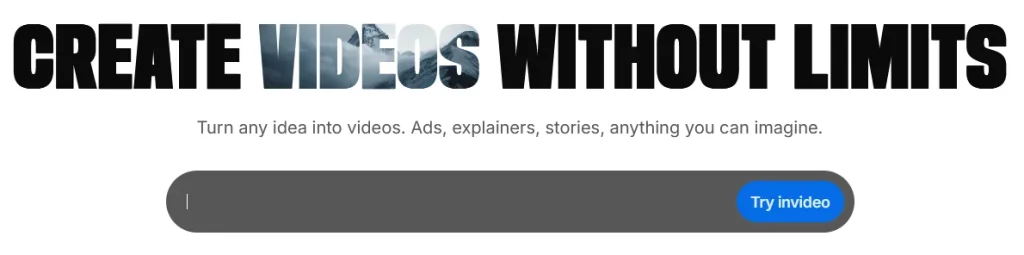
InVideo offers a more complex interface because it includes a full editing environment. While templates simplify the process, users still need to understand basic editing concepts like scene timing and layout.
| Aspect | Fliki | InVideo |
|---|---|---|
| Learning curve | Very low | Moderate |
| First video creation time | ~3–5 minutes | ~10–20 minutes |
| Interface complexity | Minimal | Feature-rich |
| Beginner friendliness | Excellent | Good |
👉 Verdict: Fliki clearly wins for ease of use, while InVideo trades simplicity for flexibility.
Templates & Presets
Templates play a major role in speeding up production, especially for social media content.
InVideo has a significant advantage here. It offers a large library of templates designed for ads, reels, presentations, and branded content. These templates are highly customizable and visually polished.
Fliki also provides templates, but they are more functional than creative. The focus is on supporting automated workflows rather than visual storytelling.
| Aspect | Fliki | InVideo |
|---|---|---|
| Template variety | Moderate | Extensive |
| Design quality | Functional | High |
| Customization | Limited | High |
| Best for | Automation | Marketing visuals |
👉 Verdict: InVideo is the stronger choice for design-heavy content.
AI & Automation Capabilities
This is where Fliki stands out.
Fliki is built around AI automation. It can generate voiceovers, match visuals to your script, and structure entire videos with minimal input. The AI voice quality is one of its strongest features, especially for narration-based content.
InVideo includes AI features as well, but they are more assistive than central. Tools like auto-captioning and text-to-video help speed up editing, but they don’t replace manual control.
| Feature | Fliki | InVideo |
|---|---|---|
| Text-to-video | Fully automated | Semi-automated |
| AI voice generation | Advanced | Limited |
| Scene generation | Automatic | Assisted |
| Workflow automation | Very high | Medium |
👉 Verdict: Fliki dominates in AI-driven workflows.
Audio & Voice Options
Voice quality can make or break a video, especially for faceless content.
Fliki offers a wide range of AI voices with different accents, languages, and tones. The voices are generally natural-sounding and suitable for professional narration.
InVideo supports voiceovers as well, but its strength lies more in background music and audio layering rather than advanced AI voice generation.
| Aspect | Fliki | InVideo |
|---|---|---|
| Voice realism | High | Basic |
| Language support | Extensive | Moderate |
| Voice customization | Advanced | Limited |
| Best use case | Narration | Background audio |
👉 Verdict: Fliki is the clear winner for voice-based content.
Video Editing Capabilities
This is where InVideo takes the lead.
InVideo provides a full editing environment with control over scenes, transitions, overlays, and timing. This allows for more polished and brand-aligned videos.
Fliki offers only basic editing options. You can adjust scenes and visuals, but you don’t have deep control over the timeline or advanced effects.
| Feature | Fliki | InVideo |
|---|---|---|
| Timeline editing | Basic | Advanced |
| Transitions & effects | Limited | Extensive |
| Visual control | Low | High |
| Professional editing | No | Yes |
👉 Verdict: InVideo is significantly stronger for editing and customization.
Stock Media Library
Both platforms provide access to stock assets, but the depth and usability differ.
InVideo integrates a large library of stock videos, images, and music, often sourced from high-quality providers. This is especially useful for marketing content where visuals matter.
Fliki also includes stock media, but it is primarily used to support automated scene generation rather than manual browsing and creative selection.
| Aspect | Fliki | InVideo |
|---|---|---|
| Library size | Good | Extensive |
| Quality | Good | High |
| Search & filtering | Basic | Advanced |
| Best use case | Automation | Creative projects |
👉 Verdict: InVideo offers a more powerful stock media experience.
Real Test – Fliki vs InVideo (Same Project)
To truly understand how these tools perform, we tested both platforms using the same scenario:
👉 Task: Create a 60-second social media video with narration and visuals.
The goal was to evaluate speed, effort, and final output quality — the factors that matter most in real-world usage.
Test Results Overview
| Metric | Fliki | InVideo |
|---|---|---|
| Total creation time | ~3–5 minutes | ~12–18 minutes |
| Manual effort | Very low | Medium |
| Voice quality | Excellent | Basic |
| Visual quality | Good | Very good |
| Ease of use | Excellent | Good |
What Happened in Practice
With Fliki, the process was extremely fast. After entering the script and selecting a voice, the platform automatically generated scenes and visuals. Only minor adjustments were needed before exporting.
The result was a complete video in just a few minutes, with strong narration quality but somewhat generic visuals.
With InVideo, the process took longer. Selecting a template, adjusting scenes, and aligning visuals required more manual work. However, the final video looked more polished and visually engaging.
Key Takeaways from the Test
The test highlights the core difference between the tools:
- Fliki is optimized for speed and automation
- InVideo is optimized for quality and control
Neither tool is universally better — it depends entirely on your workflow and priorities.
Real-World Insight (Important)
If you plan to produce content at scale (e.g., daily videos), the time difference becomes massive.
- 1 video → difference is small
- 10+ videos → Fliki saves hours
- High-quality campaigns → InVideo delivers better results
Pricing & Plans Comparison
Fliki Pricing:
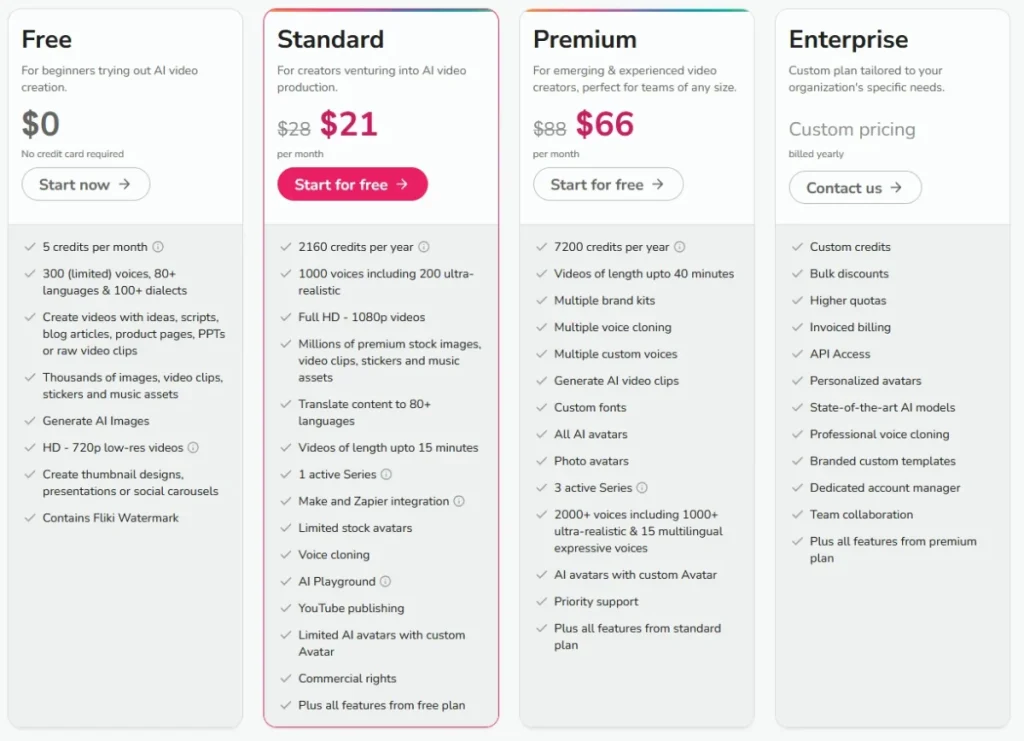
InVideo Pricing:
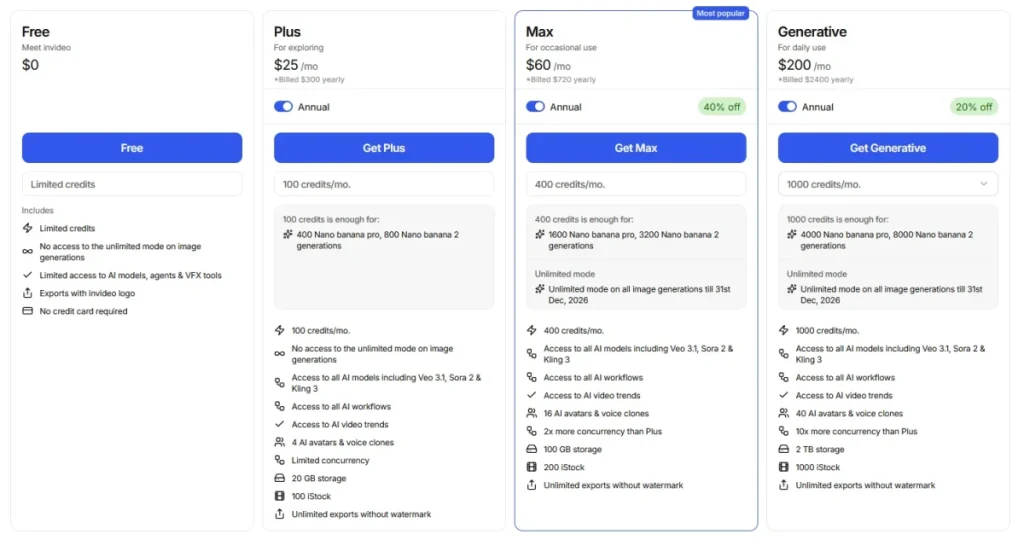
Pricing is often the deciding factor when choosing between Fliki and InVideo — but looking at monthly costs alone is misleading.
What really matters is what you get for your money, especially if you plan to create videos consistently or at scale.
Free Plans – What Do You Actually Get?
Both platforms offer free plans, but they come with significant limitations.
Fliki’s free plan allows you to test AI voice generation and basic video creation, but includes strict limits on usage and exports. InVideo’s free plan is more generous in terms of editing access, but exported videos usually include watermarks.
| Feature | Fliki Free Plan | InVideo Free Plan |
|---|---|---|
| Watermark | Yes | Yes |
| Export quality | Limited | Limited |
| AI voices | Limited access | Basic |
| Templates | Limited | Extensive |
| Usability for real projects | Low | Medium |
👉 In practice, both free plans are best used for testing only, not for serious content production.
Paid Plans – What Changes?
Once you upgrade, the differences become more relevant.
Fliki’s pricing is heavily tied to AI usage (minutes, voice quality, generation limits). This means your cost scales with how much content you produce.
InVideo’s pricing is more focused on access to templates, stock media, and export capabilities, making it more predictable for users who prioritize editing.
| Aspect | Fliki | InVideo |
|---|---|---|
| Pricing model | Usage-based | Feature-based |
| Scaling cost | Increases with output | More predictable |
| Best for | Automation workflows | Marketing teams |
Cost Per Video – Realistic Scenarios
Instead of looking at monthly pricing, it’s more useful to estimate cost per video, especially for creators scaling content.
| Scenario | Fliki | InVideo |
|---|---|---|
| 10 videos/month | Low cost | Low cost |
| 50 videos/month | Medium cost | Stable cost |
| 100+ videos/month | Higher cost | More predictable |
👉 Key insight:
- Fliki becomes more expensive as you scale
- InVideo remains relatively stable regardless of volume
Hidden Costs to Consider
Many users overlook additional costs that can affect long-term usage.
Fliki may charge more for:
- Premium AI voices
- Additional generation minutes
- Higher-quality exports
InVideo may require:
- Premium stock assets (depending on usage)
- Higher-tier plans for team collaboration
- More time investment (which is a hidden cost itself)
Pricing Verdict
Fliki is more cost-efficient for low-volume, fast content creation, especially when AI automation replaces manual work.
InVideo is more cost-efficient for consistent production and teams, where predictable pricing and creative control matter more.
Use Cases & Who Should Choose Which
Choosing between Fliki and InVideo becomes much easier when you focus on your actual use case instead of features.
Both tools are excellent — but for completely different types of users.
When Fliki Is the Better Choice
Fliki performs best when speed, automation, and voice quality are your top priorities.
It is particularly effective for creators who want to produce content quickly without investing time in editing.
Typical scenarios include:
- YouTube automation channels
- TikTok and YouTube Shorts
- Educational or explainer videos
- Multilingual content using AI voices
In these cases, Fliki reduces production time dramatically while still delivering solid results.
When InVideo Is the Better Choice
InVideo is the better option when visual quality, branding, and customization matter more than speed.
It’s designed for users who want control over every detail of their videos.
Typical scenarios include:
- Marketing campaigns and ad creatives
- Social media brand content
- Client work (agencies, freelancers)
- Presentation-style videos
In these use cases, InVideo allows you to create more polished and professional-looking videos.
Use Case Comparison Table
| Use Case | Best Tool |
|---|---|
| YouTube automation | Fliki |
| Social media ads | InVideo |
| Fast content production | Fliki |
| Brand-focused content | InVideo |
| Beginner creators | Fliki |
| Agencies / teams | InVideo |
Decision Framework – Which Tool Should You Choose?
Instead of guessing, you can use a simple decision framework to determine the right tool based on your priorities.
Step 1: Define Your Primary Goal
Ask yourself:
- Do I want to create videos as fast as possible?
- Or do I want to control how my videos look and feel?
This is the most important decision point.
Step 2: Choose Based on Workflow
| Priority | Recommended Tool |
|---|---|
| Speed & automation | Fliki |
| Control & customization | InVideo |
| Scaling content production | Fliki |
| High-quality branding | InVideo |
Step 3: Consider Combining Both (Advanced Strategy)
In many cases, the best solution is not choosing one tool — but combining both.
A highly effective workflow looks like this:
- Generate voiceovers using Fliki
- Export audio
- Import into InVideo
- Build high-quality visuals around it
This hybrid approach allows you to combine:
- Fliki’s speed and voice quality
- InVideo’s editing power and visual quality
Final Decision Table
| If you are… | Choose |
|---|---|
| A beginner | Fliki |
| A marketer | InVideo |
| A YouTuber | Fliki |
| Running an agency | InVideo |
| Focused on speed | Fliki |
| Focused on quality | InVideo |
Key Takeaway
There is no universal winner between Fliki and InVideo.
The right choice depends entirely on your workflow:
- Choose Fliki if you want to produce content fast and at scale
- Choose InVideo if you want maximum control and visual quality
If you understand this distinction, you’ll avoid one of the most common mistakes: choosing a tool that doesn’t match how you actually create content.
Pros & Cons – Fliki vs InVideo
After comparing features, pricing, and real-world performance, the strengths and weaknesses of Fliki and InVideo become much clearer.
Instead of overwhelming you with long lists, this section focuses on the most impactful advantages and limitations that actually affect your workflow.
Fliki Pros and Cons
Fliki’s biggest strength is its ability to automate nearly the entire video creation process. This makes it incredibly efficient, especially for creators producing content regularly.
However, that same automation also limits creative flexibility.
Strengths:
Fliki allows you to go from script to finished video in minutes. The AI voice quality is one of the best in its category, making it ideal for narration-heavy formats. It also removes the need for editing skills, which significantly lowers the barrier to entry.
Limitations:
Because much of the process is automated, you have less control over visuals and timing. Videos can sometimes feel generic, especially if you don’t manually refine scenes.
| Fliki | Summary |
|---|---|
| Biggest strength | Speed & automation |
| Biggest weakness | Limited control |
| Best for | Scalable content creation |
InVideo Pros and Cons
InVideo’s main advantage is its flexibility. It gives you full control over how your videos look, which is essential for branding and professional content.
The trade-off is that it requires more time and effort.
Strengths:
InVideo offers a powerful editor, high-quality templates, and extensive customization options. This allows you to create visually polished videos that align with your brand or campaign goals.
Limitations:
The learning curve is higher, and production takes longer compared to automated tools like Fliki. It’s less suited for rapid, high-volume content creation.
| InVideo | Summary |
|---|---|
| Biggest strength | Creative control |
| Biggest weakness | Time investment |
| Best for | Marketing & branded videos |
Quick Verdict – Side-by-Side
| Category | Winner |
|---|---|
| Ease of use | Fliki |
| AI voice quality | Fliki |
| Editing power | InVideo |
| Templates & design | InVideo |
| Speed | Fliki |
| Visual quality | InVideo |
👉 Bottom line:
- Fliki wins in automation and speed
- InVideo wins in quality and control
Fliki & InVideo Alternatives
Even though both tools are strong, they are not always the perfect fit. Depending on your workflow, you may want to consider alternatives.
Several platforms combine AI automation and video editing in different ways, offering a middle ground between Fliki and InVideo.
Popular Alternatives
| Tool | Best For |
|---|---|
| Pictory | Blog-to-video automation |
| Synthesia | AI avatars & corporate videos |
| Lumen5 | Simple social content |
| Runway | Advanced AI video editing |
These tools can be useful if:
- You need features that neither Fliki nor InVideo fully cover
- You want more advanced AI capabilities (e.g., avatars, generative video)
- You’re experimenting with different content formats
You can also check our Kling vs Runway comparison for full insights about some of these alternatives.
When to Consider Alternatives
You should look beyond Fliki and InVideo if your requirements go beyond standard video creation.
For example, if you need AI avatars for training videos, Synthesia may be a better choice. If you want more advanced generative AI editing, Runway offers capabilities that neither Fliki nor InVideo currently provide.
However, for most users, Fliki and InVideo already cover the majority of common use cases.
Frequently Asked Questions (FAQ)
This section answers the most common questions users have when comparing these tools. Each answer is intentionally concise to match search intent and increase the chance of appearing in featured snippets.
Is Fliki better than InVideo for text-to-speech videos?
Yes, Fliki is significantly better for text-to-speech videos. It offers more advanced AI voices, better realism, and a fully automated workflow, making it ideal for narration-based content.
Can I use Fliki voiceovers in InVideo projects?
Yes, you can export audio from Fliki and import it into InVideo. This is actually one of the most effective workflows, combining Fliki’s voice quality with InVideo’s editing capabilities.
Which tool is cheaper for large-scale video production?
It depends on your usage. Fliki can become more expensive as you scale due to usage-based pricing, while InVideo offers more predictable costs. However, Fliki may still save money by reducing production time.
Which platform is better for beginners?
Fliki is better for beginners because it requires almost no editing skills. InVideo is still beginner-friendly but involves a learning curve due to its editing features.
Can I monetize videos created with Fliki or InVideo?
Yes, both platforms allow commercial use, depending on the plan you choose. Always check licensing terms for stock media and AI-generated content.
What is the difference in purpose between these AI video generators?
Fliki and InVideo are both ai video generators but target slightly different needs: Fliki focuses on video from text and ai voiceover features, making it ideal for creating narrated content, podcasts, and videos with minimal effort using script to video workflows. InVideo is stronger on editing process, animation options, and a variety of customizable templates for marketing, social posts, and professional video production. Use Fliki when you want quick voice-cloned narration and simple online video creation; choose InVideo when you need more advanced editing, templated layouts, and versatile output for platforms like instagram reels.
Choosing an AI video generator: How do I decide between Fliki and InVideo?
When choosing an ai video generator, compare fliki vs invideo based on your priorities: if you need fast videos with realistic ai voiceover, voice cloning, and a simple script to video experience, Fliki is ideal. If you need powerful video editing, advanced templates, animation, and fine-grained control over visuals, InVideo excels. Consider video quality, customer support, pricing, and whether you require instagram reels or other platform-optimized formats. Reviewing user reviews and a detailed comparison will help you pick the best ai video generator for your workflow.
How do user reviews compare for Fliki and InVideo?
User reviews often highlight Fliki’s strength in ai voiceover, ease of use, and making videos with ai from text quickly—fliki delivers consistent audio quality and a simple prompt-driven process. Reviews for InVideo praise its customizable templates, professional video outputs, and robust editing process; users note invideo also has a free plan useful for testing. Look at reviews to assess stability, customer support responsiveness, and whether the platforms meet your content goals like animation or professional video creation.
Which platform offers better editing and templates?
In the invideo vs fliki comparison for templates and editing, InVideo generally offers a wider variety of customizable templates and more advanced basic video editing tools and animation options. Fliki focuses on streamlining video generation from text and ai voiceover, so while fliki supports template selection, it emphasizes speed and voice features over complex timeline editing. If your priority is template-driven social videos or refined edits, InVideo tends to be the best choice.
Can both platforms make videos with AI from a script or prompt?
Yes—both fliki and invideo enable video generation from text or a prompt. Fliki specializes in script to video conversion and ai voiceover, making the process extremely simple: paste a script, choose a voice, and fliki lets you publish quickly. InVideo supports video from text and provides more options for customizing visuals and animations during the editing process. For automated script-based workflows, Fliki offers minimal effort; for highly customized outputs, InVideo provides more control.
Do Fliki and InVideo support AI voiceover and voice cloning?
Fliki emphasizes ai voiceover and offers voice cloning and a wide selection of synthetic voices, which is a core selling point. InVideo also supports ai voiceover options, but its strength lies more in editing and templates rather than advanced voice cloning. If voice cloning is essential for your project, Fliki is often the better fit; if you need a balance of decent voice options plus robust editing, InVideo provides a comprehensive package.
What about pricing, plans, and value for money?
In a comparison between fliki and invideo, pricing depends on features you need: Fliki plans typically prioritize voice minutes and rapid script-to-video generation, offering good value for creators focused on audio-led content. InVideo also has a free tier and paid plans that unlock more templates, higher-resolution exports, and advanced editing. Evaluate how much ai tools, voice cloning, template variety, and exports matter to you—many users find InVideo offers strong value for professional video needs while Fliki delivers excellent ROI for voice-driven videos.
Which platform is better for social media like Instagram Reels?
For instagram reels and short-form social videos, both platforms can make videos with ai suitable for the format. InVideo’s variety of customizable templates and animation features make it easy to produce eye-catching reels; invideo also has template libraries optimized for social. Fliki is great when you need quick, consistent voiceover-driven reels or captions and want to produce many videos with minimal effort. Choose InVideo for design-forward reels and Fliki for volume and audio consistency.
Final Verdict – Which Tool Should You Choose?
After analyzing all factors — features, pricing, performance, and real-world usage — the decision comes down to your workflow and priorities.
Final Recommendation Table
| If your priority is… | Choose |
|---|---|
| Fast content creation | Fliki |
| High-quality visuals | InVideo |
| YouTube automation | Fliki |
| Marketing & ads | InVideo |
| Ease of use | Fliki |
| Creative control | InVideo |
Clear Final Answer
Choose Fliki if you want to produce videos quickly, automate your workflow, and scale content production efficiently.
Choose InVideo if you want to create visually polished, branded videos with full control over every detail.
Best Strategy for Advanced Users
For many users, the best solution is not choosing one tool — but combining both.
Using Fliki for voice generation and InVideo for editing allows you to create content that is both efficient and high-quality. This hybrid approach is especially powerful for creators who want to scale without sacrificing visual quality.
What You Should Do Next
If you’re still unsure, the best next step is simple:
- Test Fliki for speed and AI voice quality
- Test InVideo for editing and design flexibility
- Compare results based on your actual workflow
This hands-on approach will give you a much clearer answer than any feature list.