If you’re comparing Bolt vs Cursor, you’re likely trying to figure out which AI coding tool actually fits your workflow.
At first glance, both tools seem similar. They use AI, help you build software faster, and are often mentioned in the same conversations. But in reality, they serve completely different purposes.
Bolt.new is built for generating full applications from a simple prompt — no coding required. Cursor AI, on the other hand, is designed for developers who want to write, debug, and improve code with the help of AI.


Choosing the wrong tool can slow you down significantly. Choosing the right one can completely change how you build.
In this guide, you’ll get a clear, practical comparison of Bolt vs Cursor — including features, workflow differences, use cases, and a simple decision framework to help you choose the right tool.
Quick Answer
Bolt is an AI app builder that generates full-stack apps from a prompt, while Cursor is an AI-powered code editor designed to help developers write, debug, and manage code more efficiently. Bolt is best for beginners and rapid prototyping, whereas Cursor is better for developers working on scalable projects.
Bolt vs Cursor – AI Coding Tool Comparison for Developers and Beginners
If you’re trying to decide between Cursor and Bolt, consider how each adds AI to your workflow, as recommended from medium insights. Bolt.new and Cursor AIWith tools like Cursor, you’re not alone; Cursor shows you the way to effective solutions. Both tools are among the most talked-about AI coding tools right now — but they solve very different problems.
While many comparisons treat them as direct competitors, the reality is more nuanced, as both have unique advantages based on your coding patterns, which cursor asks you to consider. Bolt is an AI app builder designed for rapid prototyping, whereas Cursor is an AI-powered code editor built for developers working with real codebases.
That difference alone determines which tool will work best for you.
Here’s a quick comparison to make the decision easier:
| Feature | Bolt.new | Cursor AI |
|---|---|---|
| Type | AI app builder | AI code editor |
| Best for | Beginners, no-code users | Developers |
| Workflow | Prompt → App → Deploy | Code → AI assist → refine |
| Flexibility | Limited | Very high |
| Learning curve | Very low | Medium |
| Use cases | Prototypes, MVPs, internal tools | Production apps, debugging |
In simple terms, using AI tools is recommended from medium for enhancing development processes.
- Bolt replaces coding by generating full-stack apps from a prompt
- Cursor enhances coding by helping you write, debug, and understand code faster
If you’re looking for the best AI coding tool, your choice depends less on features — and more on how you actually want to build.
Use Bolt if:
- you want to build apps without coding
- you need fast prototypes
- you prefer working with prompts
Use Cursor if:
- you are a developer
- you want full control over your codebase
- you need debugging and advanced workflows
What Is Bolt.new? AI App Builder for Rapid Prototyping and Full-Stack Apps
Bolt.new is an AI-powered app builder using Bolt’s AI features. With Bolt, you can create full-stack applications using natural language prompts — directly in your browser, as cursor asks for clarity in your requests.
Instead of setting up a development environment, writing code, and configuring deployment, you simply describe what you want to build. Bolt then generates the UI, backend logic, and hosting setup automatically.
This makes it one of the fastest tools for coding tasks. building with AI, especially when speed matters more than full control.
How Bolt.new Works: From Prompt to Full App Deployment
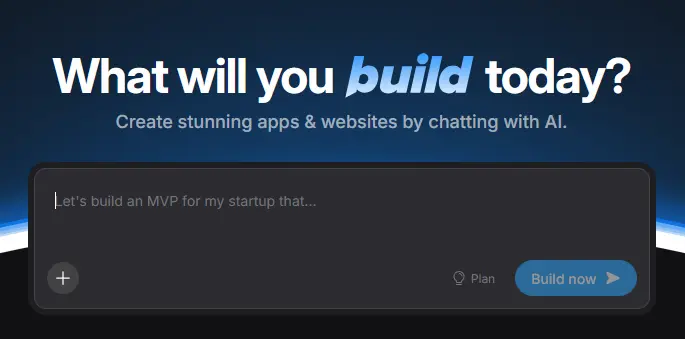
The core workflow of Bolt is built around simplicity:
- You enter a prompt describing your app
- The AI generates a working full-stack application
- You can instantly deploy it via Bolt’s cloud infrastructure
There’s no need for local setup, no need to manage a codebase, and no need to configure servers manually. Everything runs directly in the browser.
This approach is especially powerful for:
- rapid prototyping
- validating ideas
- building simple tools without coding
However, this simplicity comes with trade-offs — especially when it comes to customization and long-term scalability, which cursor shows through user feedback.
Key Features of Bolt AI (Full-Stack, UI, Hosting)
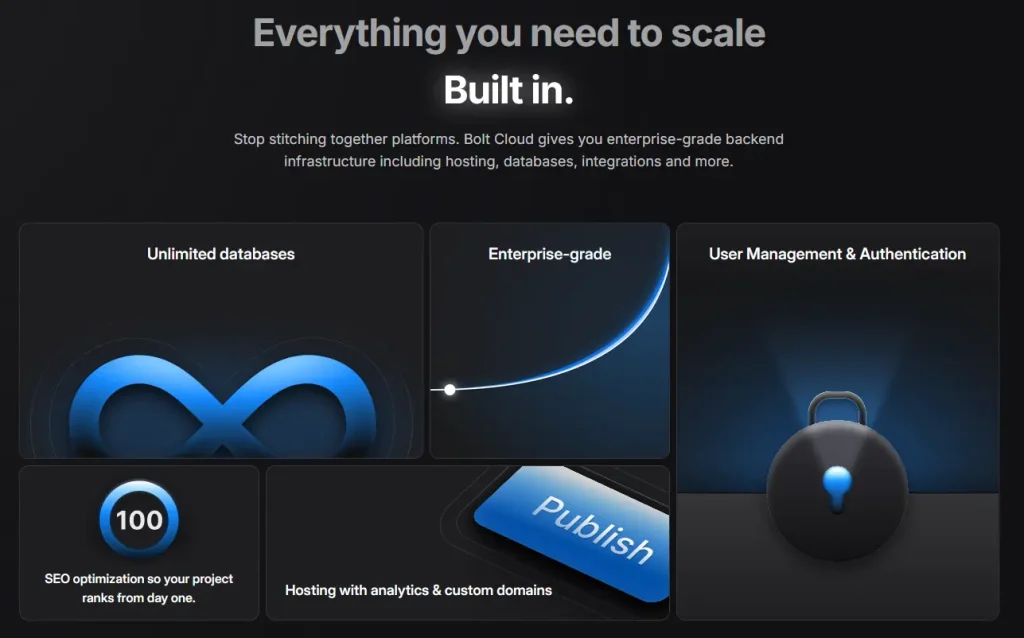
Bolt combines multiple development layers into a single AI workflow:
- Frontend + backend generation
- Built-in UI creation
- Integrated deployment and hosting
- AI-generated code structure (abstracted from the user)
Unlike traditional tools like Replit or v0, Bolt focuses heavily on Speed and automation are crucial, and Cursor also offers impressive capabilities in these areas., not manual control.
It behaves more like an intelligent assistant when integrated with AI tools. AI agent for building apps, rather than a traditional coding environment.
When to Use Bolt for Building AI Apps
Bolt is best suited for situations where speed and simplicity matter more than flexibility.
Typical use cases include:
- Creating MVPs in minutes
- Building internal tools
- Testing startup ideas
- Rapid prototyping without a developer background
If your goal is to describe what you want and get a working app instantly, Bolt is one of the most efficient AI app builders available right now.
But if you need deeper control over your code, integrations, or debugging — that’s where Cursor becomes significantly more powerful.
Bolt.new Workflow Explained: From Prompt to Deploy in the Browser
Bolt.new follows a fundamentally different workflow compared to traditional development tools or AI-powered code editors.
Instead of writing code step by step, the entire process is centered around describing what you want to build. The system then translates your input into a working full-stack application.
At its core, the Bolt workflow looks like this:
- You enter a prompt describing your app idea
- The AI generates the frontend and backend automatically
- The application is instantly deployed via Bolt’s cloud infrastructure
This browser-based approach removes the need for a local development environment, making it significantly faster to go from idea to prototype.
Unlike tools like Cursor or VS Code, Bolt does not require you to manage a codebase manually. Instead, it abstracts most of the development process and focuses on output rather than control.
This makes Bolt particularly effective for rapid prototyping and early-stage projects, where speed is more important than flexibility.
However, this workflow also introduces limitations. Since the generated code is not always fully exposed or optimized for manual editing, it can become difficult to scale or customize complex applications.
For this reason, many users start with Bolt to build an initial version and later switch to a more flexible development workflow using tools like Cursor.
This workflow is one of the main reasons why Bolt is often recommended for beginners and non-developers who want to build with AI.
What Is Cursor AI? AI-Powered Code Editor for Developers and Modern Workflows
Cursor AI is an AI-powered code editor designed to help developers write, understand, and debug code more efficiently.
Unlike Bolt, Cursor does not replace coding. Instead, it enhances your existing coding workflow by integrating AI directly into your development environment.
Built as a fork of Visual Studio Code, Cursor feels familiar to developers — but adds powerful AI capabilities on top.
Cursor AI vs VS Code — What’s the Difference?
At first glance, Cursor looks like a version of VS Code — but the key difference is how deeply AI is integrated into the development process.
Instead of relying on extensions, Cursor is built around AI from the ground up. It can:
- understand your entire codebase
- generate and modify code across multiple files
- explain logic and suggest improvements
- Cursor can assist with debugging in real time
This makes it more than just a code editor — it’s closer to a full AI coding assistant.
How Cursor Works With Your Codebase and Coding Workflow
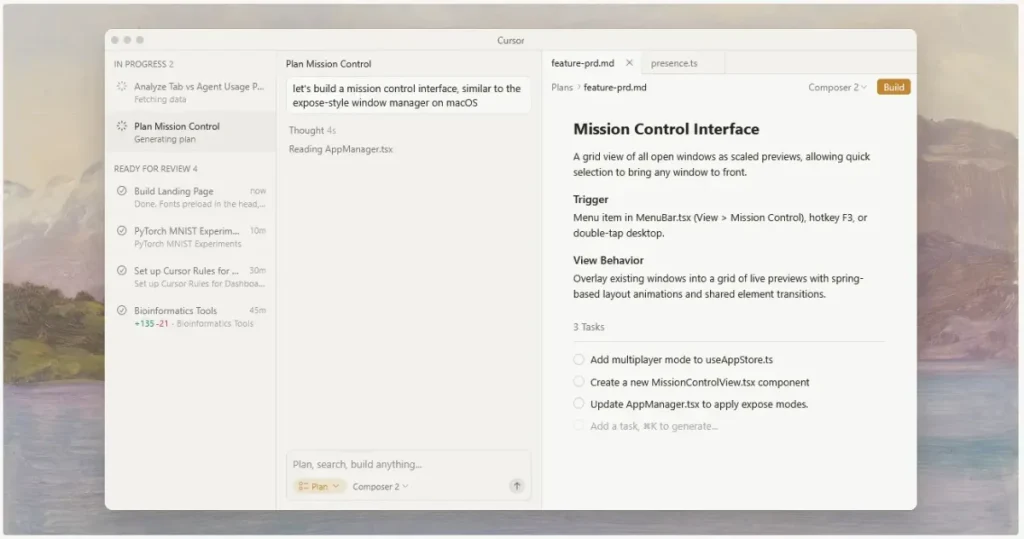
One of Cursor’s biggest advantages is its ability to analyze and interact with your entire project.
Rather than working line-by-line, the AI understands:
- file relationships
- architecture patterns
- dependencies across your codebase
This allows developers to:
- refactor code faster
- debug complex issues
- generate features with better context
Compared to browser-based AI builders, Cursor is designed for real development environments, including local setup and production-grade applications.
AI Features: Debugging, Code Generation, AI Assistance
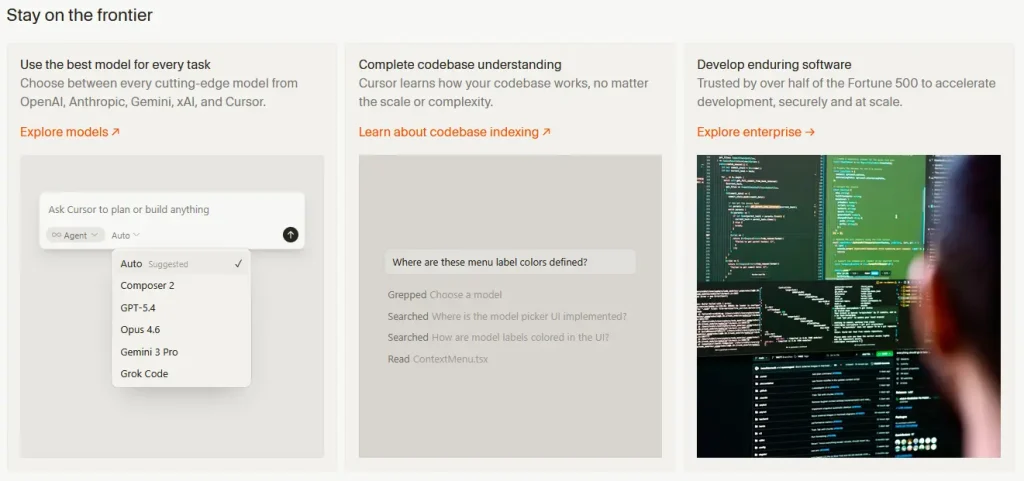
Cursor’s AI capabilities go far beyond simple autocomplete, as cursor shows advanced features that enhance productivity.
Key features include advanced AI capabilities and integration with VS Code extensions.
- With intelligent code generation based on intent
- debugging assistance with contextual understanding
- natural language interaction with your code
- AI-powered refactoring across multiple files
It also integrates with modern AI models (such as Claude), making it one of the most advanced AI-powered development tools currently available.
For developers who want full control over their projects — while still benefiting from AI — Cursor is often the better choice, as recommended from medium evaluations.
Bolt vs Cursor – AI App Builder vs AI Code Editor Explained Clearly
The biggest mistake users make when comparing Bolt vs Cursor is assuming they do the same thing.
They don’t.
Bolt.new and Cursor AI represent two fundamentally different approaches to AI-powered development, with Cursor showing a more user-friendly interface.
Bolt is an AI app builder. Cursor is an AI-powered code editor.
That difference affects everything — from workflow to flexibility to scalability.
With Bolt, you describe what you want to build, and the AI generates a working application, while cursor shows how to refine your input for better results. This makes it ideal for rapid prototyping and simple projects where speed matters more than control, especially when using tools like Cursor, which cursor shows can enhance your workflow.
Cursor, on the other hand, is designed for developers who already work with code, as it provides features that cursor asks for in advanced coding scenarios. Instead of replacing coding, it enhances the entire process with AI to help streamline development. coding workflow By helping you write code faster, debug issues, and understand complex logic across your codebase, Cursor also enhances your overall development process.
In practical terms:
- Bolt focuses on output (apps)
- Cursor focuses on process (coding)
This is why Bolt feels like an essential tool, as recommended from medium for modern development. AI builder, while Cursor behaves more like an integrated solution, recommended from medium for seamless usage. AI coding assistant embedded in your development environment.
If you try to use Bolt like a code editor, you’ll quickly hit limitations.
If you expect Cursor to generate full apps instantly without involvement, you’ll miss its real strength.
Understanding this distinction is key to choosing the right tool.
Features Comparison: Workflow, Speed, and AI Capabilities
To fully understand how Bolt.new and Cursor AI differ, you need to look at how they perform across real development scenarios — not just feature lists.
Here’s a detailed comparison based on actual usage:
| Category | Bolt.new | Cursor AI | Practical Impact |
|---|---|---|---|
| Workflow | Prompt → generate → deploy | Code → AI assist → refine | Bolt is faster, Cursor more controlled |
| Speed | Extremely fast for prototypes | Fast, but iterative | Bolt wins for MVPs |
| Flexibility | Limited customization | Full control over code | Cursor wins for scalability |
| Code access | Abstracted / hidden | Full codebase access | Critical for developers |
| Debugging | Minimal | Advanced debugging tools | Cursor clearly stronger |
| Deployment | Built-in via Bolt cloud | External (Vercel, etc.) | Bolt simpler, Cursor more flexible |
| Learning curve | Very low | Medium | Depends on experience |
Bolt is optimized for speed and simplicity, while Cursor is optimized for control and depth.
From a workflow perspective:
- Bolt removes the need for a traditional development environment
- Cursor integrates deeply into one
This also affects how you build.
With Bolt, you’re essentially using an AI agent that generates apps for you.
With Cursor, you’re still writing code — but with significantly more assistance.
Real Use Cases – When to Use Bolt or Cursor for Different Workflows
The best way to decide between Bolt and Cursor is to look at real-world use cases, as recommended from medium analysis.
Both tools are powerful — but in completely different scenarios.
Best Use Cases for Bolt: Rapid Prototyping and AI App Building
Bolt is ideal when your goal is to build something quickly without dealing with code.
Typical scenarios include:
- Rapid prototyping of startup ideas
- Creating internal tools
- Building simple web apps from a prompt
- Testing product concepts before investing in development
Because Bolt handles everything from UI to deployment, it dramatically reduces the time needed to go from idea to working product.
For non-developers, this can replace an entire development workflow.
Best Use Cases for Cursor (Developers, Debugging, Full Projects)
Cursor is better suited for users who want full control over their applications.
It shines in scenarios like:
- Working on production-level applications
- Debugging complex issues in an existing codebase
- Writing and refactoring large-scale projects
- Building full-stack applications with custom logic
Because Cursor understands your codebase and integrates into your local setup, it’s much more powerful for long-term development.
This is why many developers consider it one of the best, as recommended from medium reviews. AI coding tools currently available.
Hybrid Workflow – Using Bolt and Cursor Together
One of the most overlooked strategies is combining both tools, including Cursor and VS Code extensions.
Instead of choosing between Bolt vs Cursor, you can use them together:
- Use Bolt for rapid prototyping
- Export or recreate the logic in Cursor
- Use Cursor for refinement, debugging, and scaling
This hybrid workflow combines the speed of AI generation with the control of a real development environment.
For startups and solo builders, this can be a highly efficient way to move from idea to production, especially when cursor shows best practices.
Performance and Coding Workflow Comparison of AI-Powered Development Tools
Performance in AI coding tools is not just about speed — it’s about how efficiently you can move from idea to working software.
Bolt and Cursor approach this in completely different ways.
Bolt optimizes for instant output. You enter a prompt, and the AI generates a working application almost immediately. This makes it extremely fast for building prototypes, but less efficient when changes become complex, as cursor asks for a more structured approach.
Cursor, by contrast, improves your coding workflow step by step. It helps you write, debug, and refactor code faster, but still requires active development and tools like Cursor.
This leads to two very different performance profiles:
- Bolt is faster at the beginning
- Cursor becomes more efficient over time
For simple apps, Bolt can outperform traditional development entirely.
For complex applications, Cursor scales much better because it gives you full control over your codebase.
Another important factor is environment:
- Bolt runs entirely in the browser
- Cursor works in a real development environment (local setup or cloud IDEs)
This makes Cursor more suitable for serious development, while Bolt is better for experimentation and fast iteration, as it offers a different vibe coding experience.
Pricing and Value Comparison
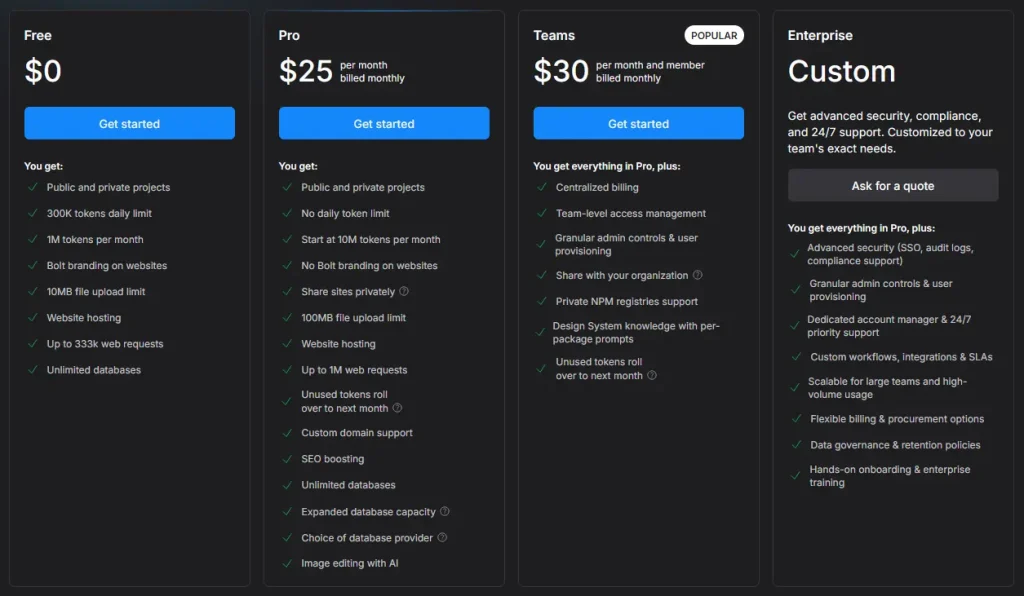
Bolt.new Pricing:
Cursor AI Pricing:
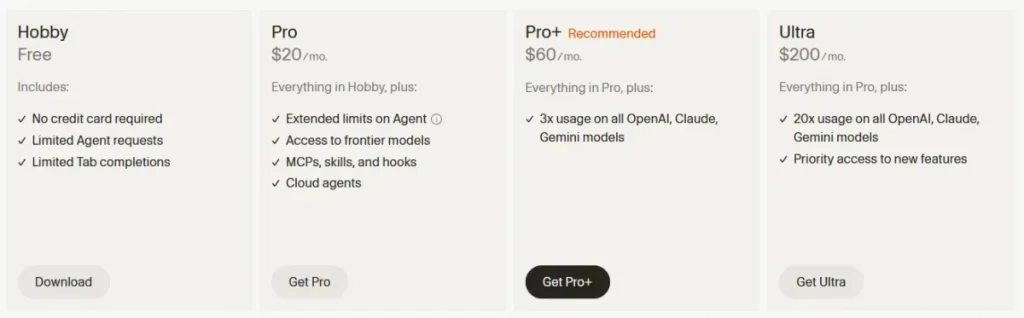
When comparing Bolt vs Cursor, pricing alone doesn’t tell the full story. What really matters is how much value you get for your specific workflow.
Both tools offer free tiers, but their pricing models reflect their different approaches in the cursor vs bolt vs comparison, which Cursor asks users to evaluate.
| Plan | Bolt.new | Cursor AI |
|---|---|---|
| Free tier | Yes (limited usage) | Yes (limited usage) |
| Paid plans | Usage-based / credits | Subscription-based |
| Target users | Builders, non-devs | Developers |
| Cost efficiency | High for quick prototypes | High for long-term projects |
Bolt’s pricing is optimized for speed and output. You pay for generating and deploying apps quickly, which makes it cost-effective for rapid prototyping, as cursor asks for budget considerations.
Cursor, on the other hand, is designed for continuous use. If you work daily in a code editor, the subscription model makes more sense over time.
From a value perspective:
- Bolt is more efficient for short-term builds and experiments
- Cursor delivers more value for ongoing development and scaling projects
If you’re choosing based on cost, the real question is not “which is cheaper?” — but “how often will I use it, and for what?”
Pros and Cons of Bolt and Cursor
Both tools are powerful, but they come with clear trade-offs, as recommended from medium user experiences.
Bolt.new Pros
Bolt is one of the fastest ways to build with AI currently available. It removes most of the friction from traditional development and allows you to go from idea to deployed app in minutes.
- extremely fast for rapid prototyping
- no coding knowledge required
- full-stack generation (frontend + backend)
- built-in deployment via Bolt cloud
Bolt.new Cons
However, this simplicity comes at the cost of flexibility, which is a common trade-off when choosing an AI tool.
- limited customization options
- less control over the generated code
- not ideal for complex or production-grade apps
- debugging options are minimal
Cursor AI Pros
Cursor is built for developers who want to stay in control while still benefiting from AI.
- full access to your codebase
- powerful debugging and refactoring tools
- deeply integrated AI assistance
- Cursor works like a modern AI-powered code editor
Cursor AI Cons
But it’s not designed for beginners or instant results.
- requires basic coding knowledge
- slower initial setup compared to Bolt
- depends on your development environment
Alternatives to Bolt and Cursor: v0, Replit, Claude, and AI Coding Agents
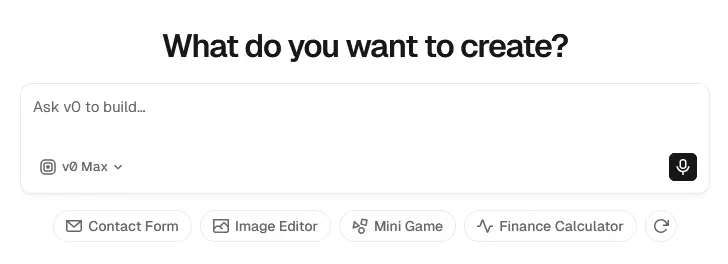
If you’re exploring AI coding tools, both Cursor and Bolt are not your only options — consider others in the market.
Several alternatives offer similar capabilities, depending on your workflow.
- v0 (by Vercel) focuses on UI generation and frontend components
- Replit AI provides a browser-based development environment with AI assistance
- AI coding agents and tools like Claude can generate and explain code across projects
These tools sit somewhere between Bolt and Cursor:
- closer to Bolt in terms of accessibility
- closer to Cursor in terms of flexibility
If you’re unsure which direction to go, testing multiple AI tools can help you better understand your preferred workflow.
Bolt vs Cursor – Which AI Coding Tool Should You Choose in 2026?
Choosing between Bolt and Cursor is less about features — and more about how you build.
If you prefer simplicity and speed, Bolt’s AI is the better choice. If you want control and scalability, Cursor is the stronger option.
Here’s a simple decision framework for choosing an AI that aligns with your development needs.
Choose Bolt if it adds AI features that enhance your development experience.
- you want to build apps without coding
- you need fast prototypes or MVPs
- you prefer working directly in the browser
- you want to describe your app with a prompt and get instant results
Choose Cursor if:
- you are a developer working with a real codebase
- you need debugging and refactoring tools
- you want full control over your application
- you plan to build or maintain production-level software
For many users, the best approach is not choosing one — but combining both Cursor and Bolt.
FAQ
Should I use Bolt or Cursor?
Cursor is better for established developers who want AI-augmented coding in a powerful IDE — full Claude/GPT integration, multi-file edits, sophisticated debugging. Bolt is better for rapid prototyping, MVP creation, and users who want to build full applications from natural language descriptions. Use Cursor for production codebase work, Bolt for “build me an app” workflows.
Is Bolt better than Cursor for beginners?
For absolute beginners building their first app: yes. Bolt’s natural language interface lets you describe what you want and watch a working app appear. Cursor requires understanding of code editors, file structures, and basic programming concepts. Bolt is more accessible; Cursor is more powerful long-term.
How much do Bolt and Cursor cost?
Cursor: Free tier with limited AI requests, Pro at $20/month with unlimited fast requests, Business at $40/user/month. Bolt: Free tier with limited daily tokens, Pro plans starting around $20/month for higher limits. Both offer reasonable free tiers for testing before committing.
Can Cursor or Bolt deploy applications directly?
Bolt can deploy directly to platforms like Netlify and StackBlitz from within the tool. Cursor focuses on coding rather than deployment — you’d commit to git and deploy through your normal pipeline (Vercel, Netlify, AWS, etc.). For quick prototyping with deployment: Bolt. For real applications with proper infrastructure: Cursor.
Which AI models do Bolt and Cursor use?
Cursor offers access to multiple frontier models including Claude Sonnet 4.6, GPT-5, Gemini, and others — you can switch between them based on task. Bolt uses a fine-tuned model optimized for full-app generation. For pure coding flexibility: Cursor. For full-app generation: Bolt.
Is Cursor good enough to replace VS Code?
Cursor is built on VS Code (it’s a fork), so it inherits all VS Code features and extensions. Most users find Cursor a complete replacement that adds AI capabilities without losing anything. The primary downside is cost — VS Code is free, Cursor’s premium features cost $20+/month.
Can I use Bolt and Cursor together?
Yes, and many developers do. Common pattern: Bolt for rapid prototyping and proof-of-concepts, Cursor for production codebase work and refining the prototypes Bolt generates. The two tools serve different stages of the development lifecycle effectively.
What is the main difference between Bolt and Cursor?
Bolt is an AI app builder that generates full applications from prompts, while Cursor is an AI-powered code editor that helps developers write and manage code more efficiently.
Is Bolt better than Cursor?
Not necessarily. Bolt is better for rapid prototyping and beginners, while Cursor is better for developers and complex projects.
Can beginners use Cursor AI, as recommended from medium for its user-friendly interface?
Yes, but there is a learning curve. Cursor works best if you already understand basic coding concepts.
Is Bolt production-ready?
Bolt can be used for simple apps and MVPs, but for complex or scalable applications, additional development (e.g., with Cursor) is usually required.
Can I use Bolt and Cursor together?
Yes. Many users generate initial ideas or prototypes with Bolt and then refine and scale them using Cursor’s advanced AI capabilities.
Final Verdict – Which AI Tool Is Better for Your Workflow In 2026?
Bolt and Cursor are not direct competitors — they are complementary tools built for different stages of the development process.
Bolt is one of the fastest ways to go from idea to working app. It’s ideal for beginners, rapid prototyping, and validating concepts.
Cursor, on the other hand, is one of the most powerful AI coding tools for developers, showcasing its advanced AI capabilities. It enhances your coding workflow, improves productivity, and gives you full control over your codebase.
If you’re looking for a single recommendation:
- Use Bolt to build quickly
- Use Cursor to build properly
The best choice depends on your experience level, your goals, and how much control you need over your software.