Artificial intelligence tools for image generation are evolving fast—and platforms like SeaArt AI promise powerful creative capabilities with just a simple prompt. But with this rapid growth comes an important question many users ask before uploading their first image or starting a project:
Is SeaArt AI safe to use?
The short answer is: SeaArt AI is generally safe for casual use, but it carries moderate risks related to data privacy, copyright, and misuse—especially for commercial or sensitive projects.
This guide provides a complete SeaArt AI safety review, covering how the platform works, what data it collects, potential risks, and how it compares to other AI image generators. We also analyze real-world usage scenarios so individual users, content creators, and businesses can decide whether SeaArt AI fits their needs.
SeaArt AI Review Summary: Is This AI Image Generator Safe to Use?
SeaArt AI is a fast-growing AI image generation platform that allows users to create AI art, stylized images, and visual content using prompt-based workflows. While it offers an accessible and often free tier experience, its safety depends heavily on how you use the tool.
Quick Safety Verdict
| Category | Safety Level | Summary |
|---|---|---|
| Data Privacy | ⚠️ Medium | User prompts and images may be stored or analyzed |
| Copyright Risk | ⚠️ Medium–High | Potential for style imitation or derivative content |
| Security | ✅ Medium–High | Standard cloud protections, no major incidents known |
| Misuse Potential | ⚠️ Medium | Possible for NSFW or deepfake-style outputs |
When SeaArt AI Is Safe to Use
SeaArt AI is generally safe if you:
- Use it for AI art, social media content, or personal projects
- Avoid uploading sensitive or private images
- Stick to original prompts instead of copying existing artists or brands
When SeaArt AI Becomes Risky
Risks increase significantly if you:
- Use outputs for commercial purposes without checking licensing
- Upload personal photos or confidential material
- Try to replicate copyrighted styles, logos, or characters
Key Takeaway
SeaArt AI is a user-friendly AI tool with strong creative capabilities, but it lacks the same level of legal clarity and enterprise-grade safety guarantees as more controlled platforms like Adobe Firefly.
What Is SeaArt AI and How Does This AI Image Generation Tool Work?

SeaArt AI is an AI-powered image generator that allows users to create digital art, illustrations, and stylized visuals using natural language prompts. Like many modern AI image generation tools, it is based on diffusion models and advanced artificial intelligence systems trained on large datasets.
Instead of manually designing visuals, users simply describe what they want—and the system generates images in seconds.
Key Features of SeaArt AI for AI Art and Image Generation
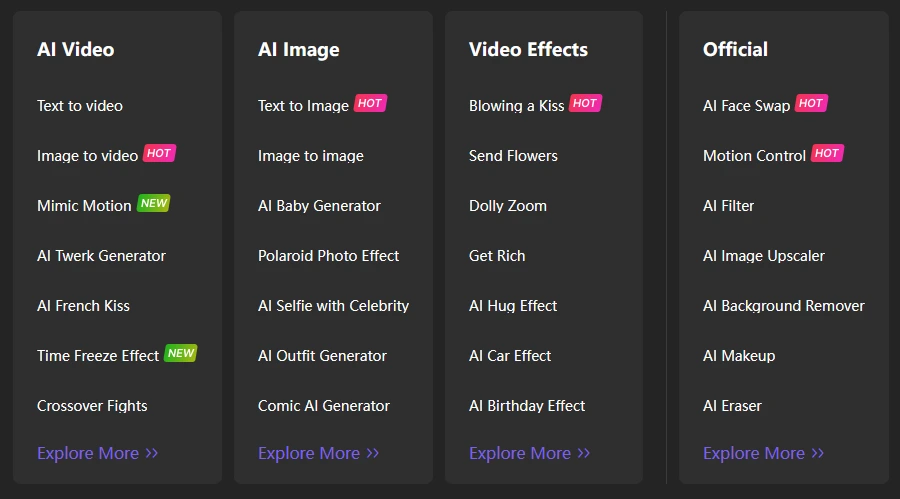
SeaArt AI includes a range of features designed for both beginners and advanced users. These features make it competitive within the broader AI art generator ecosystem.
| Feature | Description | Relevance |
|---|---|---|
| Text-to-Image Generation | Create images using prompts | Core functionality |
| Model Selection | Choose between different AI models | Advanced control |
| LoRA Support | Fine-tune styles and outputs | Customization |
| Image-to-Image | Modify existing visuals | Creative workflows |
| Free Tier Access | Daily free generations | Beginner-friendly |
In practice, this means users can generate anything from realistic AI images to stylized digital art, often with minimal technical knowledge.
How Users Use SeaArt AI (Prompt-Based Workflow Explained)
The typical SeaArt AI workflow is simple and designed to be easy-to-use and user-friendly, even for beginners.
Basic process:
- Enter a prompt (e.g. “cinematic portrait, soft lighting, ultra-realistic”)
- Select a model or style
- Adjust settings (resolution, steps, variations)
- Generate and download the image
Example Prompt Structure
| Element | Example |
|---|---|
| Subject | “portrait of a woman” |
| Style | “digital art, cyberpunk” |
| Quality | “high detail, 4k” |
| Lighting | “cinematic lighting” |
This prompt-based system is what makes SeaArt AI powerful—but it also introduces risks related to copyright, misuse, and unintended outputs, which we’ll analyze next.
Is SeaArt AI Safe? Full Safety Analysis for Individual Users and Creators
The safety of SeaArt AI depends heavily on who is using it and for what purpose. While the platform is generally safe at a technical level, risks vary between casual users, content creators, and businesses.
Is SeaArt AI Safe for Casual Creators and Individual Users?
For most individual users, SeaArt AI is relatively safe.
The platform is designed to be accessible, creative, and easy-to-use, with features like a free tier and simple prompt-based workflows. Users can explore AI image generation without needing technical expertise.
However, there are still a few important considerations.
Main risks for individual users:
- Uploaded images may be stored or reused
- Prompts could be logged or analyzed
- Generated content may unintentionally resemble existing works
Is SeaArt AI Safe for Commercial Use and Content Creators?
For content creators and businesses, the situation is more complex.
Using SeaArt AI for monetized projects introduces legal and ownership risks, especially if outputs are based on existing styles or unclear licensing terms.
| Use Case | Safety Assessment | Recommendation |
|---|---|---|
| Social media content | ✅ Safe | Low risk |
| Freelance design work | ⚠️ Medium | Verify licensing |
| Branding / logos | ❌ Risky | Avoid |
| Stock image selling | ⚠️ Medium–High | Use caution |
In general, SeaArt AI works best for creative exploration and rapid content generation, but requires caution when used in professional or commercial environments.
Data Privacy and User Data Handling in SeaArt AI
When using an AI image generator like SeaArt AI, one of the biggest concerns is how user data is handled. This includes not only account information, but also prompts, uploaded images, and generated AI images.
SeaArt AI operates as a cloud-based artificial intelligence platform, which means that most interactions—especially image generation and prompt processing—happen on external servers rather than locally on your device.
What Data Does SeaArt AI Collect from Users?
Like most modern AI tools, SeaArt AI likely collects several types of data to improve performance, maintain stability, and personalize the user experience.
| Data Type | Examples | Why It Matters |
|---|---|---|
| Account Data | Email, login info | Basic access & authentication |
| Prompts | Text inputs for image generation | May be stored or analyzed |
| Uploaded Images | Reference photos, edits | Potential privacy risk |
| Usage Data | Clicks, workflow, activity | Improves AI models |
| Technical Data | IP address, device info | Security & analytics |
From a user experience perspective, this data collection is fairly standard across AI image generation platforms. However, the key issue is not what is collected—but how it is stored and used.
Does SeaArt AI Use Your Images for Training AI Models?
This is one of the most important safety questions—and often one of the least clearly answered in many AI tools.
In general, AI platforms may:
- Use prompts and images to improve model performance
- Store data for quality control or moderation
- Aggregate usage patterns to refine AI models and outputs
The level of control you have depends heavily on the platform’s transparency.
Privacy Risk Indicators to Watch
Instead of relying only on policies, users should actively check for these signals:
- No clear data retention policy
- No visible opt-out for training
- Lack of transparency about AI model updates
- No clear way to delete uploaded images
Key Takeaway
SeaArt AI appears to follow typical artificial intelligence data practices, but without strong transparency guarantees, users should assume:
👉 Anything you upload or generate could be stored or reused
This makes it essential to avoid uploading personal, sensitive, or proprietary content.
Copyright Risks and Ownership: Can You Use SeaArt AI Images Commercially?
Copyright is one of the most complex aspects of AI image generation—and one of the biggest risk areas when using tools like SeaArt AI.
Because these systems are trained on large datasets of images, users must consider both:
- The origin of training data
- The legal status of generated outputs
Who Owns AI-Generated Images from SeaArt AI?
Ownership of AI-generated images depends on the platform’s terms of service—and these are not always straightforward.
In many cases:
- Users are granted usage rights, not full ownership
- The platform may retain certain licenses or rights
- Outputs may not be fully protected under copyright law
Commercial Use: Safe or Risky?
| Scenario | Risk Level | Explanation |
|---|---|---|
| Personal use | ✅ Low | No legal exposure |
| Social media content | ⚠️ Medium | Usually safe, but unclear ownership |
| Selling artwork | ⚠️ Medium–High | Depends on originality |
| Brand/logo creation | ❌ High | High copyright risk |
Risk of Copyright Infringement in AI Art Generation
One of the biggest concerns with AI art generators is the potential to generate images that are too similar to existing works.
This can happen when:
- Prompts reference specific artists or styles
- The AI model has learned recognizable visual patterns
- Users intentionally try to replicate existing designs
High-Risk Use Cases
Certain use cases significantly increase legal exposure:
- Generating images “in the style of” a known artist
- Recreating logos, characters, or branded visuals
- Selling AI-generated images without verifying originality
Best Practices for Safer AI Image Generation
To reduce copyright risks:
- Use generic, original prompts
- Avoid referencing specific artists or brands
- Run outputs through reverse image search tools
- Add your own edits to increase originality
Key Takeaway
SeaArt AI is powerful for creative exploration, but for commercial use, it sits in a gray legal area.
👉 If you plan to monetize your AI-generated content, you must verify licensing and originality yourself.
AI Safety Risks: NSFW Content, Deepfakes, and Misuse Potential
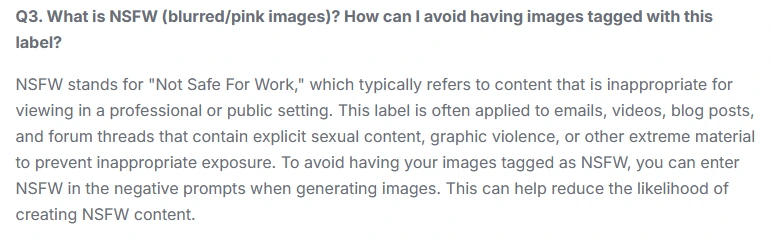
Beyond privacy and copyright, another major concern is how AI tools can be misused.
SeaArt AI, like many AI image generators, has the ability to produce highly realistic visuals, which creates both opportunities and risks.
Can SeaArt AI Generate Unsafe or Harmful Content?
AI image generators can sometimes produce:
- NSFW or explicit images
- Violent or disturbing visuals
- Deepfake-style content resembling real people
Most platforms attempt to limit this through filters—but these are not always perfect.
Risk Overview
| Risk Type | Severity | Notes |
|---|---|---|
| NSFW content | ⚠️ Medium | Often restricted, but bypass possible |
| Deepfakes | ⚠️ Medium–High | Depends on model capabilities |
| Misinformation | ⚠️ Medium | Realistic images can mislead |
| Offensive content | ⚠️ Medium | Bias still present in datasets |
How Strong Are SeaArt AI’s Safety Filters Compared to Other AI Tools?
Compared to leading platforms, SeaArt AI’s safety systems appear to be moderate rather than strict.
- More flexible than highly regulated tools like Adobe Firefly
- Less controlled than enterprise-focused AI platforms
- Similar to open or semi-open AI art generators
Practical Implication
This means:
👉 SeaArt AI offers more creative freedom, but also more responsibility for the user
Responsible Use Guidelines
To minimize misuse risks:
- Avoid generating content involving real individuals
- Do not create misleading or harmful visuals
- Respect platform guidelines and local laws
- Use AI outputs ethically and transparently
Key Takeaway
SeaArt AI is not inherently unsafe—but like any powerful AI tool, it can be misused.
👉 Safety depends less on the tool itself and more on how users choose to use it
Technical Security, AI Models, and Platform Reliability
Beyond privacy and copyright, another key factor in evaluating whether SeaArt AI is safe is its technical security and overall platform reliability.
SeaArt AI operates as a cloud-based AI image generation platform, meaning that all prompts, AI images, and processing requests are handled on remote servers. This setup is standard for most modern AI tools, but it introduces certain risks that users should understand.
How Secure Is SeaArt AI’s Infrastructure and API?
While SeaArt AI does not publicly disclose full technical details, most platforms in this category rely on standard security practices such as:
- Encrypted connections (HTTPS)
- Server-side processing
- Access-controlled APIs
- Rate limiting to prevent abuse
From a general AI tool security perspective, this places SeaArt AI in the “industry standard” category rather than a high-security enterprise environment.
Security Risk Overview
| Area | Risk Level | Explanation |
|---|---|---|
| Data Transmission | ✅ Low | Likely encrypted |
| API Abuse | ⚠️ Medium | Possible without strict limits |
| Account Security | ⚠️ Medium | Depends on user practices |
| Infrastructure Transparency | ⚠️ Medium | Limited public info |
Risks Like Model Extraction, Prompt Injection, and Data Leaks
Advanced risks exist across all AI models, including:
- Model extraction → attackers attempt to replicate AI behavior
- Prompt injection → manipulating outputs through crafted inputs
- Data leakage → unintended exposure of training or user data
For most individual users, these risks are minimal. However, for businesses or developers integrating AI into workflows, they become more relevant.
Key Takeaway
SeaArt AI appears technically stable and secure for everyday use, but lacks the deep transparency and certifications expected from enterprise-grade AI platforms.
👉 For critical or sensitive workflows, additional caution is recommended.
Real User Experience: Is SeaArt AI Easy to Use and User-Friendly?
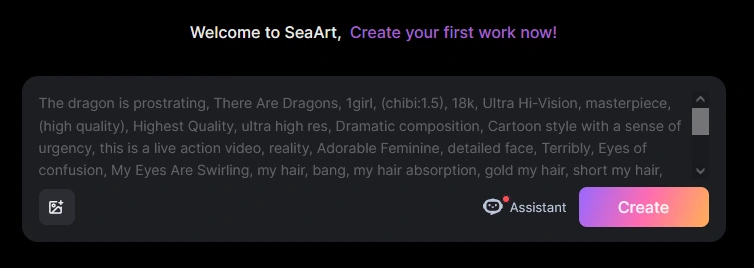
One of SeaArt AI’s biggest strengths is its accessibility. Compared to many AI image generators, the platform is designed to be easy-to-use, fast, and visually intuitive, making it attractive for beginners and casual creators.
Interface, Workflow, and Creative Process
SeaArt AI simplifies the creative process by combining:
- Prompt-based generation
- Prebuilt styles and models
- Quick iteration of AI images
This makes it possible to go from idea to output in seconds.
UX Evaluation
| Category | Rating | Notes |
|---|---|---|
| Ease of Use | ⭐⭐⭐⭐☆ | Beginner-friendly |
| Customization | ⭐⭐⭐⭐☆ | Strong with models & LoRA |
| Speed | ⭐⭐⭐⭐⭐ | Fast generation |
| Learning Curve | ⭐⭐⭐⭐☆ | Low to moderate |
The platform is particularly appealing for users who want to explore AI art generation without technical complexity.
Free Tier, Daily Limits, and Subscription Model
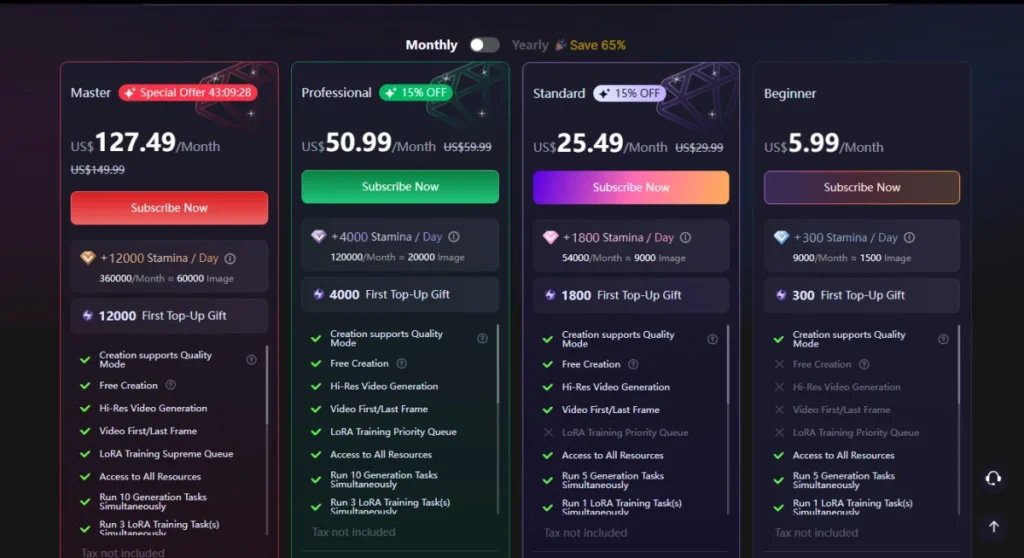
SeaArt AI offers a free tier, which is a major factor in its popularity.
| Feature | Free Tier | Paid Plans |
|---|---|---|
| Daily generations | Limited | Higher limits |
| Model access | Basic | Advanced models |
| Speed | Standard | Faster processing |
| Customization | Limited | Full access |
This “freemium” model allows users to experiment with AI image generation before committing to a subscription.
Key Takeaway
SeaArt AI stands out as a user-friendly AI image generator, especially for:
- Beginners
- Casual creators
- Users exploring AI art for the first time
SeaArt AI vs Other AI Image Generators (Comparison)
To fully evaluate whether SeaArt AI is safe and worth using, it helps to compare it with other leading AI image generation tools.
SeaArt AI vs Midjourney vs Stable Diffusion vs Adobe Firefly
Each platform takes a different approach to privacy, copyright, and control.
Comparison Table (High SEO Impact)
| Tool | Privacy | Copyright Safety | Best For |
|---|---|---|---|
| SeaArt AI | ⚠️ Medium | ⚠️ Medium | Fast, flexible AI art |
| Midjourney | ⚠️ Medium | ⚠️ Medium | High-quality visuals |
| Stable Diffusion | ✅ High (local) | ⚠️ Medium | Full control |
| Adobe Firefly | ✅ High | ✅ High | Commercial-safe content |
When SeaArt AI Is the Better Choice (and When It’s Not)
SeaArt AI is the better option if you:
- Want a free, easy-to-use AI image generator
- Need fast results with minimal setup
- Are experimenting with creative workflows
It may not be the best choice if you:
- Need commercial-safe outputs
- Require strong data privacy guarantees
- Work in regulated or enterprise environments
Key Takeaway
SeaArt AI sits between creative freedom and moderate risk—making it ideal for exploration, but not always for professional use.
Transparency, Reviews, and Trust Score: Can You Trust SeaArt AI?
Trust is a critical factor when evaluating any AI platform, especially one handling user-generated content and AI image generation.
Are There Reliable Customer Service Reviews or Support Channels?
User feedback on SeaArt AI is mixed, with many users praising:
- Ease of use
- Creative flexibility
- Free tier availability
However, common concerns include:
- Limited customer support
- Slow response times
- Lack of detailed documentation
Fact-Check Reviews and Potential Fake Reviews
As with many AI tools, not all reviews are equally reliable.
Users should be aware of:
- Overly positive “promotional” reviews
- Lack of verified user feedback
- Duplicate or suspicious ratings
Trust Evaluation
| Factor | Rating | Notes |
|---|---|---|
| Transparency | ⚠️ Medium | Limited public info |
| Community Feedback | ⚠️ Medium | Mixed reviews |
| Support Quality | ⚠️ Medium–Low | Inconsistent |
| Overall Trust Score | ⭐⭐⭐☆☆ | Moderate |
Key Takeaway
SeaArt AI is not a high-risk platform—but it also lacks the strong trust signals and transparency seen in more established AI tools.
Final Verdict: Should You Use SeaArt AI or Avoid It?
After analyzing all major factors—privacy, copyright, security, user experience, and trust—the final verdict is nuanced.
Overall Safety Rating
6.5 / 10 — Moderately Safe
Recommended For
- Casual creators
- Social media content
- AI art experimentation
- Individual users exploring AI tools
Use With Caution For
- Commercial projects
- Freelance work
- Brand-related visuals
Not Recommended For
- Sensitive data processing
- Legal-critical design work
- Enterprise environments
Final Thought
SeaArt AI is a powerful and user-friendly AI image generator, but it requires awareness and responsible use.
👉 It’s safe enough for exploration—but not fully risk-free.
FAQ
Is seaart.ai safe to use with my photos and ai face swap tools?
Seaart.ai places emphasis on user safety and privacy, but safety can depend on how you use the service. The platform typically outlines data handling and consent policies for uploads, and many users report that seaart ai supports secure processing for ai face swap and ai character creation. Review the privacy policy before uploading sensitive photos, and contact customer service if you need clarification about storage, deletion, or sharing. If you’re concerned about misuse, avoid uploading images you wouldn’t want publicly accessible and consider using a free trial or free version first to test data behavior.
What do seaart.ai reviews say about the artificial intelligence and ai video generator features?
Seaart reviews are mixed but generally lean positive about the ai video and ai video generator capabilities. Many positive reviews mention easy video generation, diverse art styles, and a user-friendly interface that allows users to create stunning ai video content. Some users say seaart’s advanced features unlock a whole new world for art and design, while others note limitations in specific edits, prompting comments like “seaart was fun” or “ight leave seaart” depending on personal expectations.
Does seaart.ai offer a free trial or free version to experience seaart before buying a subscription?
Yes, seaart.ai often provides a free trial or free version so users can experience seaart before committing. The free trial lets you explore basic ai generations, text to image, and limited video generation so you can judge whether it’s the best ai tool for your needs. Users who bought a subscription report access to more advanced features, but trying the free trial first helps you test the user-friendly interface and range of styles without immediate payment.
How good are seaart.ai’s ai chat and chatbots for art and design assistance?
Seaart.ai’s ai chat and chatbot features can help brainstorm concepts, refine prompts, and guide users through creative workflows. These tools are useful for users to explore new prompts and art styles, making it easier to ai to create characters, scenes, and ai video concepts. While some find the ai chat excellent for iterative design suggestions, others may prefer manual adjustments; overall, many positive reviews praise the convenience of having integrated chat support.
Can I edit my review or combat fake reviews on seaart.ai and how transparent are seaart reviews?
Seaart’s review system aims to be transparent, but like many platforms it may label reviews or highlight certain feedback. If you want to edit my review or report fake reviews, check the platform’s help center or contact customer service directly. Seaart wants users to share honest ai generations experiences, and they may provide ways to verify purchases or flag suspicious activity to combat fake reviews and ensure many positive reviews reflect genuine experiences.
Is seaart.ai customizable for diverse art styles and advanced features for professionals?
Yes, seaart.ai offers customizable settings and a range of styles to suit both casual creators and professionals. Advanced features often include high-resolution outputs, ai video generation controls, and text to image parameter tuning so users can create stunning visuals and ai character designs. Users report that seaart’s toolkit supports diverse art styles and gives creators the flexibility to fine-tune outputs, making it one of the contenders for the best ai video and art generators.
What should I expect from seaart.ai’s user-friendly interface and customer service?
The platform is designed with a user-friendly interface to help users quickly start ai generations, try ai video maker tools, and experiment with art without steep learning curves. If you need help, contact customer service for subscription, billing, or technical questions. Many users praise the excellent site navigation and responsive support, though response times can vary. Trying the free trial helps you evaluate both the interface and the level of customer service before you bought a subscription.
Are there ethical concerns with using seaart.ai and will seaart becomes a dominant ai technology in art without addressing them?
Ethical concerns include copyright, consent for ai face swap or character likenesses, and the potential for ai to create misleading content. While seaart.ai provides tools to create stunning art and video generation, the community and developers must address issues like art without proper attribution and how platforms combat misuse. Whether seaart becomes a leader in ai technology depends on ongoing improvements, transparency, and safeguards; developers and users should follow best practices to prevent misuse and ensure a responsible future for ai-created art.
Actionable Safety Checklist Before You Use SeaArt AI
Before using SeaArt AI, take a few simple steps to reduce risks and improve safety.
Safety Checklist
- Avoid uploading personal or sensitive images
- Use original prompts instead of copying artists
- Verify commercial usage rights
- Run images through reverse image search
- Do not generate misleading or harmful content
- Monitor updates to privacy policy and terms
Final Takeaway
Using SeaArt AI safely is less about the tool itself – and more about how you use it.