Quick answer: Murf AI is a legitimate, enterprise-oriented AI text-to-speech and voice generation platform — not a scam. It is operated by Murf, Inc. and has a stronger security and compliance posture than many consumer-focused AI voice tools, including SOC 2 Type II, ISO/IEC 27001, ISO/IEC 42001, GDPR/CCPA alignment, and EU-U.S. Data Privacy Framework participation. Murf is especially well suited for businesses, e-learning teams, marketing departments, agencies, and organizations that need a more controlled voice-generation workflow.
But “enterprise-oriented” does not mean “risk-free.” Voice data can be sensitive biometric-like data, and Murf still processes user content on its servers to generate audio. Voice cloning also creates legal and ethical risks if you clone a real person’s voice without clear permission. Murf’s terms place responsibility for lawful use on the user, and its refund policy is strict. For business users with proper consent workflows, Murf is one of the safer AI voice tools in 2026. For solo creators or anyone considering voice cloning without written consent from the voice owner, the risks deserve real attention.
Sources checked: Murf AI’s official website, pricing information, security/trust page, privacy policy, terms of service, data processing materials, API information, and current public information about AI voice cloning risks. Key pricing and platform details were checked in May 2026. AI voice tools update pricing, policies, and enterprise features frequently, so always confirm current details on Murf’s official website before making decisions for sensitive, regulated, or commercial use.


What Is Murf AI?

Murf AI is an AI text-to-speech, voice generation, dubbing, translation, and voice cloning platform. It lets users turn written scripts into spoken audio using a library of AI voices across many languages and accents. The platform is commonly used for e-learning narration, marketing videos, explainer videos, product demos, training content, podcasts, presentations, and business communications.Murf is also a common pick for creators turning written content into long-form audio — see our roundup of the best AI tools to turn a book into an audiobook for how Murf compares with other narration platforms.
Murf is operated by Murf, Inc., a US-incorporated company with a global team. The product is available through Murf Studio, a web-based voice generation workspace, plus API and integration options for teams that want to add AI voice generation to larger workflows. Murf also promotes integrations and workflow support for tools such as Canva, PowerPoint, Google Slides, and other content-production environments.
What makes Murf different from many creator-focused voice tools is its B2B positioning. Murf is not only trying to serve individual YouTubers or casual voice-cloning users. It is positioned heavily toward business teams, brand voice workflows, corporate learning, agencies, and enterprise use cases. That explains why its strongest selling points are not only voice quality, but also team features, governance, data protection, compliance documentation, and controlled access to advanced voice workflows.
For solo creators, this positioning has a trade-off. Murf can be a good standard TTS tool, but its pricing and voice cloning structure may feel less creator-friendly than some alternatives. If your main goal is affordable voice cloning, Murf may feel more expensive than tools like ElevenLabs. If your main goal is controlled, business-friendly AI voice production, Murf becomes much more compelling.
Murf AI Safety Snapshot
| Category | Verdict | What to Know |
|---|---|---|
| Legitimacy | Real platform | Murf is an established AI voice company, not a fake app or malware scheme. |
| Business use | Reasonably safe | Strong security posture compared with many AI voice tools, including SOC 2 Type II, ISO 27001, ISO 42001, GDPR/CCPA alignment, and EU-U.S. DPF participation. |
| Individual creators | Safe for normal TTS | Good for standard voice generation, but custom voice cloning is more business-tier oriented. |
| Privacy | Better than average | Data is processed on Murf’s infrastructure; voice samples and generated audio still require careful handling. |
| Voice cloning | Consent-sensitive | Cloning another person’s voice without permission can create legal, privacy, and reputational risk. |
| Refund policy | Strict | Murf’s terms describe a narrow refund window: within 24 hours and under 10 minutes of voice generation usage. |
| Pricing | Clear but not cheap | Creator is $29/month or $19/month annually; Business is $99/month or $66/month annually; Enterprise is custom. |
| Best for | Teams and businesses | Best fit for corporate narration, e-learning, marketing, training, and controlled brand voice workflows. |
Is Murf AI Safe? Quick Verdict by User Type
Safety questions about Murf AI depend heavily on how you plan to use it. Standard text-to-speech is relatively low risk if you avoid sensitive scripts. Voice cloning is more sensitive because it can involve a person’s identity, consent, and potentially biometric-like voice data.
| User Type | Safety Verdict | Best Recommendation |
|---|---|---|
| Marketing teams and agencies | Reasonably safe | Business plan at $99/month or $66/month annually fits many team workflows. |
| E-learning and corporate training teams | Reasonably safe | Strong use case for Murf, especially where repeatable narration and brand consistency matter. |
| Solo content creators | Safe for standard TTS | Creator plan at $29/month or $19/month annually can work well for standard voiceovers. |
| Healthcare, legal, or finance teams | Enterprise review needed | Only consider sensitive or regulated workflows after legal, security, and procurement review. |
| Anyone cloning another person’s voice | High caution | Get explicit written consent before recording, cloning, publishing, or monetizing the voice. |
| Privacy-sensitive users | Use selectively | Avoid uploading sensitive scripts or voice samples unless you understand retention, deletion, and account controls. |
For business and enterprise users
Reasonably safe for many business workflows. Murf has a stronger enterprise security posture than many AI voice tools. Its public trust materials reference SOC 2 Type II, ISO/IEC 27001, ISO/IEC 42001, GDPR/CCPA alignment, and EU-U.S. Data Privacy Framework participation. For organizations that need vendor security documentation, this is a meaningful advantage over less mature AI voice platforms.
That said, security documentation does not replace your own review. If your company handles regulated data, personal data, customer recordings, internal training materials, confidential scripts, or healthcare-related content, you should still review Murf’s data processing terms, retention practices, access controls, and enterprise plan details before using it in production.
For solo content creators
Acceptable for normal text-to-speech, with pricing limitations. If your need is standard AI narration for YouTube videos, podcast intros, social media content, client videos, product explainers, or online courses, Murf can be a safe and polished option. The Creator plan is listed at $29/month when billed monthly or $19/month when billed annually. That makes it a reasonable option for creators who mainly need polished TTS rather than advanced voice cloning.
The limitation is economics. Murf is more business-oriented than some creator-first voice tools, so custom voice cloning and team workflows may require a higher-tier plan than solo creators expect. If you only need high-quality AI voices from a standard voice library, Murf can make sense. If you specifically want to clone your own voice at the lowest possible monthly cost, compare Murf against tools like ElevenLabs before committing.
For anyone cloning another person’s voice
Use major caution. Voice cloning is the highest-risk part of any AI voice platform. A person’s voice can be tied to identity, reputation, consent, employment rights, publicity rights, biometric privacy concerns, and fraud/impersonation risks. Even if a tool technically allows voice cloning, that does not mean every use is legally or ethically safe.
The safer rule is simple: do not clone another person’s voice unless you have explicit written permission that explains what the voice will be used for, where it will be published, whether the use is commercial, how long the permission lasts, and how the person can revoke permission. This applies especially to employees, freelancers, actors, creators, clients, public figures, family members, and anyone whose voice could be recognized.
Who Actually Runs Murf AI?
Murf AI is operated by Murf, Inc., a US-incorporated company. The company was founded in 2020 and has grown into one of the better-known AI voice platforms for business content production. Its product ecosystem includes Murf Studio, AI voice generation, voice cloning, translation, dubbing, voice changer features, and API options for developers and teams.
The US company structure matters because it affects contract terms, data transfer questions, and legal jurisdiction. For EU and EEA users, Murf’s data processing materials and EU-U.S. Data Privacy Framework participation are relevant because AI voice tools often involve international data transfers. This does not make every use automatically risk-free, but it is a stronger position than platforms that provide little public data protection documentation.
Security and compliance in context
Murf’s public security materials describe a comparatively strong posture for an AI voice platform. Important signals include:
- SOC 2 Type II: A third-party assurance report focused on security controls over a period of time. Murf documented its SOC 2 Type II accreditation in a public announcement.
- ISO/IEC 27001: An international information security management standard.
- ISO/IEC 42001: A newer AI management system standard focused on responsible governance of AI systems.
- GDPR/CCPA alignment: Public privacy and security materials describing privacy obligations for EU and California users.
- EU-U.S. Data Privacy Framework participation: A formal mechanism relevant to certain transatlantic personal data transfers. See the official Data Privacy Framework program for the list of participating organizations.
- Enterprise security controls: Depending on plan and contract, larger organizations may be able to access more advanced security reviews, documentation, and controls.
One important wording distinction: SOC 2 and ISO certifications are not the same thing as saying that every workflow is automatically compliant with HIPAA, GDPR, or other laws. Compliance depends on your use case, your data, your contract, and your internal procedures. Murf may be suitable for regulated organizations, but those organizations still need their own legal and security review before uploading sensitive data.
Privacy and Data Collection — What Murf Actually Collects
Murf’s privacy policy describes the categories of data the company may collect and process. The overall picture is fairly typical for a business SaaS tool, but AI voice platforms deserve extra caution because scripts, generated audio, and voice samples can be sensitive.
What Murf may collect
- Account information: Name, email address, login details, organization information, and profile data provided during registration.
- Script and text content: The text you input into Murf to generate audio.
- Generated audio: Audio files created from your scripts and stored in your account or projects.
- Voice samples: If you use voice cloning or voice-related custom features, Murf may process and store voice recordings needed to create or maintain the custom voice.
- Usage data: Project activity, voice choices, feature usage, generation volume, and workspace interactions.
- Device and network data: IP address, browser type, operating system, device identifiers, cookies, and analytics-related data.
- Payment information: Billing information processed directly or through payment providers. As with most SaaS tools, full card data is usually handled by payment processors rather than stored directly by the platform.
Voice data deserves special caution
Voice samples are more sensitive than normal text prompts. They can reveal identity, accent, speech patterns, age range, emotional tone, and other personal characteristics. A voice sample can also be used to create synthetic speech that sounds like a real person. That is why voice cloning should be treated as a higher-risk workflow than standard text-to-speech.
Murf’s public security posture is stronger than many casual AI voice tools, and its custom voice workflows are intended for controlled account or workspace use rather than public access by other users. Still, the basic privacy reality remains: if you upload voice samples or sensitive scripts, that data is processed on platform infrastructure. Infrastructure can be breached, subpoenaed, misconfigured, retained in backups, or affected by future policy changes. For casual scripts, that may be acceptable. For confidential, regulated, or personally sensitive material, use more caution.
What about generated audio retention?
Generated voice files may remain available inside your project history or workspace so you can edit, export, or reuse them. You can delete projects or audio files through account controls where available. However, users should not assume that deletion from the visible interface always means immediate deletion from all infrastructure backups. That is normal for cloud-based software, but it matters if you are dealing with regulated or sensitive data.
If deletion timelines matter for your organization, ask Murf directly for written clarification through support, enterprise sales, or your data processing agreement. For normal creator use, deleting unnecessary projects is still a good privacy habit because it reduces what is exposed if your account is compromised.
Voice Cloning — The Legal Risk Most Users Underestimate
Voice cloning is where Murf users are most likely to create legal, ethical, or reputational problems for themselves. The platform can provide the technology, but the user remains responsible for how it is used.
What changed in 2024-2026?
AI voice cloning became much more legally sensitive in 2024-2026. The law is still developing, but the direction is clear: using a real person’s voice without permission can raise privacy, publicity, employment, consumer protection, biometric-data, and impersonation issues depending on the jurisdiction and use case.
Several trends matter:
- Voice as identity: A recognizable voice can be treated as part of a person’s identity, especially when used commercially or in a way that implies endorsement.
- Right-of-publicity claims: Public figures, actors, creators, and performers may have claims if their voice is cloned or imitated for commercial purposes without permission.
- Biometric privacy concerns: In some jurisdictions, voiceprints or voice data may trigger biometric privacy obligations, especially when stored, analyzed, or used for identification.
- Fraud and impersonation risk: Voice cloning has been used in scams, fake emergency calls, business fraud, and impersonation attacks. This has made regulators and lawmakers more attentive to synthetic audio.
- Disclosure expectations: Even where disclosure is not legally required, audiences, platforms, employers, and clients increasingly expect synthetic or AI-generated voice use to be transparent.
This does not mean every AI-generated voice is illegal. Standard AI narration using a licensed platform voice is very different from cloning a real person’s voice and making it say something they never said. The risk rises sharply when the voice is recognizable, commercial, deceptive, political, medical, financial, or connected to a real person who did not consent.
What Murf’s terms require
Murf’s terms of service require users to use the platform lawfully and responsibly. As with most AI tools, Murf can set rules, but it cannot make your specific use case legal. If you clone a voice without the owner’s permission, publish deceptive audio, or use synthetic voice content in a way that violates someone’s rights, the legal exposure can fall on you.
This is why the safest approach is to treat voice cloning as a permission-based workflow, not as a casual editing feature.
Practical consent workflow
If you plan to clone any voice other than your own, use a written consent workflow before recording or uploading samples:
- Get written consent before recording or uploading voice samples. The person should understand that their voice may be used to create synthetic speech.
- Define the use case clearly. Specify whether the voice will be used for internal training, public videos, advertising, client work, social media, e-learning, podcasts, or another purpose.
- Define commercial rights. If the audio will be monetized, used in ads, or delivered to clients, that should be explicitly stated.
- Set scope and duration. A narrow, time-limited permission is usually safer and more reasonable than unlimited use forever.
- Keep the consent record. Store the signed consent in a place where you can retrieve it quickly if a dispute arises.
- Respect revocation requests where appropriate. If the voice owner later asks you to stop, review your agreement and consider deleting the clone and stopping future use.
- Disclose AI-generated voice use when required or expected. This is especially important for ads, public content, political content, testimonials, education, journalism, and sensitive topics.
This workflow does not eliminate every legal risk, but it makes your use of voice cloning far more defensible than relying on informal verbal permission or no permission at all.
Murf AI Pricing Plans (2026)
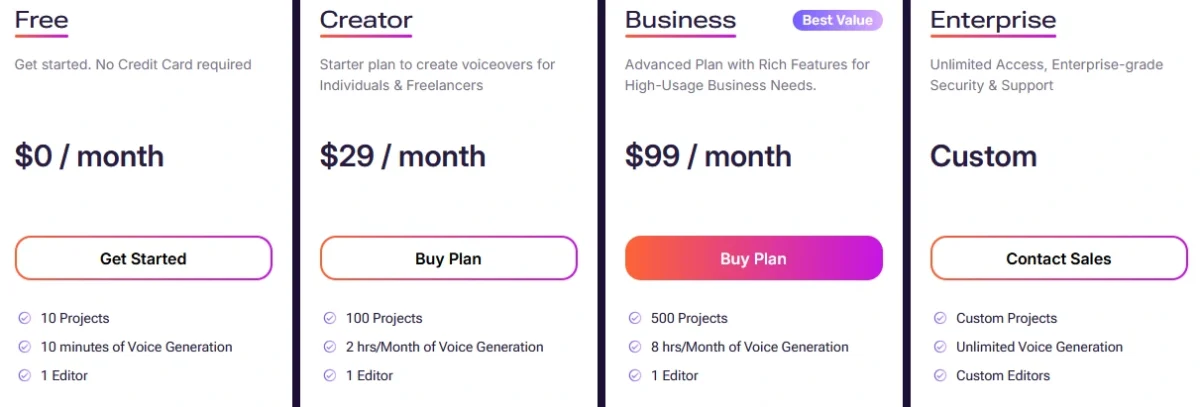
Murf’s pricing is plan-based, with differences in usage limits, commercial rights, team features, and access to advanced voice features. As of May 2026, Murf’s public pricing is built around Free, Creator, Business, and Enterprise plans. Because AI voice pricing changes frequently, check the official Murf AI pricing page before buying.
| Plan | Monthly Billing | Annual Billing | Voice Generation | Voice Cloning | Best For |
|---|---|---|---|---|---|
| Free | $0 | $0 | 10 minutes total | Not included | Testing voice quality before upgrading |
| Creator | $29/month | $19/month | 24 hours/year | Not included / not the main fit | Solo creators, freelancers, basic commercial voiceovers |
| Business | $99/month | $66/month | 96 hours/year on annual billing | More relevant for custom voice and team workflows | Teams, agencies, marketing, e-learning |
| Enterprise | Custom | Custom | Custom / negotiated | Advanced or custom options may be available | Large teams, regulated workflows, procurement-heavy organizations |
The biggest practical jump is from Creator to Business. Creator at $19/month on annual billing is reasonable for standard AI voiceovers. Business at $66/month on annual billing is a much larger commitment, but it makes more sense for teams that need higher generation limits, collaboration features, business workflows, and more advanced voice capabilities.
Two pricing details that matter for safety
Generation limits can affect your workflow. Murf plans include usage limits, often expressed as a certain amount of generation time. The Creator plan’s 24 hours/year sounds generous until you account for revisions, pronunciation fixes, pacing changes, client feedback, and regenerated takes. If you regenerate scripts repeatedly to fix emphasis or tone, you can burn through generation time faster than expected.
The refund policy is strict. Murf’s terms of service state that if you bought a subscription or one-time pack within the last 24 hours and your account usage is less than 10 minutes of voice generation time, you can write to support with a refund request. This is a narrow evaluation window. Test the free version carefully, check the voices you need, and confirm plan limits before committing to annual billing.
Separate API pricing
Murf currently advertises its Falcon real-time text-to-speech model at 1 cent per minute, with low-latency performance claims for conversational voice agents. Other API products, such as studio-quality text-to-speech, dubbing, translation, and voice changer features, may have separate pricing or sales-led arrangements. If you are building a product or production workflow on Murf’s API, check the official Murf Text to Speech API page and confirm pricing directly before launch.
Murf AI vs Other Voice AI Tools — Honest Comparison
Murf competes in a crowded AI voice category. The right tool depends on whether you need standard narration, voice cloning, podcast editing, real-time voice changing, dubbing, translation, or enterprise-grade controls.
| Feature | Murf AI | ElevenLabs | Descript | Dubbing AI |
|---|---|---|---|---|
| Entry price | Free + Creator from $19/month annually | Free + low-cost starter tier | Free + paid creator plans | Free + paid tiers |
| Main strength | Business-friendly AI voiceovers and enterprise posture | Creator-friendly voice quality and voice cloning | Podcast/video editing with AI voice features | Real-time voice changing and entertainment use |
| Best for | Marketing, e-learning, corporate narration | Solo creators, character voices, cloning workflows | Podcasters, video editors, editing teams | Gaming, streaming, real-time voice effects |
| Voice cloning economics | More business-tier oriented | Usually more accessible for solo creators | Integrated into editing workflow | Different use case; more voice changing than polished TTS |
| Compliance posture | Strong public trust materials | Strong but more creator/developer oriented | Strong for media teams | Less enterprise-focused public positioning |
| Best safety fit | Teams that need controls and documentation | Creators who understand cloning consent risks | Editors who need controlled voice replacement | Casual or entertainment use with caution |
For more side-by-side breakdowns of AI tools across categories, browse our full AI tool comparisons hub.
Murf AI vs ElevenLabs
ElevenLabs is one of Murf’s closest competitors and is often more attractive for individual creators who want accessible voice cloning. Murf is stronger when the priority is business-friendly narration, team workflows, brand voice production, and enterprise security documentation. ElevenLabs is often stronger when the priority is flexible creator use, character voices, and lower-cost experimentation with voice cloning.
The safer choice depends on the workflow. For a company producing training content and needing vendor review, Murf may be the better fit. For a solo creator testing synthetic voices for videos, ElevenLabs may be more economical. In both cases, cloning a real person’s voice still requires consent.
Murf AI vs Descript
Descript is built around video and podcast editing, while Murf is built around voice generation and narration workflows. If your main job is editing recorded media, removing filler words, correcting audio, and working inside a timeline, Descript may be more useful. If your main job is generating polished voiceovers from scripts, Murf is more focused.
From a safety perspective, Descript’s voice features are tightly connected to editing workflows, while Murf’s voice generation is more script-to-audio oriented. Both require careful handling of voice data and consent if custom voices are involved.
Murf AI vs Dubbing AI
Murf and Dubbing AI serve different needs. Dubbing AI is more associated with real-time voice changing, gaming, streaming, and entertainment-style voice effects. Murf is more suitable for produced content such as e-learning modules, marketing videos, corporate narration, product explainers, and scripted voiceovers.
If you need polished business narration, Murf is the better fit. If you need real-time voice effects for streaming or casual use, Dubbing AI may be more relevant. The privacy posture also differs: Murf is more enterprise-oriented, while real-time voice-changing tools often require separate caution around microphone access, live processing, and account security.
For broader context on AI tools that involve likeness, voice, or appearance — including the deepfake-adjacent risks that overlap with voice cloning concerns — see our Viggle AI safety review.
Who Should Not Use Murf AI?
Murf is safe enough for many legitimate use cases, but it is not the best fit for everyone.
- Do not use Murf to clone someone’s voice without permission. That is the clearest high-risk use case.
- Do not upload confidential scripts unless your organization has reviewed the terms. This includes unreleased product information, legal strategy, medical information, financial data, or private customer records.
- Do not choose Murf only because you want the cheapest voice cloning option. Murf is more business-oriented and may not be the lowest-cost option for cloning-focused solo creators.
- Do not assume Enterprise features apply to lower plans. Security reviews, advanced access controls, regulated-data workflows, and custom arrangements may require Enterprise-level discussions.
- Do not rely on the refund policy as a long trial. The refund window is narrow, so evaluate carefully before paying.
How to Use Murf AI More Safely
If Murf AI fits your workflow, these safer-use practices matter most.
- Use standard AI voices for low-risk narration. If you do not need a cloned voice, avoid cloning entirely. Standard licensed platform voices are usually simpler and safer.
- Get written consent before any custom voice cloning. Verbal permission is weak. Written permission with scope, duration, and commercial terms is safer.
- Do not upload sensitive scripts casually. Avoid personal data, confidential business information, medical details, financial records, legal documents, and private customer content unless your organization has approved the workflow.
- Match your plan to real usage. Creator costs $29/month or $19/month annually, while Business costs $99/month or $66/month annually. The right plan depends on your actual generation volume, team needs, and whether you need advanced voice features.
- Test before annual billing. Use the free or lowest-risk evaluation path to check voice quality, pronunciation, export workflow, and plan limitations before committing.
- Use Enterprise review for regulated industries. Healthcare, finance, legal, education, and enterprise customer data workflows should go through procurement, legal, and security review before use.
- Delete projects you no longer need. This reduces account-level exposure, even if infrastructure backup retention may continue behind the scenes for a period of time.
- Enable strong account security. Use a unique password and two-factor authentication if available. Voice accounts can be valuable targets because they may contain generated media, scripts, and voice assets.
- Disclose AI-generated voice use when appropriate. Disclosure is especially important in ads, testimonials, education, journalism, politics, healthcare, finance, and any context where listeners may assume a real person spoke the words.
For a complete overview of our AI tool safety analysis methodology and a comparison of all reviewed tools across image generators, AI companions, voice tools, and productivity apps, see our AI Tool Safety Reviews hub.
Final Verdict — Is Murf AI Safe in 2026?
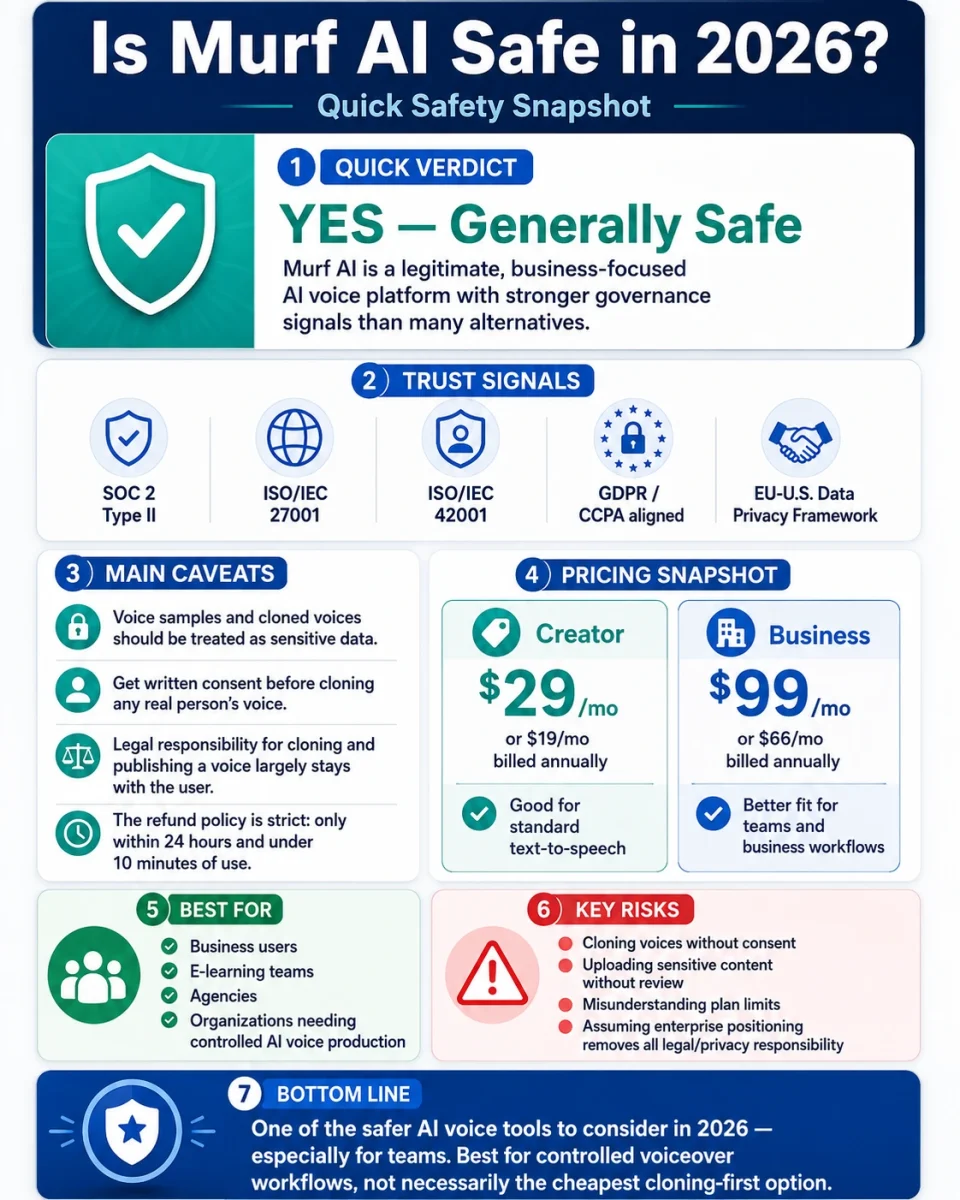
Murf AI is legitimate, business-oriented, and one of the more safety-conscious AI voice platforms available in 2026. Its public security posture is stronger than many consumer-focused voice tools, with SOC 2 Type II, ISO/IEC 27001, ISO/IEC 42001, GDPR/CCPA alignment, and EU-U.S. Data Privacy Framework participation. For business users, e-learning teams, agencies, and organizations that need controlled AI voice production, Murf is a serious and credible option.
The honest qualifications are these:
- Voice samples and custom voice cloning should be treated as sensitive data, not casual media files.
- Legal responsibility for cloning and publishing a real person’s voice sits largely with the user. Written consent is essential before cloning any voice other than your own.
- The refund policy is strict, with a narrow 24-hour and under-10-minutes usage condition described in Murf’s terms.
- The Creator plan costs $29/month or $19/month annually, which is reasonable for standard TTS but not necessarily ideal for cloning-focused creators.
- The Business plan costs $99/month or $66/month annually, which makes more sense for teams, agencies, and business workflows than casual individual users.
- For regulated industries, Murf may be suitable only after plan-specific, legal, procurement, and security review.
For business and enterprise users asking “is Murf AI safe,” the answer is generally yes for many normal voiceover and narration workflows — provided you use appropriate consent, avoid unnecessary sensitive data, and choose the right plan. See Murf’s Security & Trust page for the current list of certifications and audit reports.
For solo creators, the answer is also yes for standard text-to-speech, but with a clear caveat: Murf is not primarily the cheapest voice cloning tool. It is better understood as a polished, business-friendly AI voice platform with stronger governance signals than many alternatives.
Overall, Murf AI is one of the safer AI voice tools to consider in 2026, especially for teams. The main risks are not that Murf is fake or unusually dangerous. The real risks are voice cloning without consent, uploading sensitive content without a review process, misunderstanding plan limits, and assuming that enterprise-grade positioning removes all legal or privacy responsibility from the user.
Frequently Asked Questions
Is Murf AI legit or a scam?
Murf AI is legit. It is an established AI voice platform operated by Murf, Inc., not a fake app or malware scheme. The platform is used for text-to-speech, voiceovers, dubbing, translation, and business narration workflows. The realistic concerns are not about Murf being a scam, but about privacy, voice cloning consent, pricing limits, refund rules, and whether the tool fits your specific use case.
Is Murf AI safe for commercial use?
Yes, Murf can be safe for commercial use when you use it within the rights and limits of your plan. It is commonly used for marketing videos, training content, product demos, e-learning, ads, and corporate narration. The important caveat is voice cloning: if you use a real person’s cloned voice, you should have written permission that clearly covers commercial use.
Is voice cloning on Murf AI legal?
Voice cloning can be legal when you clone your own voice or have clear permission from the voice owner. Cloning another person’s voice without consent can create legal risk under privacy, publicity, biometric-data, consumer-protection, or impersonation rules depending on the jurisdiction and use case. Always get written consent before cloning any real person’s voice.
Does Murf AI store my voice samples?
If you use custom voice cloning or related voice features, Murf may need to process and store voice samples to create or maintain the custom voice. Standard text-to-speech using Murf’s built-in voice library does not require you to upload your own voice samples. If deletion timelines matter for compliance reasons, ask Murf directly for written confirmation through support or enterprise channels.
What is Murf AI’s refund policy?
Murf’s terms describe a strict refund condition: if you bought a subscription or one-time pack within the last 24 hours and your account usage is less than 10 minutes of voice generation time, you can contact support with a refund request. This is a narrow window, so test the platform carefully before committing to a paid or annual plan.
Does Murf AI have GDPR compliance?
Murf’s public security and privacy materials reference GDPR alignment and EU-U.S. Data Privacy Framework participation. This is a stronger privacy posture than many AI voice tools, but it does not mean every use case is automatically GDPR-compliant. Your own use of Murf still needs to match your legal basis, data processing agreement, retention needs, and privacy obligations.
How much does Murf AI cost in 2026?
As of May 2026, Murf’s main Studio pricing includes a Free plan, Creator at $29/month or $19/month when billed annually, Business at $99/month or $66/month when billed annually, and custom Enterprise pricing. The Free plan is mainly for testing, Creator is best for solo TTS workflows, Business is better for teams and higher-volume workflows, and Enterprise is for larger organizations with procurement or compliance needs.
How much does Murf Falcon API cost?
Murf currently advertises Falcon, its real-time text-to-speech API for voice agents, at 1 cent per minute. API pricing is separate from normal Studio subscriptions, and other API products may have different pricing or sales-led terms. Check Murf’s official API page before building a production workflow around it.
Can I clone my own voice on Murf’s Creator plan?
Murf’s voice cloning access depends on the current plan structure, and custom voice features are generally more business-tier oriented than some creator-first alternatives. If cloning your own voice is your main reason for subscribing, check the current Murf pricing page before buying and compare it with tools like ElevenLabs.
Is Murf AI safe for healthcare or finance use?
Potentially, but only after proper legal, security, and procurement review. Healthcare, finance, legal, and other regulated workflows require more than a normal consumer subscription. Your organization should review Murf’s enterprise terms, data processing agreement, security documentation, retention practices, and any required compliance commitments before uploading sensitive or regulated data.
What happens to my voice clone if I cancel Murf?
Custom voice clones are tied to your account or workspace, but exact deletion and retention timelines may depend on Murf’s systems, backups, and contract terms. If this matters for compliance, ask Murf for written confirmation before using custom voice cloning. For normal users, delete unnecessary projects and voice assets before closing an account where possible.
About this review: Written by Daniel, applied AI specialist at AI Everyday Tools, following our AI tool review methodology. This review is based on Murf AI’s official documentation, including its website, pricing information, privacy policy, terms of service, security/trust materials, data processing information, and API pages, plus current public information about AI voice tool safety and voice cloning risks. Key platform details and pricing were checked in May 2026. AI voice platforms update their policies, pricing, features, and certifications frequently — confirm current details on the official Murf AI site before making decisions for sensitive, regulated, or commercial use.